Remove old workplace from a data broker profile correctly
Learn how to remove old workplace from a data broker profile, stop fresh search results, and deal with employer history that keeps reconnecting your identity.
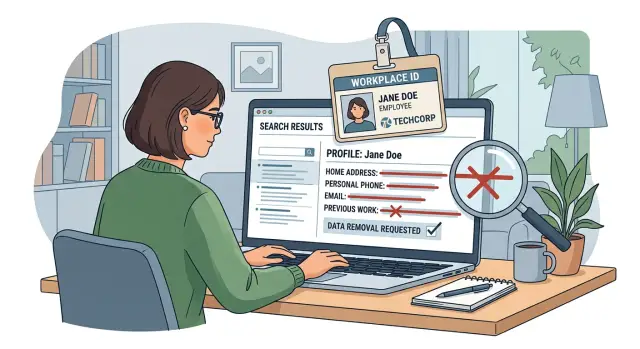
Why an old employer keeps showing up
Removing a home address from a data broker page often feels like progress, then the page shows up in search again because the employer field is still there.
That happens because an old employer is a strong identity clue. A name by itself can match plenty of people. A name plus a past company, city, school, or age range points much more clearly to one person. Brokers use those details to trust a profile, merge records, and keep the page online.
So even after part of the profile is cleaned up, the page may still have enough to identify you. A listing without your street address can still connect your name to a place you lived, the years you worked there, and people who knew you at the time. For search engines, that is often enough to keep the page visible.
The problem rarely stays on one site. Brokers buy, copy, and compare data from many of the same sources. If one page says you worked at a certain hospital, school, or store, another page may use that detail to attach a phone number, city, or relative to the same profile.
A simple example shows how sticky this can be. A broker removes "123 Oak Street" from your page, but it still shows your old workplace in Denver and a college you attended nearby. That combination can still tie the page to you, especially when someone searches your full name with the company name.
That is why partial cleanup often fails. If the employer detail stays, the broker still has enough leftover clues to rebuild the same profile.
How work history creates fresh search results
You can get an address removed and still see the profile return because the broker kept another strong match point: your work history.
Old employer details can come from an outdated resume, a company staff page, a public filing, a licensing record, or a list sold by another company. None of that has to be current. Old data still gets reused.
Employer names make matching much easier, especially when the company name is unusual. "John Smith" on its own is hard to pin down. Add a past job at a small firm with a distinct name, and the guess becomes much stronger.
Old job dates help too. If a broker sees the same name, city, and an employer listed for 2019-2022, it may decide those records belong to one person and rebuild the profile. That is how employer history keeps old job-related search results alive even after home details were removed.
Picture someone who worked at "Blue Cedar Surveying" from 2018-2021. Their address is deleted from one broker page. Months later, another data seller republishes an old employee list or resume record with that employer and date range. A broker buys or copies that data, matches the person again, and publishes a fresh page.
To a search engine, that page can look new even though the facts are old. The page has a new crawl date, a new update time, or a slightly different URL. So the result comes back in search, and it looks like the broker found new information when it really recycled old information.
That is why a broker profile correction often needs to cover more than your address. If the old employer stays attached to your name, the record can come back later.
Check what is still visible
Before you send any request, look closely at what is still public. Small details matter.
Start with a plain search for your full name plus the employer name and city. If your name is common, try a couple of versions. Search snippets often show more than the page itself. You may see "works at," an office location, or old dates in the snippet even when the page looks shorter after you open it.
Then compare the search result with the broker page. Focus on three things:
- the employer name, including past employers
- any job title, team name, or date range
- a work city, office location, or branch address
Save what you find right away. Broker pages can change without warning, and search snippets often lag behind the live page. Take screenshots of the search results and the profile on the same day. Add the date to the file name if it is not visible in the image.
One detail people miss is the gap between the page and the search result. A broker might edit the profile, but the old snippet can stay in search for days or weeks. That does not always mean the page is unchanged. It means you need proof of what was visible first so you can check later whether the update actually spread.
Keep a short note with the page name, what details were shown, the screenshot date, and what appeared in search. That makes follow-up much easier if the broker removes one detail but leaves the old workplace attached to your name.
Gather details before you ask for changes
Before you contact the broker, spend a few minutes collecting the record properly. It saves a lot of back and forth.
Save the full profile URL, the profile ID if the site shows one, and clear screenshots of the page. Support teams often ask what you saw when you made the request, and pages can change without warning.
Write the employer name exactly as it appears, even if it is misspelled, outdated, or shortened. Do the same for any job title, work dates, or city tied to that job. Tiny differences matter. "Acme Health" and "Acme Healthcare LLC" may be treated as different records.
A plain log is enough. Note the date you contacted the site, how you contacted them, and what they said back. Save the wording you used so you can reuse it later.
This record becomes even more useful when the listing comes back. You can compare the new page with your earlier screenshots and see whether the broker kept the same profile, created a duplicate, or pulled the job from another source. That makes your next request sharper and harder to brush off.
Ask for removal or correction step by step
Start with the broker's own removal or correction page. Many sites split these requests into different forms, so do not assume an address opt-out will also clear an employer record. If the company name is the real problem, ask for that field to be removed or corrected directly.
Use the exact details shown on the profile: the full name, city, age range if listed, and the employer name exactly as it appears. Small mismatches can slow the request or send you to the wrong record.
A simple approach works well:
- Find the broker's removal form, correction form, or privacy request page.
- Match the profile using the same details shown on the listing.
- Ask for the employer field to be removed or corrected directly.
- Save the confirmation screen, email, or case number.
Keep the message short. A plain note usually works better than a long explanation. You can say the employer listed is outdated, the record is inaccurate, and the old workplace keeps linking your name to fresh search results even after other details were removed.
If the form has a comment box, be specific. For example: "Please remove the employer name 'Westfield Dental Group' from this profile. It is outdated and causes this listing to appear as a current match." That is much clearer than asking the site to "update my information."
Then wait and verify. Changes are rarely instant, so check the page again after a week or two. If it is still live, reply to the confirmation email or reopen the case using the number you saved.
A simple example of how this happens
Maria found a broker page with her name, age range, and home address. She sent a removal request, and the broker did remove the address. At first, that looked like a win.
But the page still showed her last employer and the city where that job was based. The profile no longer looked like a full contact record. It looked like a work-history clue: Maria Lopez, former employee at a healthcare office in Tampa. That was still enough to keep the page tied to her.
A week later, her name started showing up again in search results. The reason was simple. People do not search by address alone. They search by name plus company name, name plus city, or name plus job title. A page with an old workplace can still match those searches very well.
That is why removing an old workplace from a broker profile often takes more than one request. Removing the home address cuts one connection, but the employer field can create another.
Once Maria asked for the employer field to be removed too, the profile became much weaker. It no longer had her address, and it no longer had the old workplace that tied her to a specific city and time period. The page stayed up for a bit, but it was harder to find and less likely to show up in fresh searches.
That is the part many people miss. An old employer can look harmless, especially if the job ended years ago. On broker sites, it can keep a profile alive long after other details are gone.
Mistakes that keep the record alive
The most common mistake is treating one page as the whole problem. Brokers often create duplicate profiles from slightly different records, so one page disappears while another copy keeps the same employer history live.
Another common mistake is asking to remove only the address. That helps, but it often leaves the detail that keeps generating new search matches. If the page still shows your former employer, job title, or work city, the broker can keep matching your name to that old record and push it back into search.
Name matching matters more than people expect. If the page says Michael Turner and your request says Mike Turner, the site may not connect the two records. Small mismatches slow things down or send the request to the wrong profile.
People also forget to save screenshots before the page changes or the URL moves. That is a problem later. Some brokers quietly edit a page after a request. Without screenshots, you lose proof of what was shown and what still needs to be removed.
Then there is the follow-up problem. Many people stop after one success, but broker sites often pull new data from other sources and rebuild the same profile weeks later. A listing can look gone, then return under a slightly different page with the same old employer attached.
Review before you move on
Before you close the tab, do one last check. A page can look corrected while the search snippet, a duplicate listing, or a buried employment section still keeps the old workplace attached to your name.
Open the profile and confirm the employer name is actually gone or corrected. Then scan the full page for the old job title and work city. Those details often sit lower down in small text, a summary line, or an "employment history" section.
Next, search your name with the old company name and read the snippet. If the page looks clean but the snippet still shows the workplace, make a note and check again after the search engine refreshes. Also look for duplicate profiles on the same broker site. One cleaned page does not solve much if a second page still connects you to the old employer.
Finally, update your request log with the review date and what you found. That last pass usually takes only a few minutes, and it can save you from seeing the same result pop up again a week later.
What to do if the listing comes back
A broker listing can return even after a successful removal. Usually the site pulled your old employer from a new source, merged records again, or rebuilt the profile during a refresh.
Do not start from scratch. Compare the new page with your old screenshots first so you can tell whether it is the same record or a slightly changed one. Sometimes the address is still gone, but the old workplace has been added back under a new profile ID or a different spelling of your name.
Before you send another request, write down when you noticed the page again, what changed since the last version, any profile ID or URL details that match the earlier record, and the old case number or confirmation email.
That paper trail helps. It shows the broker this is a repeat issue, not a brand-new request.
When you contact them again, say the profile was removed or corrected before, mention the earlier case number, and attach the old and new screenshots. Ask them to remove the relisted employer history and stop the record from reappearing from the same source if possible. Short, plain wording usually works better than a long complaint.
It is also smart to check other broker sites for the same employer. Old workplace results spread because brokers copy from each other or buy from the same source. If one site brought it back, a few others may have done the same within weeks.
Keep checking over time. A one-time fix is often not enough when old job history is tied to past addresses, phone numbers, or relatives. A monthly check is a reasonable habit.
When less manual work makes sense
If you found one or two listings, doing it by hand may be fine. You can search your name, send the request, and check back later.
That changes quickly when the same employer history shows up across many brokers. After a dozen records, the work stops being a one-time cleanup and turns into routine maintenance. You have to check whether the listing came back, whether another site copied it, and whether the search result still shows the old company name.
The real burden is usually not the first request. It is the follow-up.
If you know you will keep checking every few weeks, manual removal can still work. If you already know you will not keep up with that, automation is usually the easier option.
That is where a service like Remove.dev can fit naturally. It automatically finds and removes private information from more than 500 data brokers, keeps monitoring for relistings, and tracks requests in one dashboard. If an old workplace shows up again, new removal requests can be sent without you starting over each time.
For most people, that is the tipping point. One request is manageable. The tenth repeat request usually is not.
FAQ
Why does my broker profile still appear after my address was removed?
Because the employer field can still tie the record to you. A name plus a past company, city, or date range is often enough for a broker to keep the profile live and for search engines to keep showing it.
Can an old employer really identify me that easily?
Yes. An old workplace can be a strong match point, especially if the company name is unusual or tied to a specific city. Even stale job history can help a broker rebuild your profile from other records.
What should I check before I send a removal request?
Before you contact the site, search your full name with the employer name and city. Then save the profile URL, screenshots of the page, and screenshots of the search result so you have proof of what was visible.
Should I ask for a correction or a full removal?
Usually, ask for the employer field to be removed or corrected directly. If you only request address removal, the page may stay up because the old workplace still gives the broker enough to match you.
What details should I include in my request?
Use the details exactly as they appear on the profile. Include the full name, city, employer name, profile URL, and any profile ID or case number you have. Exact wording helps the broker find the right record faster.
Why does search still show my old workplace after the page changed?
Search snippets often update more slowly than the page itself. The broker may have changed the profile, but the old text can stay in search for days or weeks until the search engine refreshes it.
What mistakes keep the same record alive?
A common mistake is removing only one page and stopping there. Duplicate profiles, name variations, and hidden employment sections can keep the same old workplace attached to you even after one listing is cleaned up.
What should I do if the listing comes back later?
Start by comparing the new page with your old screenshots. If the employer came back, reply with the earlier case number, attach proof, and ask them to remove the relisted work history from the new record too.
How often should I check for relistings?
A monthly check is a good default. That is often enough to catch relistings without turning this into a daily task, especially if your old job history has shown up on more than one broker site.
When does it make sense to use a removal service instead of doing this by hand?
If you only have one or two pages, doing it yourself may be fine. Once the same employer history appears across many brokers or keeps returning, a service like Remove.dev can save time by handling removals and ongoing monitoring in one place.