Privacy cleanup after retirement: what to remove first
Privacy cleanup after retirement starts with the pages scammers check first. Use a simple order for employer pages, licenses, bios, and broker sites.
Why retirement changes your privacy risk
Retirement changes the story your public information tells.
While you were working, an old staff page or conference bio might have felt harmless. After retirement, those same pages can reveal your age range, former employer, city, license type, and the kinds of accounts or benefits you probably have. To a scammer, that is useful context.
Old work details also tend to look current long after they stop being true. A profile from six years ago may still list your title, office phone, board seat, or professional headshot. That is often enough to build a believable call or email.
The easier you are to verify, the easier you are to target. If someone can confirm your full name, former role, and workplace in a quick search, they can pretend to be from your old employer, a pension office, a licensing board, or a medical plan and ask you to "verify" an account.
Retirement creates another problem: fewer people notice stale information on your behalf. A company may leave your bio online because nobody updates old team pages. An association may keep a speaker page up for years. You may never see those pages again, but strangers still can.
Picture a retired nurse who still has a hospital profile, a state license listing, and an old conference bio online. Together, those pages can reveal her full name, specialty, city, and work history. That gives a scammer enough to make a very convincing call about a license issue, benefits change, or payroll record.
That is why a privacy cleanup matters more after retirement, not less. You may live more privately day to day, but your older public trail can still make you easy to identify. And when a scam sounds specific, people are more likely to trust it.
What scammers build from public pages
A scammer rarely needs one massive leak. Small public facts usually do the job.
They start with pages that confirm who you are. An old employer profile, alumni note, or retirement announcement can verify your full name, past title, department, and years of work. That gives them a script. If they know you worked at a hospital, law firm, school, or government agency, they can sound familiar very quickly.
Licensing and credential sites add another layer. These records often show your full legal name, city, license status, and sometimes a number tied to your profession. Even when the page looks harmless, it can tell someone whether you are active, retired, or recently changed status. That helps them shape the story.
Old bios can be even more revealing. A speaker page, board profile, interview, or association bio may list awards, volunteer work, past clients, and topics you used to speak about. Those details make fake messages feel personal. They can also help someone guess answers to weak security questions or build trust before asking for money or account access.
Then data broker listings tie everything to your current life. They can attach a phone number, home address, age range, relatives, and past addresses to the career details already sitting online. That is when a rough sketch turns into a usable profile.
Once those pieces are combined, a stranger can often tell:
- what name and title you are most likely to respond to
- which old employer or board name will sound believable
- what city or area to mention on the phone
- which number, address, or relative to use as bait
This is why the real problem is overlap. A single page may seem minor. Five matching pages can tell a stranger exactly how to approach you.
Start with employer and alumni pages
Begin with pages that look official.
An old staff profile or alumni spotlight can confirm your full name, former role, city, and photo in seconds. That makes fake calls, fake invoices, and "former colleague" emails much easier to pull off.
Search your name alongside every organization that may still mention you: old employers, schools, board seats, volunteer groups, and advisory roles. Focus on pages that still make you look active or easy to place. In many cases, removing one old employer page does more for your privacy than tweaking five random mentions elsewhere.
When you contact an organization, ask for removal before you ask for edits. If a page stays public, it can still appear in search results and still reveal enough to verify you. A short, direct request to the web team or communications staff usually works better than a long argument over each line.
The first pages worth checking are staff and team pages, alumni profiles, advisory and board listings, archived event pages with speaker bios, and old press releases that name your role.
Job titles matter more than people expect. "Former hospital compliance director" or "retired school superintendent" gives a scammer an instant script. If a full deletion is not possible, ask them to remove your title, photo, direct contact details, office location, and exact years.
A good rule is simple: if the page belongs to an organization you know, contact them early. These are often the fastest pages to change, and taking them down removes a lot of the context scammers use to sound legitimate.
Check licensing and credential sites next
Licensing boards and credential directories are easy to miss, but they should move near the top of your list. These pages look official, so scammers tend to trust them more than an old bio on a small event site.
Check both active and expired licenses under your name. An expired record can still show your full name, city, license number, and sometimes an old home address or personal phone number. That is enough to support fake calls, identity checks, or convincing phishing messages.
Start by searching your name with your profession, past state, and words like "license," "board," or "registry." If you held more than one credential over the years, check each one. People often remember the main license and forget a secondary certification that still has a public page.
Before you send a request, look closely at what the site shows to the public and what it keeps private. Check whether the license is marked active, expired, or inactive. Note which fields are visible, such as address, phone number, email, or issue dates. Also look for a privacy form or any option to hide contact details.
Some boards have to keep part of the record public. Even then, they may let you hide your home address or personal phone number and replace them with a business mailing address. If you are retired, that small change matters. It breaks one of the easiest links between your old work identity and your home.
A retired therapist with an expired state license page is a good example. If that record still shows a home address from years ago, a scammer can match it to a data broker listing and quickly sound credible on the phone. That is why official registries deserve attention early.
Save screenshots before and after every request. If the record reappears later, or the board republishes an older version, you will have proof of what was visible and when it changed.
Clean up old bios, interviews, and speaker pages
Old bios are easy to forget because they feel harmless. In practice, they are some of the easiest pages for a scammer to use.
A retired executive, doctor, professor, or board member may still have dozens of public mentions that look current enough to fool someone. Search your name with words like "speaker," "panel," "conference," "committee," "board," and your former job title. Add older employers, associations, and cities where you lived or worked. Small event sites often stay online for years, and many copied the same bio from somewhere else.
Conference pages are a good place to start. They often reveal more than you would choose to share now: a direct email, a headshot, your city, a career timeline, and the exact organizations you worked with. That mix makes fake outreach much more believable.
Association directories and committee pages deserve the same attention. Trade groups, alumni groups, licensing bodies, and volunteer boards may still list you as active. If a page cannot be removed, ask for a shorter version that keeps only what is still necessary.
In most cases, a good edit is simple. Remove personal email addresses and phone numbers. Cut city, region, and old office location. Drop exact dates, retirement year, and long work histories. Remove headshots if they are not needed. If possible, replace the whole page with a very short role description or remove it entirely.
Interviews and profile pages need the same review. A newspaper quote may not matter much, but a profile on a niche event site is different. Those pages are often poorly maintained, and they are more likely to be copied or scraped.
That copied-bio problem trips people up. You fix one speaker page, then the same text appears on three other sites with the same photo. It helps to keep a short replacement bio ready so you can send one clean request each time.
This part of the cleanup is usually manual. Data broker removals can be automated, but old bios and speaker pages often need direct edit or takedown requests. If a bio still makes you look publicly active, move it higher on your list.
Then deal with data broker listings
This is the tedious part, but it matters.
Data broker pages often combine the details scammers want most: age range, past and current addresses, phone numbers, and names of relatives. A fake caller does not need much more than that to sound believable.
Broker listings usually make more sense to tackle after you trim the public pages tied to your work life. That order helps because old employer pages, conference bios, and alumni profiles give brokers and scammers an easy way to match your name to the right record.
Take a retired nurse named Linda. If a broker page shows her city and age, and an old hospital bio still shows her full name, department, and headshot, the match is easy. Remove the public bio first, and some broker listings become less certain and less convincing.
Broker removals also need repeat checks. Many broker sites buy fresh data, rebuild profiles, or copy from each other. A listing you cleared in March can be back by May with a slightly different address history or a relative added.
Keep a simple log with the broker site name, the date you sent the request, whether the listing was removed, and whether it came back later. That record saves time and tells you which sites deserve the most attention during your next review.
If you are doing this by hand, check again every 30 to 60 days after the first round. Once things settle down, a quarterly review is enough for many people.
If you do not want to keep chasing relistings yourself, Remove.dev can automate removals across more than 500 data brokers and keep monitoring for new listings. That is especially useful once you have already cleaned up the public pages tied to your career.
The goal is straightforward: make your personal profile harder to find, harder to verify, and less useful to strangers. Once employer pages and old bios are trimmed down, broker removals tend to hold better and expose less even when a record slips back online.
A simple order to follow
A good cleanup starts with one question: if a stranger found this page today, could they confirm who you are in a minute or two?
If the answer is yes, move that page to the top. A full name, photo, former job title, city, and work history on one page is enough for a scammer to sound convincing.
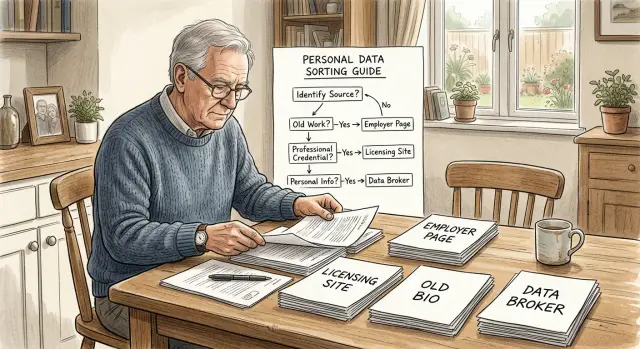
A practical order looks like this:
- Start with pages that show the fullest identity picture. Old employer profiles, staff pages, alumni directories, and association listings often reveal your name, face, career path, and location all at once.
- Next, handle pages that require account access, license lookup settings, or formal privacy requests. These can take longer, so it helps to start early.
- After that, fix pages where you can prove identity quickly, such as a speaker bio you submitted yourself or a membership profile you still control.
- Save the low-detail pages for later. If a page only shows your name and one old title, it matters less than a page with a full bio.
- Do not leave a risky page for last just because it is difficult. A hard removal process should not lower its priority if the page reveals a lot.
One simple way to score each page is detail first, friction second. A page with heavy detail and a difficult removal process should move up your list, not down.
Say an old hospital profile lists your full name, specialty, headshot, and office city. That should come before a conference page that only says you spoke in 2016. A state licensing page with your full license history may be even more urgent if it needs paperwork or a formal privacy request.
If you feel stuck, start with the pages where proof is easiest. Quick wins help, and they cut down the amount of public information scammers can cross-check while you work through the slower cases.
A realistic example of the order
Take Martin Reed, a retired nurse with a very common name. That may sound like protection, but it often works the other way. A common name creates confusion, and scammers only need one reliable page to confirm they found the right person.
The first result they find is an old hospital staff bio. It still says he worked in cardiology, names the city, and includes a headshot from ten years ago. That alone confirms his profession, likely age range, and probable retirement status.
A search for his name plus the hospital leads to a state licensing record. Now the picture gets sharper. The license page may show his full middle name, license number, and another city tied to his work history. For someone with a common name, that middle name matters a lot because it helps match the right Martin Reed across other databases.
Next comes a data broker listing. That page often fills in what the hospital bio and license record do not show together: current address, past addresses, relatives, and sometimes age. Once those records line up, a scammer can sound convincing on the phone or by email. They can mention the hospital, refer to his license, and name a relative or old street to build trust fast.
That is why your cleanup should follow the order scammers use, not the order search results happen to appear.
In practice, the fastest sequence is usually this: remove or shorten the old employer bio first, check licensing and credential sites next, take down old bios and event pages that repeat your work history, and then remove the broker listings that connect your professional past to your home and family.
If you do the broker removals first but leave the hospital bio up, the same profile is easier to rebuild later. The professional pages are often the glue.
Common mistakes that slow the cleanup
The biggest mistake is starting too wide. People search their name, see dozens of results, and try to remove everything at once. That wastes time on pages nobody would use while the pages that look most trustworthy to a scammer stay live.
Start with the pages that make you easy to verify: old employer profiles, alumni pages, licensing records, and conference bios. A forgotten forum profile with no address or work history can wait.
A few mistakes come up again and again. One is chasing dozens of low-value pages before fixing the obvious public profiles. Another is editing one bio and assuming all the copied versions changed too. People also send requests without screenshots, dates, or notes on who replied, then have trouble following up later. And many assume a removal is permanent and never check again.
Copied bios are a common trap. A retired doctor may remove an old hospital profile, but the same paragraph can still sit on a medical association page, a speaker archive, and an old webinar listing. One edit rarely fixes the copies.
Keep records from day one. Take a screenshot before you ask for removal. Write down the page title, the date you contacted them, and what personal details were exposed. It is a small habit, but it saves a lot of guesswork two weeks later when someone asks, "Which page are you referring to?"
The last mistake is assuming the job is done once a page disappears. Some sites republish from old databases. Data brokers also relist details after a fresh scrape. That is why rechecks matter.
A simple rhythm works better than a huge one-time sweep: remove the highest-risk pages first, note every request, then circle back.
Quick checks and next steps
Start with one fast search. Look up your full name by itself, then search it again with your city, phone number, and past employer. The first page of results usually shows what a scammer would see first.
Use that page as your working list. Open the top results and note any page that still shows your old job title, office location, work email, or a detailed bio. Check licensing and credential pages to make sure they are not exposing a home address, personal phone number, or anything else that is not required. Search your name with your city and past employer to catch old staff pages, alumni notes, conference bios, and copied directory entries. Then look for data broker listings that mix your work history with your current contact details.
If a page belongs to a former employer, ask for the bio or staff profile to be removed or shortened. A short contact page is far less risky than a full career summary with dates, departments, and office locations.
If a licensing site has to keep some record public, see whether it offers a privacy option. Some let you hide part of your address or switch to a business contact. If not, make sure the page shows only what the board requires and nothing extra.
Take screenshots before and after each request. It is boring, but it saves time if you need to follow up or show that a page was live when you filed the request.
Then recheck the same searches in two to four weeks. Some pages come back after they are removed, and broker listings often return with slightly different details.
If the broker side spreads across too many sites, that is where a service like Remove.dev can take a lot of the repeat work off your plate. It removes personal data from data brokers, keeps watching for relistings, and helps prevent the same details from quietly returning.
A good stopping point is simple: the top search results no longer expose old work details, license pages show only the minimum, and broker listings are no longer tying your name to past roles, home addresses, and relatives. That is a much smaller target.
FAQ
What should I remove first after retirement?
Start with pages that show the fullest picture of you in one place, like old employer profiles, staff pages, and alumni spotlights. After that, check license or credential records, then old speaker pages and bios, and leave data broker listings for the next step.
Why are old employer pages such a problem?
They look official, so strangers trust them fast. If a page shows your full name, former role, city, and photo, it gives a scammer enough detail to fake a call or email that feels real.
Should I worry about expired license records?
Yes. An expired record can still show your full name, city, license number, and sometimes an old home address or personal phone number. If the board has to keep part of the record public, ask whether it can hide contact details or use a mailing address instead.
Are alumni and conference pages really a privacy risk?
Yes, because those pages often keep more detail than people expect. A conference bio or alumni page may show your headshot, exact job history, city, and direct contact details, which makes fake outreach easier to believe.
Should I remove data broker listings before old bios and staff pages?
Usually no. Remove or trim the work-related pages first, because they help match your name to the right broker record. Once those public pages are thinner, broker removals often stick better and reveal less if a listing comes back.
What if a site will not delete my old profile?
Ask for removal first, not just edits. If they refuse, request the smallest public version possible by cutting your title, photo, city, direct contact details, and exact years, then save screenshots and follow up with a short, specific note.
How do I find copied bios and old profile pages about me?
Search your name with words tied to public profiles, such as speaker, panel, committee, board, and your old job title. Add past employers and cities too, since copied bios often show up on small event sites and old directories.
How often should I recheck after I send removal requests?
Check again in two to four weeks after your first round. For broker sites, a review every 30 to 60 days is sensible at first, then quarterly once things stay quiet.
What proof should I save during the cleanup?
Keep a screenshot from before and after each request, plus the page title, date, who you contacted, and what details were visible. That record makes follow-up much easier if a page returns or someone asks which page you mean.
Can I automate any part of this cleanup?
Usually, yes for data brokers and no for old bios. Services like Remove.dev can remove personal data from more than 500 brokers, monitor for relistings, and send new requests automatically, while employer pages, license records, and speaker bios often still need manual requests.