Reverse phone lookup apps can keep selling your profile
Reverse phone lookup apps can keep exposing your name, address, and relatives through app stores and APIs even after a web page is removed.
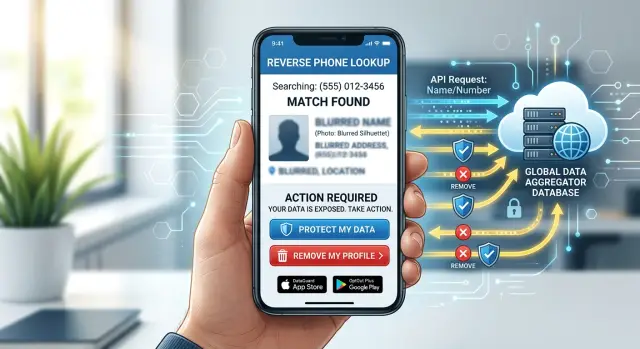
Why your profile can survive a page takedown
A page disappearing can feel like a win. Sometimes it's only a cosmetic fix.
Many reverse phone lookup apps do not rely on one public web page. They pull from stored records, app databases, paid data feeds, and older partner copies. So the page you found in search can be gone while the profile tied to your phone number still exists behind the scenes.
That difference matters. A deleted page changes what is visible. Deleted data means the underlying record is gone and should no longer be sold, shown in an app, or returned in a phone search.
This is where people get stuck. They search their number, find one profile, get that page removed, and assume the problem is solved. A week later, the same number still pulls up their name or old address inside a mobile app or a business tool that uses lookup APIs.
A simple example shows how this happens. A broker removes your public profile on Tuesday. On Thursday, someone types your number into an app and still sees your city, age range, or past address. The app is reading from a separate copy of your record, not the page that was taken down.
Phone number data brokers also share records with partners. One company deletes a profile, then a partner sends over a refreshed dataset next month, and your number-based lookups start working again. It looks random from the outside. Usually it was just re-imported.
That's why site cleanup often misses the real problem. The visible page is only one door into the same data. If the company still keeps your record in its app, sells it through an API, or gets it again from a partner feed, your profile can keep circulating.
If you're trying to remove phone number from apps, think beyond the page you can see. The real goal is to erase the record itself and stop it from being added back under your number later.
Where your number may still appear
Taking down one public page does not mean your number is gone. With reverse phone lookup apps, the record can keep moving through other products long after the original page disappears.
One common place is the app store. A company may hide or remove a web page, but its app can still return your name, old address, relatives, or past aliases when someone searches your number. New users keep downloading the app, and the data may come from a separate feed that was never touched.
Caller ID apps are another gap. When an unknown number calls, these apps try to label it before you answer. Some build that label from broker records, public records, uploaded contacts, and older partner copies. So even if one site deletes your page, your number can still trigger a profile inside a caller ID app.
Places people miss
Some companies barely show data on their own site. Instead, they sell an API to other businesses. That means a people-search widget, a sales tool, a fraud screen, or a call management app can all pull the same record behind the scenes. You may never see the source, but your number can still return the same personal details.
Partner databases make this worse. Once one company collects your record, it can be copied, licensed, or synced into other databases. That's why the same wrong middle initial or an address from ten years ago can show up in several places at once.
A few signs usually point to this pattern:
- Your page is gone, but apps still identify your number.
- Different services show the same old address or relatives.
- An app shows your name even though the company site has no public profile.
- Search results disappear, but number lookups still work inside other products.
If the app, API feed, or partner copy still has your number, the profile is still out there.
Why site cleanup often misses the real problem
With reverse phone lookup apps, the page you found is often just the storefront. Removing that page can feel like progress, but it may leave the source untouched.
Many lookup sites do not collect every record themselves. They buy, license, or sync phone data from a broker that also supplies mobile apps, caller ID tools, people-search products, and business lookup services. So one visible page can disappear while the same number stays active in several other places.
A lot of people stop after the first takedown request. That's understandable. You search your number, see one result, remove it, and move on. The problem is that the result you saw may have been only one output from a much larger data feed.
A phone number can also survive because it is stored in more than one format. A system may treat (312) 555-0188, 3125550188, +1 312 555 0188, and 1-312-555-0188 as separate records. If one version is removed and another stays, your profile can still appear in an app or an API response.
Think of a search result page as the public layer, not the whole system. App products may keep their own copy. API customers may already have pulled your data into their own tools. Number-based lookups can keep working even after the original page is gone.
If you want the cleanup to stick, go after the broker, the app listing, and any service that returns results for the number itself. That's usually where the leak is.
How to check your exposure step by step
Most people stop after finding one public page. That's too shallow. The same number can sit in an app listing, a paid tool, or a developer product long after a web page is gone.
Start in a clean browser window and search your number several ways. Different databases store the same number in different formats, so one version may show nothing while another pulls up a full profile. Try the number with your country code and without it. Search digits only, then with spaces or dashes. Run one search in quotes and one without. Check at least two search engines.
As you search, write down every result that connects the number to a name, address, relatives, age, or carrier. You don't need a spreadsheet. A note on your phone or laptop is enough.
After that, check app stores. Search for terms like reverse phone, caller ID, unknown caller, and spam call lookup. Open a few listings and read the screenshots, sample searches, and review text. Users often say what the app showed them even when the company description stays vague.
Test what a stranger can see
Now try a few lookup tools directly. You do not need twenty. Three to five is usually enough to spot a pattern. If one tool shows your full name and another shows an old address, your number has likely spread across more than one source.
Some companies hide the full result behind a paywall. The preview can still tell you a lot. If the page promises a name match, current city, or household members, note it down. Some of that same data may also be sold through APIs that feed other apps and phone searches.
Keep a simple record
Save four things each time you find a listing: screenshots, the date checked, the company or app name, and what data appeared. This part feels dull, but it saves time later. When you ask for removal, you can point to the exact app, search result, or preview instead of saying you saw your number somewhere.
If you use a service like Remove.dev, those notes also help match each listing to the right broker and track the request until it is finished.
What to ask each company to remove
A weak removal request often gets a weak result. If a company only deletes one public page, your record can still live inside its app, paid lookup tool, or business API. When you're dealing with reverse phone lookup apps, ask for every copy tied to your number, not just the page you found in search.
Be direct. Say you want your phone number removed along with any profile connected to it. That includes your name, past and current addresses, age range, relatives, email addresses, and any other data the company uses to identify you. If you have used more than one name, include common misspellings, maiden names, shortened first names, and old locations. Small mismatches often keep records alive.
A good request should ask about the public website listing, the mobile app record, internal search tools and paid reports, API feeds, and partner products that received the same data.
That last part matters more than most people expect. A broker may remove your profile from its own site but keep selling the same record through another brand or an API. Ask a plain question: "Did you share, license, or sell this record to any partner product, app, reseller, or API customer? If yes, what steps will you take to stop further access and remove existing copies?"
It also helps to ask for confirmation of what was deleted. You do not need a legal memo. A short written reply is enough if it says the number-based lookups tied to your phone number were removed across web, app, and API systems.
Save every reply, even the vague ones. Keep screenshots, ticket numbers, dates, and the wording they used. If your record shows up again two months later, that paper trail makes follow-up much easier. Services that monitor re-listings, including Remove.dev, can be useful here because the same data often reappears through a different app or partner feed.
If you send only one sentence, make it this: remove my phone number and every linked profile from all public, app, internal, partner, and API databases you control or supply.
A simple example of how this happens
Maya finds her mobile number on a people-search site. Her full name is there too, along with an old city. She sends a removal request, waits a few days, and the page disappears.
That feels like a win. Then a week later, a caller ID app still shows "Maya Patel" when someone searches her number. A spam caller even reads back her old city, which means the data did not vanish when the web page did.
What happened is pretty ordinary. The people-search site was only one place showing the record. Before the page came down, a caller ID app had already copied it or bought it through a data feed. Once that copy sits in the app's database, the app can keep matching Maya's number to her name even after the original page is gone.
There is often a second copy too, and it's less visible. Some companies sell lookup APIs to apps, call tools, and lead services. A business can send in Maya's phone number and get back a name or past address without ever visiting the old people-search page. So the profile is still being sold in the background.
That's why spam calls can keep coming. The caller does not need a public profile page. They only need a number search that still works.
The fix usually takes more than one step. Remove the public page, remove the source broker record that feeds apps and APIs, check the app result again after a few days, and test the number in a few other reverse phone lookup apps.
The delay matters. Some apps refresh fast, while others keep cached records for days or weeks. If Maya only checks the page she removed, she misses the copy that people actually use when they type her number into a search box.
A page takedown helps, but it isn't the finish line. To remove phone number from apps, you usually have to cut off the source, wait for copies to refresh, and check again.
Mistakes that slow the cleanup
One of the biggest mistakes is stopping too early. A public page disappears, and it feels done. But reverse phone lookup apps often pull from the same profile data in more than one place, so the page can be gone while the number still shows up inside an app, a paid report, or a partner product.
Another slow-down is sending vague removal requests. "Please delete my data" is rarely enough. Companies move faster when you include the exact phone number shown, the number format used, the app or product name, and a screenshot of the result. Screenshots matter because listings change fast, and support teams often ask for proof.
The number format issue trips people up all the time. One record may show as (555) 123-4567, another as 5551234567, and another with a country code. If you check only one version, you can think the removal worked when another version is still live.
Keep the follow-up simple. Search the full number in every common format, check the website and the app, save screenshots with the date visible, note the product name, and recheck after the first removal.
That last step is easy to skip. Many people never look again after the first success. But number-based lookups can reappear when a partner refreshes its data or an app syncs an old record back in.
If you want the cleanup to last, treat it as a short process, not a single request. Remove.dev does this with ongoing monitoring after the first removal, which makes sense because one-time deletion often misses re-listings.
Quick checks before you move on
A page disappearing is not the same as your number being gone. Before you close the tab and call it done, run a few quick checks.
Start with the app itself. If the web page is gone but the app still returns your number, the data is still live somewhere. Take a screenshot of the result, the app name, and the date. That gives you proof if support later says the profile was already removed.
Then test more than one version of the number. Try the local format, the country code format, digits only, a version with spaces or dashes, and any old or alternate numbers tied to you. If one format shows nothing, try the others. It takes a couple of minutes and can save you a second cleanup round.
One more thing: write down the company behind the app, not just the app name. App store brands are often different from the business that owns the database. The company name in the store listing, privacy policy, or support email is usually the name you need for removal requests.
Ask a direct question about copies. Does the company also sell data through an API, a partner feed, or a white-label product? That's often why one app goes quiet while the same number still appears in another product.
Last, set a date to check again. Seven to fourteen days is a practical window for many removals, and a second review a month later helps catch re-listings.
Next steps that save time
The fastest path is usually not starting with every app one by one. Start with the sources that feed other products. If one phone number data broker supplies records to several apps or an API, one removal request can cut off a lot of future exposure.
A simple system helps. Keep a short log with the company name, where your number appeared, when you sent the request, what reply you got, and when you checked again. This saves time when a company asks for the same proof twice or when a listing comes back a few weeks later.
Do not stop after the first removal confirmation. Recheck the number in three places: the website, the mobile app, and any number-based lookup that pulls from an API. If the number is gone from the page but still resolves in the app, the job is not done.
A good rule is to wait, then test again. Many removals take time to spread across partner products. If you still see the number after the normal update window, send a follow-up and reference your earlier request.
If manual work starts eating whole evenings, getting help can be worth it. Remove.dev removes personal data from over 500 data brokers worldwide, tracks requests in real time, and keeps monitoring for re-listings after the first cleanup. Most removals are completed within 7-14 days, which is useful when the same record keeps resurfacing through apps or partner feeds.
The goal is simple: your number should stop appearing in web, app, and API lookups. Until all three are clear, there is still a path back to your profile.