School and sports roster privacy risks parents should know
School and sports roster privacy risks can expose parent names, towns, and family ties. Learn what schools share and how families can lower the risk.
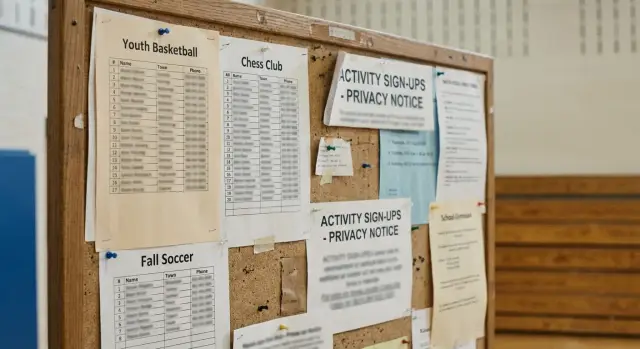
Why rosters reveal more than they seem
A roster can look harmless. It feels like a simple list for coaches, teachers, and parents.
The problem starts when one line connects a child to an adult by name. If a roster shows "Ethan Parker" and "Parent: Melissa Parker," it does more than help with team contact. It confirms a family link that other people, search engines, or data brokers might not have connected yet.
A town name makes that link much stronger. There may be many Ethan Parkers, but far fewer Ethan Parkers in one small suburb, on one baseball team, at one middle school. A detail that seems minor can narrow a family down fast.
Age clues matter too. Rosters often include a team level, school name, grade, or season. "U12 soccer," "8th grade band," or "Lincoln Middle School" gives a rough age range right away. That helps someone guess birth years, school transitions, and which adults in public records are likely the parents.
Last names add another layer. When a child and an adult share a last name, many people assume they live together. If a sibling appears on the same club page, the picture gets clearer. Even without an address, a stranger can make a solid guess about one household.
That is why school and sports roster privacy risks are bigger than they first appear. The danger is not one detail on its own. The danger is how easily small details snap together.
Think about a short roster entry with a child name, parent name, town, and team. None of that sounds secret by itself. Together, it can reveal family data exposure in a way that feels much more personal than people expect.
Once that information is copied, shared in group chats, posted on public pages, or picked up by data brokers, it can be hard to pull back. Prevention is easier than cleanup.
What details often appear on a roster
Most rosters start with a child's name. Sometimes it is a full name. Sometimes it is just first and last name. Even that can be enough to connect a child to team photos, event results, school pages, or social media posts.
Many rosters also include a parent or guardian name. That can instantly show who is connected to whom in the household. If the last names differ, it may still reveal a family link that would otherwise stay private.
Location details show up often too. A roster may name the town, school, league, or club. That sounds basic, but it narrows a family down quickly, especially in a smaller community. A line like "Emma Carter, Oak Hills, U12 girls" gives away more than many parents expect.
Age clues are common as well. A team level, age group, grade, or graduation year can put a child into a tight age range. That makes it easier to match the child with school honor rolls, old meet results, or public social accounts.
Contact details are where things get riskier. Some rosters still include phone numbers or email addresses so parents can coordinate rides and schedule changes. That can expose a direct cell number, a personal email used across other accounts, a work email that reveals an employer, or even a family naming pattern inside an address.
Small extras matter too. A jersey number, position, emergency contact, or practice location may not seem like much, but each one adds context. Put together, these entries can sketch out a family's names, hometown, routines, and relationships.
How small details turn into a family profile
A public roster page is easy to save as a PDF or grab in a screenshot. Even if a school removes it later, a copy can keep circulating in inboxes, chats, and file folders.
The longer a roster stays online, the more useful it becomes to strangers. Old seasons often remain on school sites, league pages, or tournament posts for years. Search engines can index those pages, so a family name and town may show up in a simple search long after a child has changed teams or moved up a grade.
A stranger does not need a full record at the start. They can build one from small matches across different pages. The same last name on a soccer roster and a school program, one town listed on a league page and a parent name on a volunteer sheet, or an old PDF paired with a people-search site can be enough to connect the dots.
Once those pieces line up, it gets easier to guess relationships inside the home. A child named Ava Miller in a U12 team list, a parent named Karen Miller on a booster page, and a public record for a Miller household in the same town can be enough to connect parent, child, and home address with fair confidence.
This is how family data exposure usually happens. Not through one huge leak, but through many small disclosures that fit together too well.
If your family is already on public roster pages, it is worth checking whether that information has spread into people-search databases. Services like Remove.dev can help by finding and removing personal information from data brokers, but the first rule is still simple: treat every roster like a public record, even when it feels temporary.
A simple example
Picture a Saturday baseball roster shared with families. It shows one line: "Ethan Miller - Brookfield." That does not look like much. Still, it gives away two useful facts right away: a child's full name and the town where the family likely lives.
A week later, the school play program is posted online. Under Ethan's sister Ava, it says, "Parents: Daniel Miller and Rachel Miller." Now the picture is sharper. Anyone who saw both documents can connect Ethan Miller in Brookfield to Daniel and Rachel Miller.
Then the booster club posts a thank-you note in a newsletter or social post. Maybe it says Rachel Miller helped with ticket sales, or D. Miller donated snacks for the team. The same last name shows up again in the same school community. At that point, these no longer look like separate mentions. They look like one household.
That is how school and sports roster privacy risks build up in real life. One document names a child. Another names the parents. A third repeats the family name in the same town. Together, those small details can suggest family relationships, where the children spend time, and which adults are tied to them.
Someone trying to identify the family does not need a full address on the roster. They only need enough detail to narrow the search. Once they have the child name, town, and parent names, they can compare that with public records and often pick the right family from a short list.
This gets even more specific if the last name is uncommon, the town is small, or the child is in several activities at once. A baseball roster, a school play program, and a booster club post may each seem harmless. Together, they can expose far more family data than any parent meant to share.
How to reduce the risk step by step
The safest approach is simple: find what is public, cut down what is shared, and remove old files that no longer need to be online. School and sports roster privacy risks usually come from small details spread across several pages, not from one obvious mistake.
Start with a quick search of your child's name plus the school or team name. Try a few versions, such as a nickname, a graduation year, or the town name. Look for roster pages, PDFs, photo galleries, and archived announcements that still show up in search results.
Then check for older material. A page from two years ago may still list a parent contact, jersey number, age group, or hometown. Families often fix the current roster and forget the files from past seasons.
If you find a public roster, ask whether the school or club can switch to first names only, initials, or player numbers instead of full names. For younger kids, that small change can cut the risk a lot. If old files are no longer needed, ask for them to be deleted rather than left online by default.
It also helps to opt out of public directories when the school or league offers that choice. Some forms include that option, but it is easy to miss during registration.
If those details have already spread beyond the original site, source-page removal is still the first move. After that, data broker cleanup can help with copies that show up elsewhere. Remove.dev, for example, removes personal information from more than 500 data brokers and keeps monitoring for re-listings, which can save a lot of repeat work.
Mistakes parents and organizers make
A lot of roster privacy problems come from habits that feel normal. The goal is usually convenience, not exposure.
One common mistake is posting a full PDF online when only the team or class needs access. A public PDF is easy to search, download, copy, and forward. If it includes a child's full name, parent names, town, phone number, or email, that file can travel far beyond the people it was meant for.
Another problem is leaving last year's roster online. Old files often stay on club pages, school sites, or shared folders long after the season ends. Parents may think the information is gone because the page is no longer promoted, but search results, archive tools, and copied files can keep it alive.
Group chats create their own mess. A sign-up sheet shared for snack duty or carpooling might seem private, but screenshots move fast. One parent forwards it, someone saves it, and suddenly names, phone numbers, and family connections are no longer in a closed group.
Images are another weak spot. Organizers sometimes post a photo of a printed contact sheet, a clipboard, or a check-in table without noticing what is visible in the background. Parent contact details in an image can be easy to miss at first glance, but they are still readable.
The biggest bad assumption is that a small local site is too minor to matter. It does matter. Small school pages, booster club sites, and local league blogs are often scraped because they hold clean, structured family information.
Safer habits are pretty simple. Share files only with the people who need them. Use private or expiring files when possible. Remove old rosters on a set schedule. Keep parent contact details off public posts. Check photos for paperwork before posting them.
A quick checklist before a roster goes public
A roster should do one job: help families coordinate. If it does more than that, it can expose a child and parent to people who were never meant to see it.
Before a school, club, or team parent shares a file, ask a few basic questions. Are full names needed at all, or would a first name and last initial work? Do adult names need to appear next to the child's name? Does the file include extra location details that narrow the family down? Can people outside the group open, save, or forward it? And when will it be deleted?
One more rule helps: one person should own the file. When everyone can upload new versions, old copies stay in inboxes and shared drives.
A simple test works well. If a stranger saw this file, could they figure out which adult belongs to which child, where the family likely lives, and where the child spends time each week? If the answer is yes, the roster shares too much.
The safer version is boring on purpose. Keep only what families need right now, share it in a closed space, and delete it later. Boring files are usually safer files.
What to ask schools and clubs
Most roster problems start with one assumption: "It is only for parents." Then a PDF ends up on a public page, in search results, or attached to an old newsletter that stays online for years.
Ask direct questions before names go live. Who can view the roster? Where will it appear? Will search engines be able to index it? When will old versions come down? If your family does not want a public listing, what is the opt-out process?
Many schools and clubs can split this into two versions, and they should. One version can stay inside a family portal or team app. A public version, if they need one at all, should be stripped down to first names, team names, and schedule details.
It also helps to ask which details are truly necessary. Parent phone numbers, email addresses, home towns, and emergency contacts do not belong on public pages. Even a child's full name plus team and town can be enough to connect one household to other records online.
The last questions matter more than many parents think. Old files are often the real problem, not the current roster. A spring baseball PDF can still sit on a server in winter, and once it gets copied elsewhere, it is much harder to pull back.
If the group seems unsure, that tells you something. Privacy rules do not need to be fancy, but they do need to be written down and easy to follow.
What to do next if your family is already listed
Move fast, but start by saving proof of what is online. Take screenshots of the page, the full web address, and the date you found it. If the page changes later, you will still have a record of what was shared.
Then send one clear request to the school, club, or coach. Keep it short. Name the page, list the details you want removed, and explain that the roster exposes family information such as parent names, town, and child activity. A polite, direct message usually works better than a long complaint.
After that, search for the same details on other sites. Do not assume the problem ends when the original page is fixed. Team pages get copied into league sites, tournament pages, PDFs, and search results. A baseball roster might disappear from the school site but still sit on a booster club page for months.
Use a few searches that match how other people would find you. Try the child's full name with the team name, the parent name with the town, and the school or club name with the graduation year or age group. That is often enough to uncover mirror pages or old files that stayed public.
If you find copies, ask each site to remove them too. Keep your requests in one folder so you can track who replied and when. That saves time if you need to follow up a week later.
Sometimes the information spreads past roster pages and into data broker listings. Once that happens, manual cleanup gets tiring fast. Remove.dev is built for exactly that problem. It automatically finds and removes personal information from over 500 data brokers, tracks requests in real time, and keeps checking for re-listings after the first removal.
One fix is good. A second check a week later is better. Families usually miss the copies, not the original post.
FAQ
Why is a school or sports roster a privacy risk at all?
Because a roster rarely shows just one fact. A child’s name next to a parent name, town, school, or team can confirm family links and make one household much easier to identify.
Which roster details cause the most trouble?
The riskiest details are full child names, parent or guardian names, town, school, grade or age group, phone numbers, and email addresses. Even small extras like jersey numbers or practice locations can add useful context when someone matches them with other public pages.
Is a small local team page really something to worry about?
Yes. A small local page can still be indexed by search engines, copied into PDFs, shared in chats, or scraped by data brokers. Once that happens, the audience is no longer just local families.
Do first names only or initials actually help?
Usually, yes. Using first names, last initials, or player numbers makes it harder to match a child to school pages, photos, and public records. It does not make a roster private, but it cuts down the amount of usable detail.
What should I ask a school or club before they post a roster?
Ask who can view the file, whether search engines can see it, what details will be shown, when old versions will be deleted, and how to opt out. If they need a public version, ask them to strip it down so it does not connect children to adult names or contact details.
What should I do if my family is already listed online?
Start by saving proof with screenshots, the full page address, and the date. Then ask the school, club, or coach to remove the page and search for copies on league sites, newsletters, and old PDFs so you can request those removals too.
Are old PDFs and past-season pages still a risk?
They can be. Old season files often stay online for years, and search engines may keep showing them long after the team has changed. A page that feels forgotten can still be easy to find.
Are group chats and event photos a privacy problem too?
Not really. Screenshots move fast, and photos of clipboards, check-in tables, or printed contact sheets can expose names, numbers, and emails without anyone noticing at first. Treat shared files and event photos like public material unless you know access is tightly limited.
If the original page is removed, is the problem solved?
No. Taking down the source page is the first move, but copies may still live on other sites, in search results, or in people-search databases. That is why a second search after the first removal request is worth doing.
Can a removal service help if the data has spread beyond the roster?
It can. If your family details have spread into people-search or broker sites, a service like Remove.dev can save a lot of manual work by finding and removing records across more than 500 brokers. Most removals finish in 7–14 days, and the service keeps checking for re-listings so the same data does not quietly come back.