Security camera app privacy: how posts expose your home
Security camera app privacy matters more than it seems. Clips, comments, and usernames can reveal a home address and the person living there.
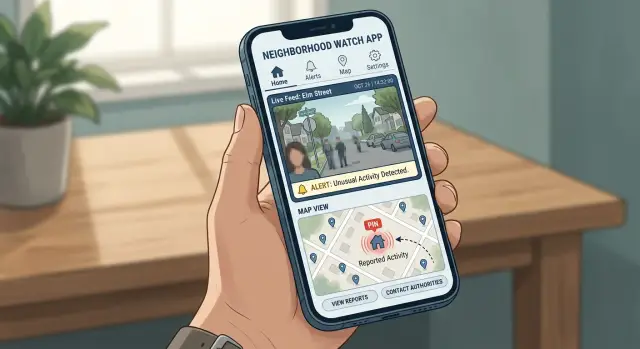
Why these posts can point to your house
A neighborhood camera post can feel local and anonymous. Often, it is neither. The risk is usually not one big leak. It is a stack of small clues that become useful once someone lines them up.
A short clip can show far more than the person at your door. It might catch the shape of a driveway, a porch light, part of a fence, a parked car, or the edge of a house number. Even a street sign in the corner can narrow the search to a few homes.
The app can narrow it even more. A neighborhood label, cross street, or small map circle saves a stranger from searching an entire city. They can focus on one cluster of streets and compare what they see in the video with map images, home listings, and public people-search sites.
Timing adds another clue. A clip posted late at night suggests you are home and awake. A post that says you are out of town, or shows packages piling up, can suggest the opposite. One detail alone may not matter. Put together, those details start to reveal your routine.
Why small clues matter
Picture a 15-second clip of someone checking car doors. The video shows a brick mailbox, a curved driveway, and the number 14 on the curb for a split second. The app labels the post with a neighborhood name. For someone patient, that can be enough to narrow the match to a short list of houses.
That is the pattern people miss. The clip shows physical markers near your home. The app gives a rough location. The posting time says something about your schedule. Your username or profile photo can supply the final match. If your address or phone number is already listed by data brokers, the job gets much easier.
A public post does not have to reveal everything by itself. It only has to reveal enough to connect the dots.
How someone can connect a clip to an address
Most people do not start with your exact house. They start with the area label inside the app. A neighborhood name, cross street, or map circle cuts the search down fast.
After that, the video does a lot of the work. A porch shape, fence style, mailbox, driveway slope, parked car, or large tree can be enough to match the scene to map and street-view images. One clue may not mean much. Five small clues together can point to one house.
Timing helps more than people expect. If a clip was posted during heavy rain at 8:12 p.m., someone can compare that with local weather and lighting. If the sky looks bright in the video but the app says it was posted late, they may assume it was recorded earlier and look through older posts from the same block.
A typical search is simple. First, someone uses the neighborhood label or nearby street name to limit the area. Then they scan map images for matching rooflines, fences, cars, trees, or mailbox shapes. After that, they use shadows, weather, and post time to narrow the side of the street. Older posts often fill in whatever the new clip hides.
That is why old clips matter so much. A recent post may blur a plate or crop out the house number, but an older one may show the front walk, holiday decorations, or a cleaner angle of the yard. Once someone finds two or three clips from the same account, the picture gets much clearer.
The last step is often the easiest. If the account uses a real first and last name, or a username used elsewhere, public records can connect that person to an address. If data brokers already list that person in the same area, the guess becomes much easier.
None of this requires hacking or special tools. It mostly takes time, public information, and a little patience. That is why small choices inside a post matter more than they seem.
What comments and usernames give away
A clip does not need to show a street number to expose someone. In many cases, the comments and username finish the job.
This is where privacy often breaks down. People hide the exact address in the video, then reveal enough around it that a stranger can still connect the post to a real home.
A username is often the first clue. If it includes a real first name, last name, birth year, or neighborhood name, it becomes much easier to match that account to a person elsewhere online. A clear profile photo can do the same thing. If it matches a public social account, that can lead to a full name, employer, school, or city.
Then the comments start filling gaps. Someone writes, "This keeps happening near Oak Park," or "We're two blocks from Jefferson Elementary." Another person replies, "I think I know this house," or "Is this the blue place by the church?" Each comment sounds harmless on its own. Together, they narrow the map fast.
Replies are even riskier because they confirm what outsiders only suspect. A neighbor saying, "Yes, that's Sarah's house," or "You live right behind the baseball field, right?" turns an anonymous post into an identified one.
Local groups make it easier
Local groups make this worse because people already know the area. They do not need a full address. A park name, school mascot, cross street, or mention of the weekend farmers market may be enough.
That is why neighborhood video posts can reveal more than the clip itself. A stranger might not recognize your porch at first, but local users can identify the block, and your profile can identify the person.
The pattern is simple: name, face, and place. If two appear in one post, the third is often easy to find.
Before you comment, ask one blunt question: would this sentence help a stranger place my home on a map? If the answer is maybe, cut the detail. Skip cross streets, school names, park names, and any reply that confirms who lives there.
How this happens in real life
Picture a normal post after a package theft. A homeowner uploads a porch clip to a neighborhood feed because they want help identifying the person. It feels harmless. The camera mostly shows the thief, but it also catches a mailbox, a dark green front door, and a few seconds of the street in front of the house.
That is often enough to start narrowing things down. A stranger does not need a full address in the video. They only need a few clues that fit together.
The process can be surprisingly basic. The porch video shows the mailbox style, door color, and shape of the front steps. The background shows a corner sign, fence line, or parked cars that look familiar. In the comments, the owner says it happened "near the park." The username matches one used on a public Instagram or Facebook profile. That public profile shows a family name, a face, and maybe a few older home photos.
At that point, the post is no longer just a clip of a theft. It points to a specific house and then to a specific person. Someone can compare the porch details with homes near that park, match the username to a public profile, and feel fairly confident they found the right address.
That is the part many people underestimate. Each detail looks minor by itself. Together, they can identify where you live in a surprisingly short time.
The realistic version is not some movie-style hacking scene. It is someone scrolling public posts for ten minutes, checking a map, and matching a username to a social account. Once that happens, the clip can expose more than the theft. It can expose your home, your name, and parts of your daily routine.
How to check your own account
Start with your profile, not your videos. Your username, photo, and bio often reveal more than the clip itself. If your handle matches your real name, your face is clear, or your bio mentions your street, school, workplace, or even your dog's name, change that first.
Then review your posts like a stranger would. Do not watch them as the person who already knows the block. Watch them as someone trying to figure out where you live.
A quick review helps:
- Open your public profile and note anything that points to you as a real person.
- Watch old clips in full screen and pause on frames with house numbers, mailboxes, street signs, license plates, or unique yard features.
- Check the background for fixed landmarks like a church, corner store, park gate, or apartment entrance.
- Read the comments and look for mentions of cross streets, nearby buildings, or "the house by" a local spot.
- Trim, archive, edit, or delete posts that make your home easy to place.
Older posts need extra care. People forget what they shared six months ago, especially clips posted in a rush after a package theft or a late-night alert. A one-second view of the curb number can be enough.
It also helps to search your username online. If the same name appears on social apps, forums, or old classifieds, someone can stitch those pieces together. That is when an app privacy problem turns into a broader identity problem.
If your name, address, or phone number is already showing up outside the app, cleaning up posts alone will not do much. Data broker removal can make that trail harder to follow.
Common mistakes that make tracking easier
Most people do not post their address on purpose. They leak it a little at a time.
The first mistake is showing too much of the house. A full view of the front door, porch, roofline, mailbox, or a very distinct driveway gives strangers plenty to work with. Even without a visible house number, those details can match real estate photos, map images, or older neighborhood posts.
Using a real name as a username makes the search much easier. A clip posted by "Sarah Miller" feels normal to friends and neighbors, but it also gives anyone a name to search. Add one casual comment like "this happened again on Oak Street," and the post stops looking anonymous.
Repeating the same camera angle is another common slip. One clip shows blue shutters. Another shows the trash bins on pickup day. A third shows the same fence and the house across the street. Put together, several posts from the same spot can narrow a location quickly.
Old posts matter more than most people think. Many users forget that clips from months ago may still be public or easy to find inside the app. Someone can scroll back and build a clearer picture than any single post shows today.
A simple example makes the problem obvious. Imagine someone posts a package theft clip with the full porch in view. Their username is their real first and last name. In the comments, they mention their street, then later post a loose dog video from the same doorbell camera. None of those posts seems risky on its own. Together, they can point to one home and one person.
That is why small habits matter. Crop tighter. Avoid real names. Keep street names out of comments. Clean up old posts you no longer need. One minute of editing can remove the clues that make tracking easy.
Quick checks before you post
A lot of privacy mistakes happen in the last 30 seconds before posting. The clip feels harmless, but small details can turn it into a map to your front door.
Pause and check what a stranger would notice first. They do not need your full address. A house number, a street sign, a parked car, and a familiar username can be enough.
Before you share anything, run through this short list:
- Trim or crop the frame if it shows house numbers, license plates, street signs, package labels, or a neighbor's mailbox.
- Listen to the audio once. If someone says a first name, your street, your apartment number, or where you are headed, mute it.
- Post later, not live. If you are away from home, wait until you are back so the clip does not tell people the house is empty.
- Use a neutral username and a plain profile image.
- Ask one question: does this clip still make sense without showing where I live?
A short porch clip may seem fine, but the edge of the frame can show a curb number or street sign, and that can be enough. If the post only works because the location is obvious, it is probably too revealing to share publicly.
What to change in the app and on your profile
Start with your profile, not the camera. In many apps, a stranger can learn more from your name, photo, and posting settings than from the clip itself.
If the app lets you hide profile details, do it. Use a first name, initials, or a neutral screen name instead of your full name. Turn off anything public that shows your street, household details, or how long you have lived in the area.
Comments and messages need the same care. Public replies often turn into long threads, and that is where extra details leak out. If you can limit who comments or messages you, set it to trusted contacts or turn it off completely.
Your profile photo matters more than most people expect. A clear face photo makes it easy to match your account to other social profiles. A photo taken on your porch, driveway, or in front of a house number is worse. A plain image, or no photo at all, is safer.
One setting catches people off guard: neighborhood labels. Some apps add your area, block, or map pin by default when you post. Check every posting screen, not just the main privacy menu. If the app will not let you reduce location detail, keep alerts private instead of sending them to a public feed.
A five-minute settings pass usually helps. Hide public profile details, remove identifying profile photos, reduce location precision, and use private alerts by default. Then look at your profile as someone else would. If a stranger can guess your house from the profile alone, keep trimming.
What to do if your information is already out there
If a post, comment, or username already points people to your home, start with search. Type your full name, camera app username, street address, and phone number in different combinations. You are looking for anything that ties a face, a clip, and a location together.
Then clean up what you control. Delete old neighborhood posts that show your front door, house number, mailbox, street sign, or the view from your window. Edit your profile if the username matches your real name. If relatives use the same app or repost your clips elsewhere, ask them not to tag your address or mention your block in comments. One careless reply can undo a lot of cleanup.
The cleanup order is straightforward:
- Search for your name, username, address, and phone number in pairs.
- Remove public posts and comments that narrow your location.
- Check family accounts and reposted clips.
- Save screenshots of anything you cannot remove yourself.
If your details also appear on data broker sites, app cleanup is only half the job. Those sites can list your name, age, relatives, past addresses, and current address in one place. That makes it much easier for someone who saw a neighborhood clip to confirm which house is yours.
If you want to cut down that exposure, Remove.dev can help remove personal information from more than 500 data brokers and keep watching for relistings. That matters because one-time cleanup is rarely enough. If your home address is already exposed, ongoing follow-up is what keeps the same record from quietly showing up again a few weeks later.
The big takeaway is simple: public camera posts reveal more than most people think. A safer account usually comes down to boring fixes that work - less location detail, fewer identifying comments, and regular cleanup of old posts.