Selling a house privacy checklist before and after closing
Use this selling a house privacy checklist to review listing photos, parcel records, agent pages, and local directories before and after closing.
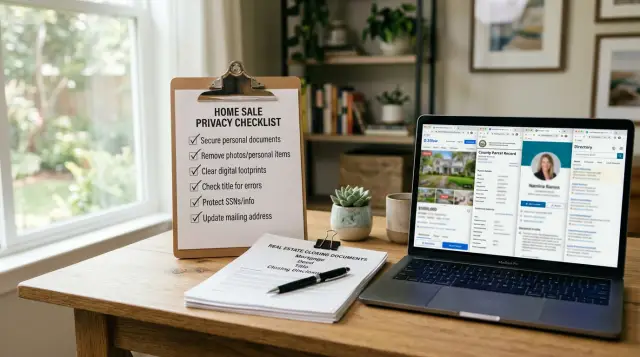
Why a home sale can leave your details public
Selling a home can put more of your personal information online than most people expect. Your name, phone number, mailing address, and even pieces of your daily routine can end up spread across listing pages, agent sites, parcel records, and local directories at the same time.
Some of that exposure starts before the sale closes. An agent page might show your full name next to the property. Public records may connect the address to a mailing address you still use. If your phone number appears anywhere in the process, it can spread fast once one site posts it and other sites copy the page.
That copying is the real problem. Real estate platforms pull data from each other, directories scrape public records, and smaller sites often keep old pages long after the original listing changes. One page turns into several copies. Months later, those copies can still show up in search results.
Closing the sale does not make that go away. Sold pages often stay live, and some still show photos, price history, tax details, and old captions. That makes it easy to connect the property to the former owner even after move-out.
Photos and attached files can reveal more than people realize. A gallery might show family photos on a wall, a house number by the front door, the view from a bedroom window, or a license plate in the driveway. Floor plans, brochures, and disclosure files can expose full names, signatures, or contact details if nobody checks them closely.
Usually, the risk is not one dramatic leak. It is a lot of small details spread across many places. They are easy to miss until they start appearing everywhere.
Before the listing goes live
The easiest privacy problems happen before the first buyer ever sees the home. A few choices early on can save a lot of cleanup later.
Start with contact details. If possible, use one phone number and one email address only for the sale. When a personal number ends up on flyers, portals, and copied listing pages, it can stay online long after the house is sold.
Then walk through the house as if you were a stranger. Remove anything that ties the space directly to you: mail on the counter, shipping labels, school papers, framed diplomas, family photos, and pet tags by the door. Buyers may barely notice those things. Cameras do.
Before photos or brochures are approved, ask your agent a simple question: "How will my name appear?" Some listings use a full owner name in remarks, brochure text, showing notes, or even file names. It is much easier to fix that before the listing is published than after it has been copied.
A quick pre-listing check helps too:
- Look up the county parcel page and note what is already public.
- Review any old sale pages, rental pages, or neighborhood posts that still mention your name.
- Confirm which phone number and email address will appear in listing materials.
- Save screenshots of pages that already show owner details.
Those screenshots are not exciting, but they help later. After the listing goes live, and again after closing, you can compare what changed, what spread, and what still needs work.
Review photos, captions, and tours
The media package deserves extra attention. Photos and tours help sell the home, but they can also reveal far more than you meant to share.
Start with the obvious details, then look again more carefully. A buyer may notice the kitchen. Someone else may notice your house number, the street sign at the corner, or a car plate in the driveway.
Inside the home, small details matter. Zoom in on counters, desks, calendars, family photos, framed certificates, labels, and fridge doors. One image can reveal a last name, a school, a workplace, or the times your home is usually empty.
Captions need the same care. They should describe the property, not your life. Skip lines that mention the owner by name, say when the family is away, or describe security habits such as "system armed at night" or "vacant on weekdays."
Do not stop with the photo gallery. Video tours, 3D walkthroughs, floor plan files, and brochure PDFs often slip past review because most people focus on the main listing first. Those extra files can show names on mail, diplomas on a wall, or room labels that say too much about how the home is used.
A good rule is simple: if a detail would help a stranger identify you, find you, or guess when the house is empty, remove it. Clean media usually looks better anyway.
Check parcel and property records
A home sale does not wipe public records clean. In many counties, the old owner name, mailing address, and sale history stay visible long after the sign comes down. If you want fewer details floating around, start with the government pages that other sites copy from.
Check the property on the assessor page, the recorder or clerk page, the tax page, and the GIS or parcel map page. Use the street address and parcel number if you have it. The parcel number often works faster, especially when a home has a unit number or a recent address change.
As you search, keep a simple note of what each page shows. You are looking for the owner name, mailing address, sale date, deed images, and any notes field with personal details. A short table in a notes app is enough.
If a page shows more than you expected, contact the office that runs it and ask what can be corrected, limited, or updated under local rules. Some offices will not remove ownership history. Others may let you update a mailing address, correct an old address, or limit public display in certain cases.
If your county allows it, use a separate mailing address instead of your home address. That will not erase every record, but it can keep future tax and parcel pages from showing where you live.
It also helps to track each request in one place: the date, the office name, the case or ticket number, the reply, and the next follow-up date. That way you are not starting over each time you check back.
Here is a common example. The assessor page shows your full name and old mailing address, and the GIS map repeats that same address. If the tax office lets you update the mailing address, make the change and note the date. Then check again a week or two later. Even when a record cannot be hidden, you will know which page started the spread and which office already answered you.
Ask your agent for a full cleanup
Your agent usually controls more than the live listing. They may also manage the brokerage page, brochure files, photo galleries, and sold-property posts that stay up after closing. That makes them one of the first people to talk to if you want a proper cleanup.
Start with the pages that no longer need to exist. An old listing can keep your address, interior photos, showing notes, and sometimes contact details online long after the sale. Ask which pages can be deleted completely and which can only be edited.
Be specific. Ask the agent and brokerage to remove inactive listing pages if they are no longer needed. Ask them to delete or replace brochure PDFs that still show names, phone numbers, email addresses, alarm notes, or access instructions. Have them check office staff pages and agent profile pages for sold-property posts that mention you directly. If the property was published through syndication partners, ask which sites received the listing and whether those copies were updated.
Contact details deserve extra care. A sold post may look harmless, but if it still shows your phone number or email, it creates an easy path for spam, scams, and people-search sites to copy the data. Downloadable flyers are especially easy to miss, and they often stay online longer than the main listing.
Partial cleanup is common. The main page comes down, but the brokerage still has a cached brochure, a news post, and a gallery page with the same photos and address. That is why it helps to ask for a written list of every place the property was published.
Before you move on, ask for one final email confirming what was removed, what was edited, and which third-party sites were contacted. That record makes follow-up much easier.
Watch local directories and copy sites
After a home sale, the biggest privacy leak is often not the listing itself. It is the smaller sites that copied it, mixed it with public records, and kept your name, address, or phone number live long after the sale.
Start with direct searches. Look up your full name with the street name, city, and any phone number that may have been tied to the property. Then search the address by itself. Some sites show owner details even when they do not show a full profile page.
A few searches usually uncover most of the problem pages: your full name with the street name, your full name with the city, the phone number with the city, the property address with the word "owner," and the old listing title or a distinctive photo caption.
Check neighborhood directories, local listing sites, and smaller real estate copy sites. These pages often stay up because they are not updated when the original listing changes. Some may look minor, but even a page with your name and part of the address can make it easier for someone to piece together more information.
When you find a page, note how removal works. Some sites use a form. Others want an email. A few ask for a screenshot or the exact page title. Keep a short note with the site name, the page you found, the date you contacted them, and whether they replied. It saves time when you need to follow up.
People-search pages deserve special attention because they often combine sold listings, parcel details, and directory entries into a single profile. If the problem has spread beyond a few listing copies and into data broker profiles, Remove.dev can help with that part by finding your personal data across more than 500 data brokers, sending removal requests, and continuing to watch for re-listings.
Do not stop after one round of searching. Check again two to four weeks later. Copy sites often lag behind the original source, so the second pass is usually the one that catches what the first pass missed.
A simple before-and-after example
Maya and Chris are getting ready to sell their house. Before the listing goes live, they make a few smart choices. They use their agent's phone number and email on the listing instead of their own. They walk through the house before the photographer arrives and remove family photos, a stack of mail, and a delivery label by the back door. None of that changes the sale, but it keeps names, routines, and contact details out of the pictures.
The home sells, and they assume the privacy work is done. That is where many sellers stop too early.
A few weeks after closing, Maya searches the old address. The county parcel page still shows an older mailing address tied to the property record. The brokerage still has a sold-page PDF online that names both sellers. Then a local directory copies the old address and one phone number into its own profile page. Suddenly, their names, former home, and contact details are all connected in search results.
That is why the after-closing check matters just as much as the pre-listing one. The first pass limits what gets published. The second pass catches the copies that appear later.
Their cleanup is straightforward. They ask the agent and brokerage to remove or replace the sold-page PDF. They check county and parcel records to see what can be corrected or changed. They submit removal requests to the local directory that copied the old address and phone number. Then they keep checking for a few weeks because copy sites rarely update at the same speed.
Mistakes that keep details online
One mistake is checking only the big real estate sites and stopping there. Those pages matter, but they are rarely the only copies. A home listing can spread to small brokerage pages, local directories, map-style property pages, and old neighborhood indexes that keep owner details visible long after the sale.
Another easy miss is the extra material around the listing. People remove the main page and forget the brochure PDF, the virtual tour page, or image files with names that include the street address or family name. Search results can also keep short cached snippets for a while, so even a removed page may still show a phone number or seller note.
Sold pages are another problem. Many homeowners assume a sold listing will fade out on its own. Often it does not. It stays live as a permanent property page, sometimes with photos, captions, agent remarks, and leftover contact details. If the page was copied across partner sites, one cleanup request will not be enough.
Personal contact details also cause trouble. If you use your own phone number in every listing form, open house signup, or intake sheet, that number can end up in far more places than you expected. Later, the main listing is gone, but the number still lives on in an agent bio page, a saved brochure, or a scraped directory entry.
The fix is simple, even if the work is not. Do not treat this as a one-site job. Check the listing page, the downloadable files, the sold version, smaller brokerage copies, and the local directories that pull owner data from public records.
Quick checks after closing
Closing day does not end the privacy work. Old listing pages, copied photos, county PDFs, and people-search sites can keep your name tied to the property for weeks or months.
Start with plain searches. Look up your full name, the old address, and your phone number one by one. Mixing them into one search can hide results you would catch if you checked each term separately.
Then look beyond regular web results. Image search can keep listing photos long after the main page changes, and map listings may still show sold details, old captions, or business records tied to the address.
A good post-closing sweep should cover regular search results, image results, sold pages, cached pages, downloadable PDFs, local directory entries, and people-search profiles. Look closely at anything marked "sold." Those pages often stay public because they still bring traffic. Agent profile pages can do the same, especially if they reuse old listing text.
County and parcel records need their own check. In many places they are public by default, and sometimes the record appears as a PDF that search engines can index. If you find one, save the exact page title and the date. Follow-up is much easier when you have the details in front of you.
Take screenshots as you go. Include the date in the file name or in a simple note. If a page disappears and later comes back, you will have a clean record of what changed.
Run the same sweep again after 30 days, then after 90 days. Some sites update quickly. Others lag behind or republish data from another source. If the same result is still live after 90 days, treat it as a removal task instead of waiting for it to disappear on its own.
What to do next
Once you know where your details still appear, do the easy fixes first. Usually that means agent pages, old listing copies, and downloadable flyers or PDFs. Those pages often come down faster than county records, so they are the best place to start.
A simple order works well:
- Remove or update every sale-related page you can reach quickly, including agent bios, property pages, brochures, and image galleries.
- Follow up on county, tax, assessor, or parcel record requests you already submitted.
- Search local directories and property copy sites for the old address, your full name, and any phone number that appeared in the listing.
- Check whether people-search sites or data brokers picked up the same information.
- Keep a basic tracker with the page name, date found, action taken, and result.
That tracker matters more than most people think. Without it, you end up checking the same pages again and again or forgetting which sites ignored your first request. If a page keeps coming back, note that too. Repeat problems usually point to one source site that others are copying.
For the wider data broker side, Remove.dev can take a lot of manual work off your plate. It automatically finds and removes personal data from over 500 data brokers and keeps monitoring for re-listings, which helps when an old address keeps resurfacing after the home listing is gone.
The goal is simple: when you search your name and old address, the same pages should stop coming back. That is when the cleanup is starting to hold.
FAQ
When should I start thinking about privacy during a home sale?
Start before the listing goes live. It is much easier to keep your name, phone number, email, and personal items out of the listing than to clean up copies later.
What personal details usually leak through listing photos and tours?
Look for family photos, mail, shipping labels, diplomas, calendars, pet tags, house numbers, street signs, and license plates. Video tours, floor plans, and brochure PDFs can expose the same details, so review those too.
Should I use my personal phone number and email on the listing?
If you can, no. Use one phone number and one email only for the sale, or let the agent's contact details appear instead, so your personal info does not keep circulating after closing.
Do sold listings usually disappear on their own after closing?
Not always. Sold pages often stay live with photos, price history, captions, and old files, and smaller sites may keep copied versions for months.
Which public records should I check after I sell?
Check the assessor page, tax page, recorder or clerk page, and the GIS or parcel map page. Write down what each page shows, especially your owner name, mailing address, sale date, and any deed images or notes.
Can I get my name removed from county or parcel records?
Sometimes you can update or limit parts of a record, but many counties will not remove ownership history. Ask whether they can correct an old mailing address, swap in a separate mailing address, or limit public display under local rules.
What should I ask my agent or brokerage to clean up?
Ask them to remove inactive listing pages, sold-property posts, brochure PDFs, photo galleries, and any downloadable files that still show your details. Also ask for a written list of every site that received the listing through syndication.
Why do my old address and phone number keep appearing on small websites?
Because smaller sites copy listing pages and public records, then fail to update when the original source changes. One old page can turn into several search results that connect your name, address, and phone number.
How often should I search for old sale pages and copies?
Run one sweep soon after closing, then check again after 30 days and 90 days. Search your full name, the old address, and any phone number separately so you can catch pages that only show one piece of the data.
When does a service like Remove.dev help with a house-sale privacy cleanup?
It makes sense when the information has spread beyond a few listing copies and into people-search sites or data brokers. Remove.dev finds your data across more than 500 data brokers, sends removal requests, and keeps watching for re-listings so old details do not keep coming back.