Privacy cleanup for separated parents in school and medical portals
Privacy cleanup for separated parents means checking school portals, medical apps, shared logins, and emergency contacts before old access stays open.
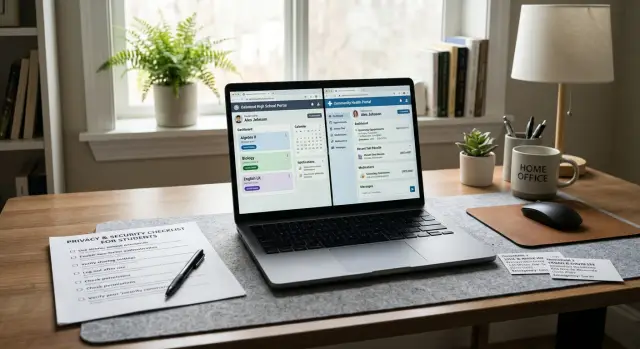
What stays exposed after a separation
A separation changes daily life overnight. Accounts and records usually do not. That gap leaves private information exposed long after the relationship changes.
School portals are a common example. A login created years ago may still work even after one parent moves out, changes email, or stops handling pickup and billing. Report cards, attendance notes, teacher messages, tuition receipts, and schedules can keep going to the wrong inbox for months.
Medical access can be harder to spot. One parent may still be able to view appointments, prescriptions, billing details, vaccination records, or after-visit notes for a child. In some systems, both parents remain attached to the same account, so one outdated login opens far more than expected.
Shared email addresses make all of this worse. If school notices, portal alerts, or insurance updates still go to an old family email, both households may keep seeing messages meant for one person. The same thing happens with co-parenting tools when notifications still route to an email address or phone number both people once used.
Emergency contacts often stay unchanged too. A school, daycare, pediatrician, dentist, or sports program may still have an ex-partner, former in-law, or old neighbor listed as the first call. That is more than awkward. It can send private updates about a child to someone who should no longer get them.
Old phone numbers are another quiet risk. If a school portal or patient portal still uses an old number for password resets, a former partner may be able to get back in even after the password changes. One parent updates the login, forgets the recovery number, and the next reset code goes straight to the other household.
Most exposure after a separation is not dramatic. It is routine, silent, and easy to miss. That is why it sticks around.
Make a full account list first
Before changing anything, make one plain list of every account tied to your child. It sounds dull, but it saves a lot of backtracking. The bigger problem is usually not one major account. It is the small one nobody remembered.
Start with the obvious accounts: school portals, daycare apps, pediatrician portals, dental records, insurance logins, and activity apps for sports, music, or tutoring. Then add the easy-to-forget ones, like lunch payment accounts, bus tracking apps, parent email lists, after-school tools, and any service that sends text alerts.
Do not stop at online accounts. Paper mail matters too. If a school or clinic still mails forms, bills, or appointment reminders to an old shared address, that still exposes both households.
For each account, write down four things: who owns the login, which email address is attached, which phone number gets alerts, and whether there is a backup email or recovery method. Old access often stays open because a reset link still goes to a former shared inbox.
A simple checklist is enough:
- the exact name of the portal, app, office, or service
- what it shows, such as grades, forms, bills, messages, or medical records
- who can log in now
- where alerts go: email, text, mail, or app notifications
- whether the account is still used on a shared phone, tablet, or browser
Be specific. Do not write "school app" if there are three of them. Write the actual app name and what it controls. One school may use one system for grades, another for lunch money, and another for teacher messages.
If you are not sure an account still matters, list it anyway. It is faster to cross off an old tutoring app than to find out later that it still contains your home address, emergency contacts, or payment details.
A basic spreadsheet or notebook is enough. The goal is simple: one map of who can still see what, and where access still lives.
Lock down access in the right order
Order matters more than most people think. If you edit names, contacts, or permissions first, the other person may still have a working login and get notified right away. Secure access first. Clean up the details after that.
A practical order looks like this:
- Change the password on the account owner's login.
- Turn on 2-step verification right away.
- Replace any shared email address or phone number.
- Update recovery methods, trusted devices, and saved browsers.
- Then review contacts, permissions, and profile details.
That sequence shuts the easiest doors first. It also cuts down the chance that a reset link or login code still goes to an old shared inbox or family phone plan.
Each parent should use their own phone number, their own email, and their own device for login codes. If one parent still receives the other parent's school portal alerts or medical reset texts, the account is not really separated.
Shared contact details are where people often get stuck. A school portal may still send grade notices to an old joint email. A pediatric portal may still list one parent's number as the recovery method for the other parent's account. Check every place the system can send alerts, codes, and password resets.
Do not stop at the password screen. Look for remembered browsers, trusted devices, and sessions that stay signed in for weeks. Sign out of other sessions if the portal allows it. If a laptop, tablet, or old family iPad still opens the account without a password, access is still open.
Keep a record as you go
Take screenshots after each change. Save the date, time, and page showing updated access, removed contact details, or new 2-step settings. If there is later confusion about who had access to school records, billing notices, or medical messages, those screenshots can save a lot of time.
Keep the folder simple. Name each image with the portal and date, like "school-portal-access-2026-03-10." Small habits like that make later disputes much easier to sort out.
Review school and daycare systems
School and daycare records often keep old details longer than parents expect. A separation can change who should see messages, who can pick up a child, and which address should appear on forms, but the system may still show last year's setup.
This part matters because schools rarely use one tool for everything. The main portal may be updated while the lunch app, daycare check-in app, class messaging tool, or trip payment account still sends notices to the wrong person.
Start with the fields that affect daily access and safety. Review parent and guardian profiles, pickup and authorized contact lists, emergency contacts, household and mailing addresses, and any saved payment methods for lunch, fees, or field trips.
Old addresses are easy to miss. A school form may still list the former shared home as the mailing address, billing address, or default household location. That can send report cards, invoices, or attendance notices to the wrong place.
Payment settings need the same attention. If one parent still has a card saved on a lunch account or trip portal, that account may also still expose student details, receipts, or parent contact information. Remove cards that no longer belong there, and update billing emails at the same time.
Then check message settings in every school app. Many schools use separate tools for announcements, teacher chats, bus alerts, daycare check-out, and photo sharing. Open each one and look at who gets emails, texts, push alerts, and weekly summaries.
A quick call to the office can save a lot of guessing. Ask how the school handles account access after family changes, who can edit pickup rights, and whether updates in one system carry over to the others. In many schools, they do not.
If your child attends daycare, after-school care, or camps run through the school, review those records too. One missed pickup list can keep old access open long after the main school portal looks fixed.
Review medical, dental, and insurance records
Medical and dental records often stay shared by accident. A parent may be removed from daily routines but still receive lab alerts, billing emails, prescription notices, or insurance mail for months.
Start with one direct question at each provider: who can currently see visits, bills, test results, and messages for the child? Do not assume the answer is the same across the pediatrician, dentist, therapist, orthodontist, pharmacy, urgent care clinic, and insurer.
A portal check helps, but it is not always enough. Some offices manage access in the portal, some through consent forms, and some through notes on the account.
Ask each office to confirm who has portal or proxy access, which email addresses and phone numbers receive alerts, where bills and visit summaries are sent, who is listed for consent and emergencies, and which mailing address is on file. If access needs to change, ask for the exact form required. Many clinics need a new consent or proxy form before they can change who sees records online.
If your child is older, ask what the portal actually shows at that age. Some systems change what parents can view as children get older, and the rules are not always obvious.
Pharmacies are easy to overlook. An old pharmacy app on a shared phone can expose prescription names, refill dates, and pickup locations. Sign out of old devices, remove saved passwords, and check whether text alerts still go to a number both households once shared.
Insurance records need the same care. Log in and review the mailing address, paperless settings, and claim notifications. Explanation of benefits letters can reveal the doctor visited, the date, and the type of care even when the full medical record is not shared.
One common mistake is assuming the pediatrician update covers everything. It does not. The dentist, eye doctor, therapist, urgent care clinic, pharmacy, and insurer may all keep separate emergency contacts and separate release forms.
A final call to each office is worth the extra few minutes. Ask them to read back the current contacts, portal permissions, and mailing details. That simple step closes gaps that otherwise stay open for years.
Check shared devices and family accounts
This is where a lot of access stays open by accident. School and medical logins matter, but the bigger issue is often the device or app that still remembers everything.
An old iPad in one house, a laptop both people used last year, or a browser with saved passwords can still open school messages, appointment notices, billing records, and pickup details in seconds. If the device auto-fills names, emails, and insurance information, anyone using it can see more than you expect.
Start with every device that was ever shared, even if nobody uses it much now. A tablet in the kitchen or an old phone in a drawer is easy to forget. Those are often the ones still signed in.
Look at five places first:
- browsers with saved passwords and autofill data
- school, clinic, pharmacy, and insurance apps that are still logged in
- shared cloud folders with report cards, ID scans, or medical forms
- calendar apps that still show therapy visits, parent meetings, or pickup times
- family plan settings that still share location or account recovery options
Cloud storage needs extra care. Child documents often end up in a shared drive because it felt convenient at the time. Later, that folder still holds birth certificates, school forms, insurance cards, and photos of medical paperwork. Move sensitive files into a private folder you control, then remove old shared access.
Calendars can be just as revealing. Even if nobody can open the school or doctor portal anymore, a synced calendar may still show where your child will be, when they have an appointment, and which parent is taking them. Delete old shared calendars or limit what each event shows.
Family plans are another blind spot. Phone accounts, Apple or Google family groups, and location apps may still share device locations, app purchases, and account recovery options. Check who can see location, who gets login alerts, and which email or phone number receives security codes.
A simple rule helps here: if a device can open an account without asking for a password, it still needs cleanup. Sign out first, then clear saved logins and stored form data so the access does not come right back.
A simple example from two households
These problems usually start with small surprises. Dana thought the school had stopped sending updates to her ex, but he still got absence alerts every time their son was marked late. At the same time, Dana still received email reminders for pediatric visits that were supposed to go only to his inbox.
Nobody had hacked anything. The family had simply carried old settings from one household into two. The school portal still had both parents checked for attendance notices, and the clinic portal still used an old email rule that sent reminders to everyone on file.
The shared tablet made it worse. Their son used it for homework in both homes, and one school app was still signed in. New portal messages popped up on the lock screen, so anyone picking up the tablet could see teacher notes, schedule changes, and billing notices.
They set aside one hour and fixed most of it in a single session. Dana updated the school portal notification settings, removed the old shared device, and checked who could see grades, attendance, and message history. Her ex called the clinic, confirmed the right parent contacts for reminders, and removed an old backup email from the patient portal.
By the end of that hour, the overlap was much smaller. School absence alerts went only to the parent who wanted them. Appointment reminders matched the current contact plan. The shared tablet stopped showing new portal messages. Each household had its own login and device access.
A week later they did one more pass and found two things they had missed: a recovery phone number tied to the school account and a backup number on the medical portal. That is how old access keeps returning. The main login looks fixed, but the recovery settings quietly reopen the door.
Mistakes that keep access open
A lot of access stays open because the fix was only half done. The obvious step is changing the password. The less obvious steps cause trouble weeks later.
One common miss is updating the website account but forgetting the mobile app. School and medical apps often stay signed in for months. If an old phone or tablet still has the app logged in, changing the web password may not block that session right away.
Another problem is changing the password but leaving the recovery email or phone number untouched. That gives a former partner, or anyone using an old shared inbox, a way back in. If password resets still go to a joint email, the account is not locked down.
Billing details get missed too. Old debit cards, shared credit cards, and bank accounts often stay on file in school lunch systems, daycare billing, dental offices, and telehealth apps. That can expose names, service dates, home addresses, and payment history. Even when nobody is trying to snoop, a receipt sent to the wrong card account can reveal more than you meant to share.
Contact lists are another quiet leak. Grandparents, former in-laws, babysitters, and new partners may still be listed for pickup, emergencies, or notifications long after the situation changes. Sometimes that is harmless. Sometimes it means updates about absences, injuries, or medication go to people who no longer need them.
The most frustrating mistake is assuming one update changed every system. Schools often split records across the main portal, the nurse's office, transportation, cafeteria payments, and after-school programs. Clinics do the same with patient records, billing, lab systems, and appointment tools. You tell one staff member, and only one screen gets updated.
If you want a fast second pass, check the app as well as the website, review every reset email and phone number, remove old payment methods, read every emergency and pickup list, and ask whether billing, messaging, and records live in separate systems. Ten extra minutes here can close the kind of access people assume is already gone.
Final checks before you stop
The job is not done when the settings look right. It is done when the wrong person cannot get alerts, resets, or pickup approval by accident.
Do one last review from both households. A change can look fixed on one phone and still stay open on an older tablet, a shared email account, or a paper form at the front desk.
Test each login on each household's own device. School, daycare, medical, dental, and insurance portals should open only for the people who still need them. Check where notices land too. Attendance alerts, report cards, billing texts, vaccine reminders, and password resets should go to the correct phone numbers and email addresses.
Pull out printed forms from the last year. Schools and clinics often keep scanned copies of enrollment packets, consent forms, emergency cards, and sign-out sheets. Confirm who can pick up the child in an emergency, and ask the school office or clinic to read back the list instead of assuming the portal matches the desk copy.
Paper records trip people up more than portals do. A parent may update the online account but forget the soccer sign-out form, the nurse's medication sheet, or the dentist intake form. One old email address on file can still expose appointment details or send a reset link.
Then set a reminder to check everything again every few months, especially after a new term, a software update, an insurance change, or a move. These records have a way of drifting back to old defaults.
A good final test is simple: if the school closed early today, would the right adults get the message, and only the right adults? If the answer is not clear, there is still one more fix to make.
Keep it maintained
Treat this like regular maintenance, not a one-time project. School portals, medical records, shared calendars, and old family logins keep changing. A setup that felt fine a few months ago can suddenly expose a new address, a new phone number, or a child's weekly schedule.
Keep one private list that only you can access. For each account, note the login email, phone number, recovery options, who still has access, and the date you last checked it. That one list saves time later, especially when a school office asks for details quickly.
Most parents only need a short master list covering school, daycare, lunch, and activity portals, medical and insurance accounts, co-parenting apps and shared calendars, old cloud storage and family email accounts, and emergency contacts held by schools, clinics, and caregivers.
Run the same review again after any big change. A move, a new school, an insurance switch, or a new device can bring old details back by accident. Front desks often copy old records forward, and shared accounts tend to stay alive longer than anyone expects.
Portal cleanup solves only part of the privacy problem. If people-search sites still list your address, phone number, or family connections, those details can keep resurfacing outside school and medical systems. Remove.dev removes personal data from over 500 data brokers and keeps monitoring for re-listings, which fits well with the same clean-as-you-go approach.
The goal is simple: each household sees only what it needs, and your child's information is harder to misuse.
FAQ
What should I update first after a separation?
Start by locking the login itself. Change the password, turn on 2-step verification, and replace any shared email address or phone number before you edit contacts or profile details.
If you change names or permissions first, the other person may still get alerts and reset codes while you are making updates.
Is changing the password enough?
Yes. A new password is not enough if reset links still go to an old shared inbox or a former partner's phone.
Check every recovery option, trusted device, and saved session. If a school or clinic app stays signed in on an old tablet, access may still be open.
Which school accounts do parents usually forget?
School systems often miss the small tools around the main portal. Lunch accounts, bus apps, daycare check-in tools, class messaging apps, trip payments, and photo apps can still send notices to the wrong place.
Open each service one by one and confirm who gets emails, texts, push alerts, and mailed forms.
How do I check who still has access to my child's medical records?
Ask each office to tell you who can see visits, bills, test results, portal messages, and reminders for your child. The portal view does not always match what the office has on file.
It also helps to ask where bills and visit summaries are sent, because billing systems are often separate from the medical record.
What should I do about old tablets, phones, and shared browsers?
Look at every device that was shared at any point, even if it is barely used now. Old iPads, spare phones, and browsers with saved passwords are often still signed in.
Sign out of apps, remove saved logins, and clear autofill data. If a device opens the account without asking for a password, it still needs cleanup.
Do paper forms and front-desk records still matter?
Yes, paper forms still cause problems. A portal may be updated while the office desk still has an old pickup list, emergency card, mailing address, or consent form.
Call the school, daycare, dentist, and clinic and ask them to read back the current contacts and pickup rights from their records.
Should I call the school or clinic, or just update the portal?
Call if the issue affects access, alerts, pickup rights, or medical permissions. Many offices use separate systems, so changing one screen online may not update the others.
A short phone call can confirm who gets messages, who can log in, and whether another form is needed.
What details matter most in school and daycare records?
Start with parent and guardian profiles, emergency contacts, pickup lists, mailing addresses, billing emails, and saved payment methods. Those fields affect daily messages and can expose private details fast.
Then check after-school care, camps, transportation, and any tool that handles sign-out or schedule changes.
How often should I recheck everything?
A quick review every few months is usually enough. Do it sooner after a move, a new school term, an insurance change, or a new device.
These systems drift back to old details more often than people expect, especially when staff copy older records forward.
What if my family's address and contact details still show up online?
Portal cleanup fixes only part of the problem. If people-search sites still show your address, phone number, or family connections, that information can keep surfacing outside school and medical accounts.
A service like Remove.dev can remove personal data from data brokers and keep watching for re-listings, which helps reduce that wider exposure over time.