Shared itinerary privacy: what to remove after a trip
Shared itinerary privacy matters because group trip tools can expose names, dates, and home cities. Learn what to hide, delete, and check after travel.
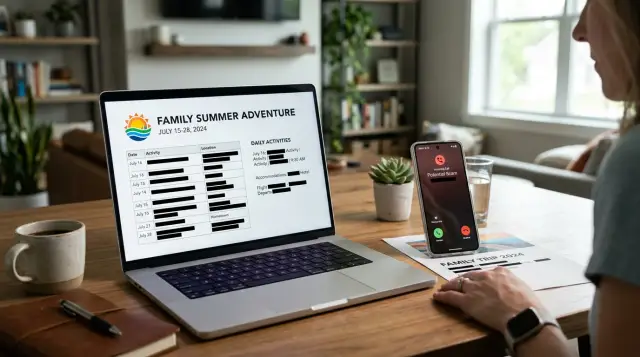
Why shared trip plans attract scammers
A shared trip plan feels harmless. Families use them to keep everyone on the same page, and that part is useful. The problem is how much personal context these tools collect in one place.
A single group travel planner can hold full names, mobile numbers, flight times, hotel names, restaurant bookings, notes about late arrivals, and details about who is traveling together. Some plans also include home airports, hometowns, emergency contacts, or comments like "kids with grandparents after Sunday." That is more than enough for a scammer to build a believable story.
This is why shared itinerary privacy matters. A scammer does not need your full booking history or your whole life story. A few correct details can be enough.
One shared link can also spread much farther than the family intended. It gets forwarded in a text thread, pasted into email, dropped into a group chat, or saved as a screenshot. Someone opens it on a work laptop. A cousin shares it with a friend joining dinner. An old link stays active long after the trip ends. The plan spreads in ordinary ways, which is what makes it easy to miss.
Travel dates and locations are especially useful for scammers. If someone knows you land in Denver at 6:40 p.m. and check into a hotel that night, they can call and claim there is a booking issue, a shuttle problem, or a failed payment. If they know your family name and the city you left from, the call sounds specific instead of random.
These plans work well for bad actors because they tie names to exact dates, show where you are supposed to be, reveal who is traveling together, and give a caller a reason to create urgency.
There is also a home security angle. Travel dates can suggest when a house may be empty, especially if the planner names the whole family or shows a return date. That can feed scam calls about alarms, deliveries, or "suspicious activity" near your property. Even if the caller only wants payment details, the timing makes the lie easier to believe.
The issue is not the planner itself. It is the amount of context it bundles into one place, and how easily that context can spread.
What itinerary-sharing tools often reveal
Most people think they are sharing one simple plan. In practice, many itinerary tools expose a lot more. A single invite can reveal full names, travel dates, locations, and ways to contact people.
That is where privacy usually breaks down. The risk is rarely one dramatic leak. It is a pile of small details that, together, paint a clear picture of a family or group.
The guest list is often the first giveaway. Calendar invites and shared trip boards can show first and last names for every traveler, plus notes about who is bringing children, who has a separate room, or who is arriving late. If several people share the same surname, that alone can tell a stranger who is related to whom.
Dates are often visible at a glance. Departure and return times sit on the main screen, sometimes next to flight numbers. That tells anyone with access when the home may be empty and when the group is likely to be rushed, tired, or distracted.
Location details add even more. A travel plan might include a home city, departure airport, hotel name, resort booking, restaurant reservation, or a meeting point like "Terminal B pickup." None of those facts seems especially sensitive on its own. Together, they can make a stranger sound familiar.
The details people miss
The messiest data usually sits outside the main schedule. Comments and side chats often contain phone numbers, room numbers, emergency contacts, and notes like "Call Mom when you land" or "Uncle David is driving from Columbus." Those loose details are easy to forget because they feel temporary.
Screenshots create another problem. People crop the itinerary but miss the notification bar, email address, profile photo, battery time, or other open tabs. A screenshot shared in a family chat can reveal more than the trip itself.
Then the trip ends, and the leftovers remain in inboxes, chat threads, shared folders, and photo libraries. That stale trail is often the real problem.
How scam calls become convincing
A scam call works because it sounds close enough to the truth. When someone already knows your destination, travel date, hotel name, or the names in your group, they do not need much else. One or two real details can make a fake story feel real.
That is why itinerary sharing scam calls work so well. The caller does not need your full reservation. They just need enough to speak with confidence.
Why the story sounds real
The trick is usually simple. The caller pretends to be an airline agent, a hotel employee, an airport driver, or a tour operator. Then they mention a real detail from your trip.
Maybe it is a flight to Denver on Friday. Maybe it is a late hotel check-in under your family name, an airport pickup with a "missing payment," or a booking update for your return trip. Once you hear something true, your guard drops. Most people assume the caller must be legitimate if they know that much.
The next step is the ask. They say they need to verify something small, like the last four digits of a card, your date of birth, a one-time code, or the billing ZIP code. Sometimes they ask for a small payment to hold a room or keep a transfer from being canceled. Small requests feel normal, which is why people go along with them.
Family trips make this worse. If a shared plan shows parents, kids, or grandparents by name, the caller can sound much more believable. "Is this Mary? I'm calling about the shuttle for Tom and the kids." For a grandparent or another relative trying to help, that can create instant panic and quick trust.
Picture a realistic example. A scammer sees that the Johnson family lands in Miami on June 12 and is staying near the beach. On travel day, Grandma gets a call saying the hotel card failed and the family is stuck at check-in. She is asked to confirm a card number "just for incidentals." The names, timing, and destination do most of the work.
That is what makes these calls feel personal. They are often built from plain travel details that were shared too widely.
A simple example of how this happens
Imagine a family vacation planned in a shared spreadsheet. One cousin creates tabs for flights, hotel bookings, airport pickup, and emergency contacts. Other relatives fill in the blanks as they book.
Very quickly, the sheet holds more than dates and addresses. It has the parents' full names, the kids' first names, mobile numbers, flight numbers, hotel names, arrival times, and notes like "call this number if we land late" or "Grandma is staying an extra night."
The file feels harmless because it is only for family. In reality, it creates one neat package of personal details.
Now imagine the trip is over. A parent is driving home from the airport with tired kids in the back seat. The phone rings. The caller says they are from the hotel and there is a problem with the booking.
They sound believable right away. They know the family's last name. They mention the exact hotel. They know the family checked out that morning. They even say, "I see you were in two rooms under the Miller group booking, and one payment did not go through."
A lot of people would stay on the line after hearing that.
Then the pressure starts. The caller says the card on file failed for a damage deposit, and if the balance is not cleared in the next 30 minutes, the charge will be sent to collections. Because the parent is distracted and already recognizes the trip details, the request feels real instead of random.
What made the scam convincing was not great acting. It was context: the hotel name, the checkout day, the family surname, the right phone number, and the fact that everyone was traveling home that day.
Even one shared file can give a scammer enough to sound informed.
How to share plans with less risk
Most group travel tools ask for more detail than people really need. A safer approach is simple: give each person enough information to stay on schedule, but not enough for a stranger to build a story around your family.
Use first names, initials, or nicknames in the main trip plan. "Jen, Max, and Ava" is safer than full legal names, especially if the planner also shows dates, flights, hotel stays, or a hometown.
It also helps to split public trip details from private booking details. Put flight times, meeting points, and hotel check-in windows in the shared planner. Keep record locators, ticket numbers, passport details, and confirmation codes in direct messages to the people who actually need them.
A safer setup
Trim the plan before anyone opens it. Use casual names instead of full names. Keep booking codes in private messages. Limit access to invited people and turn off open links. Leave out home addresses, school names, and extra phone numbers. Then set a reminder to review the plan after the trip.
That last step is easy to skip, but it matters. Families often leave old pickup notes, emergency contacts, and day-by-day plans sitting in an app for months. If one note says "leave for Lincoln Middle at 7:30" and another lists Grandma's address for the pet sitter, you are no longer sharing only travel information.
A reunion trip is a good example. The main itinerary only needs dates, arrival windows, and where to meet. It does not need the family's street address, the kids' school, or every adult's phone number in one place.
Set a reminder for the day you get home, or the next morning if you know you will be tired. Open the planner, remove extra details, and close access for anyone who no longer needs it. It takes a few minutes and cuts down a lot of group travel planner risks later.
What to clean up when the trip ends
The trip may be over, but the shared plan often stays live for months. That is when small bits of information keep leaking: full names, phone numbers in comments, old invite links, and calendar entries that still show when everyone got home.
Start with access. If your planner, doc, or folder was set to "anyone with the link," turn that off first. Then remove people who no longer need it. A cousin who needed the hotel address for one night does not need lasting access to flight details, backup contacts, or the full family schedule.
After that, clean the parts people forget. Delete old invite links and shared links. Remove comments with phone numbers, home addresses, birthdays, or notes like "we get back Sunday night." Archive or delete trip boards and folders you no longer need. Ask family members to delete screenshots they saved for the airport, hotel, or rental car. Check calendar entries for return dates, arrival times, and visibility settings.
Comments are often worse than the main itinerary. People write quick notes like "Call Dad if the train is late" or "Text Jenna at this number when you land," then forget they are still there. A scam caller does not need much. One name, one date, and one family role can make a fake story sound real.
Screenshots deserve special attention because they end up in chat threads, camera rolls, and cloud backups. They are easy to lose track of. Keep only what you still need for receipts or claims, and delete the rest.
If you want to save a record, keep a stripped-down version in a private note with only the booking numbers or payment details you may need later. Leave out family contacts and timing notes.
If those details have spread beyond the trip planner, a broader cleanup can help. Remove.dev helps remove personal data from data brokers and keeps monitoring for re-listings, which matters when travel details get mixed with your wider online footprint.
Mistakes that leave data behind
Most travel plans do not leak because of one dramatic mistake. They leak because small bits stay online after the trip. A shared document still works, an old screenshot sits in a family chat, or a reused template carries last year's details.
One of the biggest traps is the "anyone with the link" setting. It feels harmless when you are trying to get ten people organized quickly. But that link can be forwarded, saved in old messages, or found later in an email search. If the planner includes full names, flight times, hotel bookings, and phone numbers, one open link gives a stranger a ready-made script.
Another common mistake is stuffing everyone into one master planner. Adults, kids, and emergency contacts end up in the same file, often with birthdays, mobile numbers, and home cities. That is too much in one place. Keep the basic trip plan separate from contact details, and keep children's information out of anything shared widely.
Social posts create another leak. A countdown image, a boarding pass selfie, or a screenshot of the itinerary can reveal names, dates, booking codes, and where the family is headed. Even casual posts can give scammers enough to make the trip sound familiar.
Reused templates also cause quiet problems. People copy last summer's planner and forget to remove old passport notes, school contacts, medical reminders, or the address of a rental home. The new trip may be over, but the file still carries personal data from the old one.
Email is easy to miss too. The planner may be deleted, while the same details still sit in forwarded threads, calendar invites, and inbox search results. One relative replies all with an attachment, another downloads it, and now there are five copies instead of one.
A simple habit helps: turn off link sharing, delete screenshots and downloaded PDFs, strip personal details from templates before reusing them, and search email for the trip name so you can remove extra copies.
A quick check before and after travel
Most travel leaks are small. A full name here, a phone number there, a return date left in plain view. Put together, that can be enough for a stranger to sound believable on a call or text.
Before you share a trip plan, run through a short check:
- Replace full names with first names, initials, or nicknames.
- Hide anything that reveals when your home will be empty, including exact return dates.
- Remove booking codes, ticket numbers, and phone numbers from notes and screenshots.
- Limit access to the actual group and turn off public sharing.
- Check the page as a guest would, not as the person who built it.
After the trip, clean up quickly:
- Remove access for people outside the group.
- Delete screenshots from chats, shared albums, and cloud folders.
- Remove notes with emergency contacts, pickup times, or home addresses.
- Watch for odd calls or texts about missed deliveries, travel refunds, or account checks.
A good rule is simple: once the trip is over, your itinerary should shrink to receipts you need and memories you want. Everything else can go.
What to do next if your details are already out there
If your trip details have already spread, move quickly. You may not be able to pull everything back at once, but you can make scam calls less convincing and reduce what strangers can still find.
Start with a search of your own details. Look up your full name, phone number, home address, and a few combinations with your city or family members' names. People-search sites often collect exactly the kind of data that makes a travel scam sound real.
A practical first pass looks like this:
- Search your name, phone number, and address separately.
- Check people-search and background-check sites in the results.
- Save screenshots of listings before you try to remove them.
- Tell close relatives to ignore travel-related calls they did not expect.
- Verify urgent requests by calling back on a number you already trust.
That last point is worth sticking to. If a caller says your child missed a flight, your parent lost a wallet, or a hotel needs a payment fix, hang up and contact the person or business yourself. Scammers win when they control the pace.
It also helps to warn the people around you. A short message is enough: do not trust surprise calls about the trip, do not confirm birthdays or home addresses, and do not send money until you verify the story another way.
After you remove listings, check again later. Data brokers repost old records all the time, and copied records can show up on another site a week later. Set a reminder to recheck your name and number every few weeks, especially after a family trip, reunion, or school break.
If you try the manual route, expect it to take time. Each site has its own opt-out process, and some ask for repeat requests. If you want help with that, Remove.dev finds broker listings, sends removal requests, and keeps monitoring for re-posts. That can be useful if the same phone number or address keeps coming back.
Do one search today, warn your relatives today, and keep checking until the old trip details stop resurfacing.
FAQ
Why can a shared itinerary be risky?
A shared trip plan can bundle names, dates, hotels, flight times, and family notes in one place. If that link spreads, a scammer can use one or two real details to make a fake call sound real.
What details should I keep out of the shared plan?
Leave out booking codes, ticket numbers, passport details, full birth dates, home addresses, school names, and extra phone numbers. Keep only the timing and meeting details people need to get through the trip.
Are first names better than full names in a trip planner?
Yes. First names, initials, or nicknames are usually enough for a family trip. Full legal names make it easier for a stranger to connect your trip to other personal records.
Is anyone with the link too open for travel plans?
Usually, yes. Open links get forwarded, saved, and found later in old chats or email. It is safer to limit access to invited people and turn link sharing off when the trip is over.
Why are itinerary screenshots a privacy problem?
Because screenshots often catch more than the itinerary itself. They can expose an email address, profile photo, open tabs, the time, or notes you forgot were on the screen.
What should I clean up after the trip ends?
Start with access, then remove the leftovers. Turn off sharing, delete old links, strip comments with phone numbers or home details, and ask relatives to delete screenshots they no longer need.
How do I spot a fake travel-related call?
Watch for pressure and surprise. If someone claims there is a hotel charge, a missed pickup, or a flight issue and asks for card details, a one-time code, or your birth date, hang up and contact the company yourself.
What should my family do if they get one of these calls?
Tell them not to trust the caller just because the story sounds familiar. They should end the call, reach the traveler or business on a number they already know, and avoid confirming names, birthdays, or payment details.
What if my phone number or address is already out there?
Search your name, phone number, and address to see what is already public. Then remove old trip files, warn close relatives, and start opt-out requests on people-search sites so future scam calls have less to work with.
Can Remove.dev help if my travel details have spread online?
Yes. Remove.dev finds and removes personal data from more than 500 data brokers, keeps checking for re-posts, and shows requests in a live dashboard. Most removals finish in 7 to 14 days, and plans start at $6.67 a month.