Shipping label history and where old addresses stay
Shipping label history can keep an old and new address visible in order pages, returns tools, and carrier records. Learn what stays and for how long.
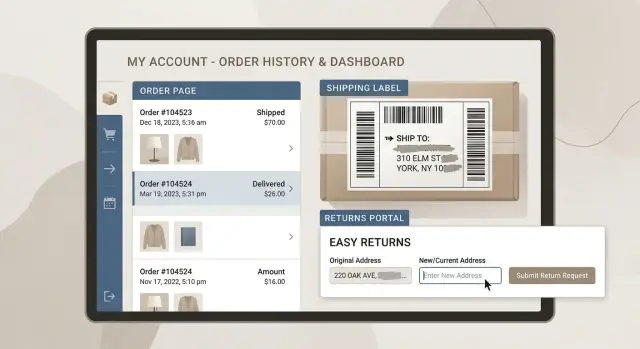
Why an old address can still show up
An old address can stay in ecommerce systems far longer than most people expect. You update your profile once, but that does not replace every copy of your delivery details. In many stores, the new address is saved for future orders while older orders keep the address that was used at the time.
That happens because one purchase often creates several address records. The store can keep your address in your account, inside the order itself, in shipping label history, in payment or fraud review logs, and in customer support tools. If you started a return, the returns portal may keep another copy.
So the old address and the new one can exist at the same time. The old one might appear on a past order, a return label, or an autofill field at checkout. The new one might show in your profile and on recent purchases. It feels like a bug, but it is usually just separate systems keeping separate snapshots.
A simple example makes this easier to see. Say you moved in March. In April, you order shoes and update your account to the new address. The store now has your current address in your profile, but your February order still keeps the old one. The carrier label for that order still points to the old place, and the returns page may still offer that older address as a default.
Most shoppers never see every stored record. You might only see the address book in your account, while the merchant keeps copies in order software, shipping apps, and return tools you never open. That is why past delivery details can surface months later, even when you thought you already changed them.
If privacy matters to you, this is also why cleanup takes time. One visible edit rarely removes everything.
Where stores keep past delivery details
An old shipping address usually does not live in one place. Online stores often copy it into several records during one purchase, and each copy can stick around on its own schedule.
The most obvious place is order history. When you buy something, the store saves a snapshot of that order, including the shipping address, billing address, items, payment status, and delivery method. Even if you later update your profile, that past order often keeps the old address because it is part of the transaction record.
Many stores also keep a separate address book inside the account. This is the list you see at checkout when a site offers saved addresses. Deleting or changing your default address does not always remove older entries. Sometimes an old one stays inactive in the background until you delete it yourself.
Stores also copy addresses into internal tools. If an order gets flagged for fraud checks, payment review, or manual approval, staff may see and save the delivery details in a separate log. Customer support systems are another common spot. If you contacted support about a delayed package, a replacement, or a refund, the agent may have pasted your address into the ticket notes. Those notes can stay attached to your account long after the order is closed.
Guest checkout does not always avoid this. Even without a full account, the store still creates an order record, and it may tie that record to your email address, phone number, or payment details. If you later create an account with the same email, those older orders may appear there.
That is why an old address in ecommerce can resurface during checkout, a return request, or a support chat. The store is not always pulling from one live profile. It may be pulling from old order data that was never cleared.
What returns portals usually save
Returns portals often keep more information than people realize. They usually start by pulling in the address from the original order. If you bought something six months ago and start a return today, the portal may still show the old delivery address by default because it was tied to that purchase from the start.
That old address can stay attached to the return label too. Many systems create a return shipping record that mirrors the original order, so the label, the return request, and the internal ticket all point back to the same address. Even if you moved after the order arrived, the return flow may still keep the address that was on file that day.
Exchanges make things messier. A refund usually points backward to the original order, but an exchange points in two directions. The portal may keep the old address for the return and ask for a new address for the replacement item. One account can end up holding both addresses at once.
Returns systems also repeat address details in emails. A return confirmation, label email, or exchange update may include the full address in plain text. Even if the portal later updates the account, the old message still sits in your inbox unless you delete it.
Some stores keep address history for convenience. If you have returned items before, the portal may offer past addresses in a dropdown or fill them in automatically. That is handy when nothing has changed. After a move, it is an easy way for an old address to keep resurfacing.
If you want to test this, open an old return request and a recent one side by side. You will often see the older order address copied into one screen, while a newer exchange form asks where the replacement should go.
What carriers and shipping tools keep
Carriers and shipping apps usually save more than the label you printed. Much of the shipping label history people notice after a move comes from back-office records built for reprints, audits, refunds, and delivery disputes.
If a store uses shipping software, that tool often keeps every label tied to an order number, recipient name, address, service level, package weight, and tracking number. Even if the store changes your address later, the first label may still sit in the account history as its own record.
Carrier tracking pages can keep some of that visible too. Public tracking often shows less, such as city, state, ZIP code, delivery date, or an address correction note. Logged-in business views may show more. In some cases, proof-of-delivery screens, delivery instructions, or label reprint pages can expose the full street address.
A few records hold onto details longer than most people expect. Label history in shipping apps, pickup logs, delivery exception notes, daily manifests, shipment export files, proof-of-delivery records, claim paperwork, and support tickets can all keep some version of the address.
Exception logs are easy to miss. If a package is delayed, forwarded, held for pickup, or marked "address corrected," that note can reveal address details that were not obvious on the original tracking page. A support agent may also paste the full address into a case while checking a failed delivery.
Manifests and proof-of-delivery files often last longer because businesses use them for accounting and dispute handling. A merchant might delete an order from the storefront view but still keep a PDF manifest or CSV export in a shipping account. That is one reason past delivery details can hang around well after the package arrives.
A simple rule helps here: if a shipment created a document, a scan, or a support case, some version of the address may still exist.
How long this data tends to stay
There is rarely one clean deadline for an old address. What you can still see in your account is often only part of the story.
A store may hide an old order from the customer view but keep the same delivery details in billing records, warehouse systems, fraud checks, and support logs. That is why shipping label history can outlast the page where you first entered the address.
Visible order pages often stay available for years. Many shops keep them so you can download invoices, reorder the same item, check a warranty, or start a return later. If an account has a long order history, an old address can sit there much longer than most people expect.
Archived records often last even longer. A business may need them for tax rules, refund disputes, chargebacks, audit trails, or abuse prevention. Put simply, deleting an address from the front end does not always remove it from the back end.
A rough pattern looks like this:
- order pages in your account: often years
- returns portal records: months to years
- billing, tax, and fraud records: often several years
- carrier and shipping tool logs tied to a shipment: often years
- backups after deletion: weeks or months, sometimes longer
Backups are easy to miss. If a company removes your address today, older copies may still sit in backup systems until those copies expire and are replaced. That does not always mean staff can use the data easily, but it can still exist for a while.
Policies vary a lot. Two stores selling the same product can keep past delivery details for very different lengths of time because their payment provider, return tool, shipping app, or legal team follows a different retention rule.
The part many people miss is simple: the address may vanish from your profile long before it vanishes from the company records.
A simple example of how it happens
Picture a common move. Jamie orders gifts in December and ships them to an apartment in Chicago. A few months later, Jamie moves to Denver and updates the address in the store account.
In March, one of those holiday gifts needs to go back. Jamie opens the return from the old order, and the returns portal pulls details from that original purchase. The prepaid label still shows the old Chicago address because that is where the order was first sent. But when Jamie chooses a refund by mail or an exchange, the portal asks where the replacement or refund paperwork should go now. Jamie enters the new Denver address.
One return can now tie both addresses together in the same chain. The old one stays on the return label and order record. The new one gets saved in the return form, the replacement order, or the refund profile.
Then the carrier starts sending updates. One email confirms that the package was picked up from the old order record. Another confirms that a replacement is headed to the new address. If Jamie uses the carrier app, both stops can show there too.
None of this feels dramatic when you are just trying to send back a sweater. But it gives stores, return tools, and carriers more chances to connect an old address with a new one. If customer support reviews the return, they may see both addresses. If the store uses outside shipping or returns software, those details may be copied there as well.
How to check your own accounts
Old addresses usually hide in more than one place. Deleting one address at checkout is a good start, but it often stays in order history, return forms, carrier apps, and old confirmation emails. If you have moved, set aside 20 minutes and check each place on purpose.
Start with the store accounts you use most. Open old orders one by one, not just the last two or three. Check the shipping address on each order, the invoice view, and any "buy again" page. Many stores also keep a separate address book, so remove anything you do not use there too.
Then look at the places people usually forget: return and exchange portals, old order emails, carrier apps such as USPS, UPS, FedEx, or DHL, browser autofill, payment wallets, shop apps, and account settings pages named "saved addresses," "address book," or "delivery locations."
If the old address still shows up, ask support a direct question: "Can you delete old shipping addresses, return records, and saved recipients from my account? If not, what do you need to keep?" That usually gets a clearer answer than a broad privacy request. Some stores must keep parts of an order for tax, fraud, or warranty reasons, but they can often remove saved entries that keep resurfacing.
Carrier accounts deserve a separate check. A saved recipient in a shipping app can put an old address back into a label months later, even after you fixed the store account.
It also helps to keep a short note of what you cleaned up and what would not delete. That makes follow-up much easier.
Mistakes people often make
The most common mistake is deleting one saved address and assuming the job is done. In many stores, that only removes the address book entry you can see. Older orders, refund records, and shipping label history can still keep the same details in the background.
Another easy mistake is changing the default address but leaving older ones in the account. That looks fixed on the surface, but old forms can still offer previous addresses at checkout, in support tickets, or inside a return flow.
Guest checkout causes more problems than people expect. Even without a full account, orders are often tied to an email address, phone number, or payment profile. Later, when you open an order lookup page or a returns portal, past delivery details can show up again because the system recognizes that earlier purchase.
People also forget the returns portal once the refund arrives. The money is back, so the task feels finished. In reality, returns portal address history may stay attached to the order for future support, repeat returns, or reporting.
There is also confusion about who controls what. A seller may update or remove an address in its own store, but the carrier can still keep tracking records, shipment history, or label data in a separate system. If you only contact the shop, the carrier record may remain untouched.
The boring approach works best. Remove old addresses, not just the default one. Check past guest orders. Open any return or order lookup tools you used before. Review shipping notifications and carrier accounts separately. Ask support what order and return records still remain.
A small detail can keep an old address alive for months. One saved label, one guest order, or one finished return is often enough.
A quick check before and after a move
A move is when old addresses come back in the most annoying ways. A store may pull from a past order, a carrier app may autofill the last destination, and a return email may repeat details you thought were gone.
The fastest way to catch problems is to check a few places right away, then check them again a few weeks later. Some systems do not update at the same time.
A short routine helps:
- open your last five orders at the stores you use most and confirm which address is attached to each order, invoice, and return page
- delete old addresses from store accounts, shop apps, wallet checkouts, and carrier apps if they still appear in saved address books
- look for old label files on your phone, laptop, email inbox, and cloud storage
- read return emails closely, including attached PDFs and portal summaries
- set a reminder to repeat the same check in a few weeks
That last step matters. You might remove an old address from a store account today, then see it again later because the return portal, shipping app, or past order tool kept its own copy.
A simple example: you move in June, update your main shopping accounts, and place two new orders. In July, you start a return for an older purchase. The return form pulls your previous delivery details from the original shipment, and the prepaid label still shows the old address. If you only checked once, you would miss it.
It is also smart to review carrier accounts after any package arrives at the new place. Delivery managers and tracking apps often keep old stops in history even after you change your profile.
What to do next
Once you spot an old address, make a short cleanup list. Start with the stores, carriers, and returns portals where you still see it. A plain note on your phone is enough if it includes the account name, where the address appeared, and the date you checked.
A simple order works well. Update your current default address first. Remove saved addresses you no longer use. Send a deletion request if the account offers one. Check any returns portal connected to recent orders. Then review carrier accounts that store shipment history.
When you ask for deletion, be direct. Say which address you want removed, where you found it, and which account it belongs to. If customer support only offers an address update, ask whether past delivery details, saved return data, or label history can also be cleared.
Save screenshots before and after each change. That gives you proof if the same address shows up again later. It also helps when support says something was removed but the old record is still visible somewhere else.
If your old address starts appearing outside store and carrier accounts, the problem has moved beyond ecommerce. That usually means the data spread to people-search or broker sites. Remove.dev handles that separate part of the cleanup by finding and removing personal information from over 500 data brokers and then monitoring for relistings.
The goal is not perfection on day one. It is to stop the old address from spreading further, clear the places you can control, and keep track of what changed.
FAQ
Why does my old address still show up after I changed it?
Usually because the store kept more than one copy. Updating your profile often changes future orders, but past orders, return records, label history, and support notes can still keep the old address.
If I delete a saved address, is it gone everywhere?
No. That usually removes the address book entry you can see, not every record behind it. Old orders and return pages may still show the address used at the time of purchase.
Where do online stores usually keep past delivery addresses?
They often keep it in order history, checkout address books, return tools, fraud or payment review logs, support tickets, and shipping software. One purchase can create several separate records.
Can a returns portal keep both my old and new address?
Yes, and this is common after a move. The return can stay tied to the old order address while the exchange or replacement uses your new one, so both can sit in the same account.
Do USPS, UPS, FedEx, or DHL apps keep old addresses too?
Often, yes. Shipping apps and carrier accounts may keep label history, tracking records, delivery exception notes, and proof-of-delivery files long after you update a store account.
How long can an old shipping address stay on file?
Often for years, at least in some form. You may stop seeing the address in your profile much sooner, but businesses can keep order, tax, fraud, shipping, and backup records longer.
Does guest checkout still leave an address record behind?
Yes. A guest order still creates a transaction record, and it may be tied to your email, phone number, or payment details. If you later use the same email again, that old address can resurface.
What should I check right after I move?
Start with your most-used stores, then check old orders, saved addresses, return portals, carrier apps, browser autofill, payment wallets, and old order emails. Check again a few weeks later because some systems update later than others.
What should I ask customer support to delete?
Be specific. Ask them to remove old shipping addresses, saved recipients, return records, and any visible saved entries on the account. If they cannot delete some records, ask what they must keep and why.
When is this more than just an ecommerce problem?
If the address starts showing up on people-search or broker sites, it is no longer just a store issue. That usually means your data spread further, and a service like Remove.dev can help remove those listings and watch for relisting.