Shopping tracker privacy risks that can expose a household
Shopping tracker privacy risks go beyond deal emails. Saved addresses, shared links, and profile details can reveal who lives in your home.
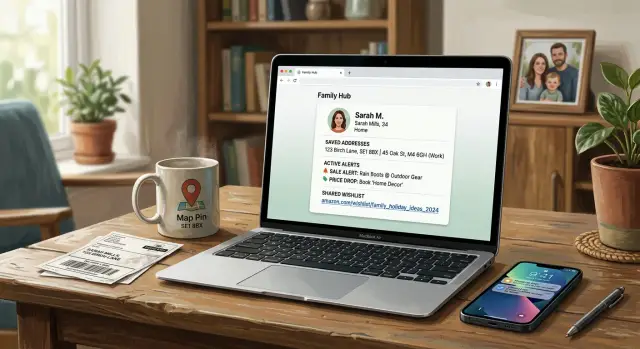
Why shopping trackers can reveal your home
A shopping tracker feels harmless at first. It watches prices, saves products, and sends alerts when something drops. But once those alerts are tied to your name, email, device, or delivery details, the tracker stops being a simple wishlist tool. It starts building a record.
That is where shopping tracker privacy risks get personal. A deal alert for a laptop is one thing. A long pattern of alerts tied to one account, one phone, and one delivery address can point to a real household.
A saved address does not need to be public to matter. If an app keeps your home for faster checkout, or remembers your nearest store, it can narrow down where you live and shop. Even a preferred pickup location can say a lot, especially in a small town or a specific city neighborhood.
The products you track can say even more. Repeated searches for baby formula, pet medicine, school uniforms, or moving boxes can hint at who lives in the home and what daily life looks like. Over time, those patterns can suggest children, pets, work hours, hobbies, or an upcoming trip.
None of those details looks serious on its own. Put them together, and they become much sharper. A first name, a saved store, a home ZIP code, and a steady stream of alerts for kid-related items can sketch out a family profile that feels uncomfortably close to real life.
The risk grows because shopping data does not always stay in one place. Parts of it can be shared with ad networks, analytics tools, or data brokers. Once that happens, the tracker is no longer just helping you catch discounts. It can help build a record of where you are, what your home needs, and who might live there.
That is why price alert privacy matters. One clue says almost nothing. Ten clues can expose a household.
What these apps usually save
Most shopping trackers store much more than a product and a target price. Over time, they can build a quiet record of where orders go, which stores you visit, who shops through the account, and what kinds of items show up again and again.
Delivery addresses are the clearest example. Many apps keep every address ever used unless you remove it yourself. An old apartment, your current home, a work address, and a relative's place can all stay in the account for years after a single purchase.
Pickup settings add another layer. A saved store, curbside location, or map pin can narrow your area to a few blocks, or at least a small part of town. If the same account also shows your usual shopping times, the picture gets clear fast.
Profiles often hold more personal detail than people expect. Full names, phone numbers, birthdays used for coupons, billing names, payment labels, clothing sizes, shoe sizes, and fit preferences can all sit in one place. Each detail looks minor. Together, they can point to a real household.
Order history is often the biggest clue. Old receipts can show what was bought, where it was shipped, and who received it. A few years of purchases may reveal children's clothing sizes, pet supplies, medical items, baby gear, or gifts sent to the same names every holiday season.
Gift lists and size settings can fill in the rest. A profile that saves "Dad - XL," "Emma - youth medium," and "dog food every 30 days" says much more than a simple wishlist. Even without a public street address, those patterns can expose who likely lives in the home and what their routines look like.
How saved locations expose a household
Saved locations make shopping easier. They speed up checkout, show nearby deals, and suggest pickup spots. They also create one of the clearest privacy problems.
A saved address is more than a pin on a map. If an app stores "Home" and "Work," it can sketch your daily pattern in seconds. Even without exact GPS data on every visit, those two labels can reveal where you sleep, where you spend weekdays, and when your home may be empty.
Smaller details matter too. A store-radius setting can narrow your area more than most people think. If you ask for alerts within 2 miles of one supermarket, 5 miles of a pharmacy, and local pickup at a certain electronics store, you may be giving away your neighborhood without ever posting it publicly.
Pickup history adds more context. Weekly grocery orders, the same Saturday pickup window, or repeated baby supply purchases can show who lives in the home and when people are usually around. A rough location plus a routine is often enough.
A common problem is that location permission stays on after one use. You check local stock once, then forget about it. Months later, the app may still collect location data in the background or keep a long record of places you searched from.
It builds up quickly. Someone saves a home address for delivery, uses work for daytime pickup, and sets alerts for stores within a short drive. Over time, the account shows two likely addresses, a commute pattern, and regular shopping times. If that information leaks or gets shared beyond what the user expected, it does not expose one person only. It can expose a partner, children, roommates, or an older parent in the same home.
The biggest trouble spots are saved labels such as "Home," "Work," and "Mom's house," tight delivery or search-radius settings, repeated pickup locations and time slots, always-on location access, and old addresses left behind after a move.
Why shared links are less private than they look
A shared wishlist or cart can feel harmless. Sometimes it is just a quick way to show gift ideas, compare prices, or ask someone at home, "Does this work for us?" The problem is that many shopping sites treat shared links more like public pages than private messages.
Some wishlists are visible to anyone with the link, and that setting is sometimes on by default. Once one person forwards the link, you lose control of where it goes. A cousin sends it to a friend, a group chat copies it, or it ends up in an old email thread that several people can still open.
That matters because the page may show more than products. Shared wishlist links and carts can include your name, gift notes, item sizes, color choices, and comments about delivery. A list of school shoes, pet food, and baby gates can tell a stranger a lot about who lives in the home.
Short links make this worse. They are easy to send and easy to forget. Months later, you may not remember which lists are still live, who got them, or whether the privacy setting changed. Most people never go back and check.
A simple example makes the risk clear. Say you share a birthday wishlist with relatives. The page shows your first name, a note that says "please ship before Friday," and items for a child turning seven. Even if you lock the list later, a forwarded screenshot can still keep the child's age, your shopping habits, and your timing visible.
Before you share anything, check three things: is the page open to anyone with the link, does it show your name or delivery notes, and can you delete or expire the link after people use it?
Privacy settings only affect the page going forward. They do not pull back forwarded links, copied text, or screenshots already sitting in other people's inboxes and camera rolls.
How account profiles fill in the gaps
Most people focus on the items they save. The profile page can say even more. It often connects loose details from alerts, wishlists, and deliveries into one clear picture of a household.
Family accounts are a common example. One account may list two adults, a child's name for school or toy purchases, and one shared address. Even if that page is not public, it still sits inside the retailer's system. If someone gets access to the account, a shared device, or a support screenshot, they can see who likely lives together.
Loyalty profiles can add more. Many stores keep birthdays, phone numbers, and shopping preferences because they want repeat sales. A birthday plus a mobile number may not sound serious on its own, but it helps confirm identity quickly. Add a home address, and the household becomes much easier to map.
Saved payment names can fill in missing names. A card label like "Emma and Chris" or "Dad's Visa" can reveal relatives, partners, or roommates. Strangers do not need a full family tree. Two or three names at one address are often enough.
Order notes are easy to forget and surprisingly revealing. People leave instructions like "use the side gate," "buzz 4B," or "deliver after 5:30." Those notes can expose entry points, apartment numbers, and the times when someone is usually home or away.
Old fields cause problems too. Retail accounts often keep stale details long after you stop using them. An old phone number, a former roommate's name, or delivery notes from a previous building may stay in the account for years. Deleting the app does not always delete the profile.
A cleanup here helps more than people expect. Remove household members you do not need on the account, delete birthdays and phone numbers from optional fields, clear old delivery notes, and check saved payment labels for names you would rather not show.
How the clues add up
This is where the risk stops feeling abstract. One clue looks harmless. A few clues together can sketch a household with surprising accuracy.
Picture a parent using a shopping app for everyday errands. They save a pickup store near their child's school because it fits the afternoon routine. That setting does more than say "this is my store." It points to a regular route, a likely school area, and a part of town the family visits often.
Now add a shared wishlist. It includes a child's first name and jacket size. Maybe it was sent to grandparents before a birthday or the holidays. At that point, someone looking at the list can guess there is a child in the home, get a rough age range, and learn a personal detail most families would rather keep private.
A gift registry can narrow it further. If it shows the city and a preferred shipping area, the picture gets tighter. It may not show an exact street yet, but it can narrow the search to a real neighborhood.
Then past orders do the rest. Old confirmations, saved checkout details, or exposed order history can reveal the full home address. Once that happens, the separate clues stop being small. They become a usable household profile.
That profile can reveal where the family likely lives, where a child may go to school nearby, what age range fits the child's size and items, and which stores or delivery areas the household uses.
The problem is not one wishlist or one saved address. The problem is how neatly the details connect when they sit in the same account.
How to reduce the risk
Most of this comes from small details you forgot were still there. An old delivery address, a pickup point near your child's school, or a public list can give away more than one clue about where your household lives and how it shops.
Start with a cleanup. Do it once, then check again every few months.
- Remove old addresses and pickup spots you no longer use. Keep only the one you need now. If an app saves store locations automatically, clear those too.
- Set wishlists, registries, and saved collections to private. Then test them in a private browser window or while signed out. If you can still see them, other people can too.
- Delete saved notes, gift messages, and extra profile details. Short notes like "leave by side gate" or "birthday for Emma" can reveal names, routines, and parts of your home setup.
- Turn off location access unless you are actively using store pickup or nearby-deals features. Many shopping apps keep location permission longer than they need it.
- Use a separate email address for shopping if you can. That makes it harder to connect your purchases, alerts, and household identity across different sites.
One step people skip is checking what other family members can see. A shared account can expose a lot by accident. If one person saves an address, someone else may use the same list, order history, or registry without thinking about who else has access.
It also helps to read your profile like a stranger would. Look for clues about who lives with you, where you usually shop, and when nobody is home. If something feels too revealing, it probably is.
The safest approach is simple: keep less data in shopping accounts. The less they store, the less there is to expose later.
Mistakes that make exposure worse
Most household data leaks do not start with one dramatic mistake. They come from everyday habits that nobody revisits.
A common one is assuming "unlisted" means private. In many apps, an unlisted wishlist or price-alert page is still open to anyone with the link. If that link gets copied into a group chat, a school parent thread, or a work channel, control disappears fast.
Another mistake is treating one family account like a shared fridge note. It may be easy to let a partner, sibling, roommate, and parent all use the same login, but that account can end up holding years of addresses, gift ideas, saved stores, and delivery notes. One careless share can expose the whole household.
A few habits cause trouble again and again: keeping old addresses after a move, leaving ex-partners or relatives saved as delivery contacts, posting lists before checking who can open them, reusing the same account across several devices, and forgetting seasonal shopping apps after the holidays.
That last one gets missed all the time. Gift apps, deal trackers, and one-off shopping tools often stay logged in for months. By then, nobody remembers them, but they may still hold your name, address, saved searches, and partial payment details.
Old contact entries can be worse than people expect. If a profile still shows your former apartment, your parents' house, and your current address, it quietly maps part of your life. Add a public list or a shared account, and the picture becomes much clearer.
A good rule is simple: if an app knows where you shop, where you ship, and who else receives packages from you, treat it like sensitive data.
What to do if your data is already out there
If your address, list links, or account details have already spread, do two things first: stop adding new data, then clean up the old data. Waiting until the next big sale usually makes things worse because that is when people turn alerts back on, save shipping details again, and share lists without thinking much about it.
Start with the accounts you still use. Tighten the settings before the next holiday rush or promo weekend. Make wishlists and saved items private, remove delivery addresses you do not need, turn off public profiles and social sharing, check whether alerts reveal your city or pickup location, and sign out of shared devices and browsers.
Then deal with old shopping accounts. Dormant accounts are easy to forget, but they often still hold names, phone numbers, shipping addresses, and order history. If you no longer use an account, delete it. If full deletion is not offered, strip out what you can first: saved addresses, payment methods, profile details, and any shared lists.
After that, look beyond the shopping site itself. Search for your name, phone number, and home address on people-search pages and data broker sites. Try a few versions, including your full name with your city or an old phone number. Save screenshots and keep a short note of what you found. That makes follow-up easier if a listing comes back later.
If the cleanup is too big to do by hand, Remove.dev is one option for handling data broker removals. It works across more than 500 data brokers, sends removal requests through direct integrations, browser automation, and privacy-law requests, and keeps monitoring for relistings so the same information does not quietly return.
Then change the habits that caused the problem. Use fewer accounts, share fewer lists, turn off location access when you do not need it, and keep only one current shipping address on file. Shopping accounts work best when they know as little about your household as possible.
FAQ
Are shopping trackers really a privacy risk?
Yes. One price alert means little, but months of alerts tied to your email, device, and shipping details can show where you shop, what your home needs, and who may live there.
What kind of data do shopping apps usually keep?
Most apps keep more than saved products. They often store old delivery addresses, pickup stores, order history, phone numbers, birthdays, sizes, gift notes, and payment labels. Put together, those details can point to a real household.
Can a saved pickup store reveal where I live?
It can. A saved store, pickup spot, or tight search radius can narrow your area a lot, especially when the same account also shows repeat orders and usual pickup times.
Are shared wishlists private by default?
Not always. Many wishlists and carts are visible to anyone with the link, and links are easy to forward or screenshot. Check the page while signed out, then delete old links if the app allows it.
Why are delivery notes a privacy problem?
Even short notes can give away more than you expect. Things like apartment numbers, side entrances, or preferred delivery times can show parts of your home setup and when someone is usually there.
Is it risky to use one shopping account for the whole family?
One shared login is convenient, but it mixes everyone's addresses, lists, and order history in one place. If you keep a family account, remove old contacts, sign out of unused devices, and avoid saving extra details.
What should I delete first from my shopping profile?
Start by removing old addresses, saved pickup spots, public lists, and delivery notes. After that, clear optional profile fields like birthdays, extra phone numbers, and payment labels that show names you do not need there.
Should I turn off location access for shopping apps?
Usually, yes. If you only need local stock or pickup now and then, set location access to only while using the app or turn it off when you are done. That cuts down on background collection.
What should I do about old shopping accounts I forgot about?
Old accounts are easy to forget, and that is the problem. Sign in, remove saved addresses, payment methods, and profile details, then delete the account if you no longer use it.
How can Remove.dev help if my shopping data is already out there?
If your address or phone number is already on people-search or data broker sites, cleaning the app is only part of the fix. Remove.dev can find and remove your data from over 500 brokers, keep watching for relistings, and send new removal requests automatically. Most removals finish in 7–14 days.