Side business without home address: practical setup steps
Start a side business without home address exposure by choosing a better registration address, handling mail safely, and cleaning up public profiles.
Why this problem shows up so often
Most side businesses start at home. A kitchen table, spare room, or garage is enough to get going. The trouble starts when your home address gets used as the business address once, then spreads much farther than you expected.
A lot of business records are public by default. If you register an LLC, apply for a license, or fill out a form with the wrong address, that information can end up in state databases, county records, and business lookup pages. Many owners do not notice until they search their business name and see their street address sitting there for anyone to find.
It also leaks through normal daily work. A return address can appear on shipping labels, invoices, receipts, and payment records. If you sell products, send samples, or mail contracts, one routine habit can place your address in dozens of systems. Customers, vendors, directories, and data brokers can all copy it from there.
Profile pages make the problem worse. Google Business, marketplace storefronts, social profiles, and directory listings often ask for more than you realize. One field says "business location," another says "contact info," and a third fills itself in from older records. You can hide one field and still reveal the same address somewhere else.
Once one site has it, copy sites tend to follow. Data brokers, people-search sites, and business directories scrape public records and each other. That is why building a side business without home address exposure takes more than changing one setting. You have to stop the first public listing and keep an eye out for copies.
That is also why the whole thing feels unfair. Most people are not oversharing on purpose. The setup process pushes solo owners to reuse one address everywhere. Cleaning it up later takes real time. If your address has already spread to broker sites, a service like Remove.dev can help remove it and watch for relistings. Still, prevention is much easier than cleanup.
What actually needs an address
If you want a side business without home address details showing up everywhere, sort addresses into two buckets.
The first bucket is for legal and government use. The second is for everyday contact with customers. Those jobs do not always need the same address, and mixing them is where people usually get stuck.
A legal address may be required for business formation, tax records, licenses, banking, or formal notices. In some places, you also need a registered agent address or a physical street address for specific filings. The rules depend on your state, country, and business type, so read the form closely before you submit anything.
Customer contact is different. Most buyers do not need your home address. They usually need a way to reach you, ask for support, send a return if you sell physical goods, or receive an invoice with basic business details.
Separate legal mail from customer contact
Ask two simple questions.
Where must state agencies, banks, or officials send formal mail? And where do you want regular customer mail to go, if you want to receive it at all?
For many one-person businesses, email handles most customer communication. If you still need physical mail, a virtual mailbox for business can work well for routine letters and forwarding. That does not mean it replaces every address requirement on official forms, so do not assume one setup covers everything.
Make an address map
Before you launch, make a quick list of every place your address could appear. Keep it in a note or spreadsheet. Include registration forms, tax and banking records, invoices, return instructions, marketplace profiles, directories, domain records, and social accounts.
This usually takes about 20 minutes and can save hours later. A business profile privacy problem often starts with one small field filled out too fast.
Be strict here. If a page asks for an address, decide whether that field is required, optional, public, or private. If your home address is already circulating on people-search or data broker sites, it can resurface even after you stop posting it yourself. That is another reason to know exactly where your address is being used.
Registration options that protect your home address
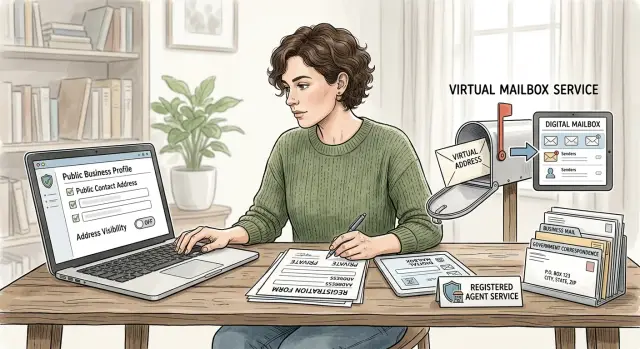
If you want a side business without home address exposure, you will usually look at three options: a registered agent, a virtual mailbox, or some kind of office address. They solve different problems. The common mistake is expecting one address to do every job.
A registered agent is mainly for legal notices. This address receives service of process, government notices, and other formal mail for an LLC or corporation. In many places, this is the safest way to handle legal mail. The downside is simple: a registered agent address is often not meant for your everyday business mail.
A virtual mailbox is better for day-to-day mail. You usually get a street address, mail scanning, forwarding, and sometimes package handling. For many solo businesses, it is the most practical mix of privacy and cost. But a virtual mailbox may not count as your legal business address for every filing, and some states will not accept it in place of a registered agent.
An office rental or coworking address can make sense if you want a business location people can visit. It can also look more natural on invoices or public listings. The trade-off is price. Some coworking plans include mail handling but still do not allow you to use the address for every official filing.
A short comparison helps:
- Registered agent: good for legal notices, not always for regular mail
- Virtual mailbox: good for privacy and mail forwarding, but filing rules vary
- Office or coworking address: useful if you need a real place to work or meet people, but it costs more
Before you pay for any service, check four things. First, ask exactly what kinds of mail it accepts. Regular mail and legal service are not the same. Second, confirm the address is allowed on the filings you plan to make. Third, read the fee sheet closely. Low monthly prices can hide forwarding charges, storage limits, scan limits, and other add-ons. Fourth, check the identity rules. Many mailbox providers require ID verification before they can receive mail for you.
For many one-person businesses, the most practical setup is a registered agent address for legal mail and a virtual mailbox for business mail. It costs more than using your home address, but it prevents a lot of cleanup later.
Set it up in the right order
Order matters. If you register first and think about privacy later, your home address can land on state records, seller accounts, invoices, and public profile pages before you catch it.
The safer move is to build your contact setup first and then use the same details everywhere.
Start with one worksheet. List every place that will ask for contact details: business registration, tax forms, your bank, payment processors, seller accounts, domain records, social profiles, and email signatures.
Then set up your address plan before filing anything. If your state filing needs a registered agent address, choose that first. If you want a mailing address for routine business mail, set up the virtual mailbox at the same time. People often rush this step and end up with mismatched records that are annoying to fix.
Create a separate business email and phone number on day one. That small step helps more than people expect. It keeps your personal contact details out of receipts, public profiles, and account settings.
Create one source of truth
This part is a little boring, but it works. Make one master contact card in a note or document and copy from it every time you open an account.
Keep only the details you want to reuse:
- legal business name
- public business name, if different
- mailing address
- registered agent address, if a form asks for it
- business email and phone number
Then paste from that card every time. Do not type from memory. That is how people end up using a home address on one form and a mailbox on another.
A simple example: if you sell digital templates on a marketplace, the signup flow may ask for a return address, the payment service may ask for a billing address, and your public profile may offer to display contact details by default. If your contact card is already set, those choices are much easier.
Handle mail without confusion
A private setup falls apart fast when mail goes to the wrong place. Before you launch, decide what should go where. Letters, customer returns, and packages do not always belong at the same address.
For many small businesses, the simplest setup is this: use one address for official letters, one return address for physical products if you sell them, and a separate delivery location for large packages if your mailbox provider does not accept everything. A virtual mailbox for business works well for letters and scans, but always check its rules for couriers, package size, and return handling.
Use one routine and keep it simple
The best system is predictable. If your mail process changes every week, something gets missed.
Pick one routine for the whole business. Review scans on the same day each week. Forward only the mail that needs a physical copy. Shred junk mail on a set schedule. Keep tax forms, bank letters, and state notices in a separate folder from customer returns and supplier mail.
That routine prevents more trouble than any fancy tool. It also helps protect your privacy because fewer people need to know where anything actually ends up.
One step people skip is testing the setup before they depend on it. Send a real letter to your business mailing address. If you expect customer returns, send a small package too. See how long scanning takes, whether notifications are clear, and what happens if something needs forwarding. A cheap test now is much better than finding out during a deadline week that your provider refused a package or delayed a scan.
If you sell services only, your setup can stay lean. If you ship products, write down the exact address rules you will use on invoices, return labels, and account registrations. One page of notes is enough.
Profile pages that share too much
A lot of home addresses leak through profile pages, not official filings. Google Business, marketplace seller accounts, social bios, and old directory pages often reveal more than you meant to share.
If customers do not visit you in person, do not display a street address just because a setup form asks for one. In many cases, you can choose a service area, a city and state, or no public address at all.
Start with the pages people are most likely to see when they search for your business or your name:
- Google Business and map listings
- marketplace seller pages
- social media bios and contact buttons
- old business pages you made before separating business and personal details
- review sites and local directories
Google Business is a common issue. If you run a home-based service business and do not meet customers there, turn off the public address and remove any map pin tied to your house. A map result with your street name is often enough for someone to connect the rest.
Marketplace profiles can be loose too. Some seller pages show a location by default, and some pull in an old legal name or address from another account. Check what buyers can see on your storefront, receipts, and return details.
Social bios deserve a close look. People add a contact line once and forget about it. That can include a personal email, a neighborhood name, or even a house photo in a pinned post. Remove anything that gives away your exact location, including street signs, building numbers, mailbox photos, or a clear shot of the front of your home.
Old pages are sneaky. Maybe you created a Facebook page under your personal name, claimed a listing years ago, or tested a directory when you were first starting out. Search your business name, your own name, and old usernames. You may find pages that still show your address or link to another profile that does.
If your address has already spread beyond the pages you control, edits alone may not fix it. Remove.dev focuses on removing personal data from more than 500 data brokers and keeps watching for relistings, which is useful when your address has already been copied into people-search sites.
A simple example
Picture a weekend candle seller working from a small apartment. She pours candles on Friday nights, packs orders on Saturday, and wants the shop to look professional without turning her home into a public business address.
She separates the address job in two. For state filings, she uses a registered agent address where the rules allow it. For customer mail, returns, and routine business post, she uses a virtual mailbox for business. Legal notices go to the right place, and regular mail does not pile up in her apartment lobby with her unit number attached.
Her public shop page stays simple. Customers see a support email, a contact form, and her city and state. They do not see a street address. For a one-person online shop, that is usually enough.
Before launch, she does one smart check. She searches her name, business name, phone number, and old usernames. She finds an outdated directory listing and an old profile that still point to her apartment. She removes what she can herself and then deals with the broker copies separately.
That is what a side business without home address exposure looks like in practice. It is not complicated. It is a few clear decisions made early, then used the same way everywhere.
Mistakes that put your address back online
One bad copy-and-paste can undo a careful setup.
Many people build a side business without home address exposure, then type their home address into one form because they want to finish quickly. After that, the same address gets reused on invoices, payment accounts, directory listings, tax paperwork, and social profiles. It spreads fast because many sites import business details from older records.
The fix is simple. Choose one mailing plan first, then use it consistently everywhere it belongs. If you change it later, update the older accounts too. One forgotten profile can be enough for search engines and data brokers to reconnect your name and address.
Mixed records create leaks
A common mistake is mixing personal and business mail. When bills, customer returns, bank letters, and household mail all land in one place, people start sharing the home address because it feels easier.
It usually creates more mess. Packages go to one address, legal notices to another, and customer messages still mention the wrong place. If you use a virtual mailbox or a registered agent address, write down what each one is for and keep that note where you handle orders, invoices, and account setup.
Old profiles and photos still count
The obvious places matter, but the forgotten ones often cause the real trouble. Old forum accounts, creator pages, marketplace bios, event listings, and freelance profiles can still show a full address, a city block, or personal contact details from years ago.
Check business directories, map listings, seller pages, old social bios, forum signatures, portfolio pages, and image galleries. Photos are an easy miss. A package photo on the porch, a selfie near the mailbox, or a workshop shot with a street sign in the background can reveal more than you meant to share.
Privacy slips are usually small, not dramatic. One old bio, one return label, or one photo can be enough.
Quick checks before you call it done
Give your setup one last pass before you trust it.
Start with a plain search audit. Search your full name, business name, phone number, and address in different combinations. Try name plus city, brand plus phone number, phone number plus address, and address plus email username. It sounds basic, but it catches a lot.
A short checklist helps:
- search in a private browser window
- check more than the first page of results
- open map listings, directory pages, and old profile pages
- save screenshots of anything that shows your home address
Then review the places where your address can leak by default. Look at invoices, order confirmations, payment processor settings, domain records, marketplace seller pages, and return policy text. Many tools copy your legal address into public-facing pages unless you change it yourself.
Do one more mail test. If you use a virtual mailbox for business or a registered agent address, send yourself a letter and make sure scans arrive on time, forwarding works, and legal mail gets your attention quickly. Privacy does not help much if you miss a tax notice or filing reminder.
If data broker sites already list your address, fixing business pages may still leave copies behind. That is where Remove.dev can save time. The service automates removal requests, tracks them in a dashboard, and keeps monitoring for relistings, which is useful if your information is already bouncing between broker databases.
One habit makes all of this easier: keep a short list of the places where your address appears on purpose. That might include state registration, your bank, your payment processor, and your mail provider. If your address shows up somewhere else, treat it as a leak and fix the source first.
After that, check again in a week. A quick monthly review is usually enough to keep your setup private and your mail under control.
FAQ
Do I have to use my home address to start a side business?
Usually, no. For public-facing contact, you can often use a business mailing setup instead of your home address.
Some forms still need a legal or government address, and the rules change by state, country, and business type. Read each form closely before you submit it.
What is the difference between a registered agent and a virtual mailbox?
They do different jobs. A registered agent receives legal notices and state mail, while a virtual mailbox is usually for regular business mail, scanning, and forwarding.
Many owners use both because one address rarely covers every need.
Can I use separate addresses for legal forms and customer contact?
Often, yes. A common setup is one address for legal filings and another for customer mail or returns.
That split keeps your records cleaner and makes it less likely that your home address ends up on public pages.
What should I set up before I file any business paperwork?
Before you register anything, make one simple contact sheet with your business name, mailing address, registered agent address if needed, business email, and business phone.
Then use that same sheet every time you fill out a form so you do not mix home and business details by accident.
How do I stop Google Business from showing my home address?
If customers do not visit your home, do not show a public street address. In Google Business and similar profiles, use a service area, city and state, or no visible address when the platform allows it.
After that, check the live profile to make sure no old address or map pin is still showing.
Where do home addresses usually leak from?
Most leaks start in boring places, not dramatic ones. State filings, seller profiles, invoices, return labels, payment accounts, directory pages, and old social bios are common sources.
One old profile or copied field is enough for other sites to pick it up.
What address should I put on invoices and return labels?
Use the address that matches the job. If you sell products, put your planned return address on return labels and store pages, not your home by default.
For service businesses, you often do not need any public street address on invoices beyond the business details required in your area.
How can I test my mail setup before I rely on it?
Send yourself a real letter before launch. If you expect returns or packages, mail a small package too and see how scans, forwarding, and alerts actually work.
That quick test shows problems early, like slow scans or a provider that will not accept certain deliveries.
What if my home address is already online?
First, remove it from the places you control, like profiles, directories, and account settings. Then deal with broker copies, since those often keep spreading the address after you fix the source.
If you want help, Remove.dev can remove listings from data brokers and keep watching for relistings so the same address does not keep coming back.
How often should I check for address leaks?
Start with one full search before launch, then check again a week later. After that, a quick monthly review is usually enough for most small side businesses.
Search your name, business name, phone number, and address in different combinations so you catch old pages and copied listings.