Skip-tracing databases vs people search sites explained
Skip-tracing databases vs people search sites can look alike, but they work differently. See how removals work and where people get stuck.
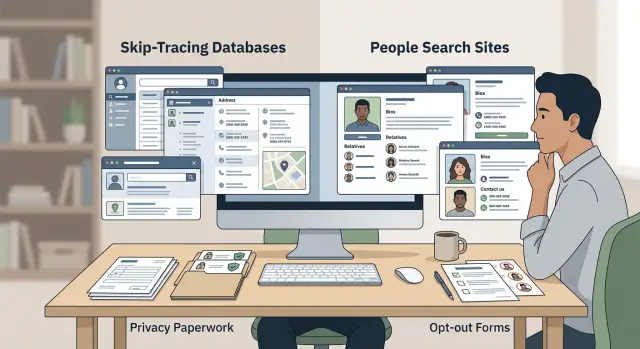
Why they get mixed up
The confusion starts with the data. Both skip-tracing databases and people search sites can show the same basic facts: your name, current and past addresses, phone numbers, age range, relatives, and sometimes email addresses. If you see your information in both places, they can look like the same product with different branding.
They are not the same.
A people search site is built for public lookup. Anyone can type in a name and scan results. A skip-tracing database is usually built for business users who want to find someone fast, even when the contact details they have are old or incomplete.
That difference changes the removal process. People search sites often have a public opt-out form, even if it is clunky. Skip-tracing databases may have no simple public form at all. Some handle requests through support or privacy teams. Others expect a request under laws like CCPA or GDPR. A few are so vague that people are left guessing where to start.
This is where requests often stall. Someone sends the same short "remove me" message to both types of companies and expects the same result. That can work on a public listing page. It often fails with a broker that wants more identity details, proof of residency, or a formal privacy request.
The line gets blurrier because the data keeps moving. A people search site may pull from data brokers. A skip-tracing tool may pull from public records and other brokers. So when one profile disappears and the same phone number shows up somewhere else, it can feel like one giant database. Usually, it is a chain of separate companies copying and refreshing the same record.
That is why removals feel uneven. You are not dealing with one system. You are dealing with different businesses, different rules, and often no clear front door for consumers.
What skip-tracing databases do
The main difference is visibility. A people search site is usually public. A skip-tracing database usually is not.
These databases are built to help businesses reach someone when the usual contact details are old, incomplete, or wrong. That might mean finding a current phone number, checking whether someone moved, or matching a name to a newer address. They are often used by debt collectors, insurers, law firms, real estate teams, or investigators rather than casual web users.
Behind the scenes, a skip-tracing database may pull from many sources. That can include public records, property data, court filings, utility clues, older broker files, and other commercial data feeds. The result is less like a neat public profile and more like a report stitched together from many sources.
That matters because you may never see your own record as a normal webpage. There may be no public profile and no obvious button to remove it. Your data can sit inside a tool that only paying business users can access.
Picture a simple case. You moved two years ago, changed your number, and did not update every old account. A skip-tracing tool may connect your old address, a newer property record, a likely mobile number, and other names tied to the same household. It is trying to answer one question: how can this person be reached now?
Because access is limited, consumers often have no clear view of what is stored, where it came from, or who bought it next. That is one reason skip-tracing database removal is usually less direct than standard people search site removal.
What people search sites show
People search sites are the public side of this world. You type in a name, phone number, or address, and the site tries to match that person to a profile.
Those profiles are often easy to open. In many cases, anyone can see at least part of the record without proving who they are or why they want the information. That is why these sites feel so invasive. You are not dealing with a hidden business database. You are looking at a page that neighbors, strangers, or old contacts can find in seconds.
A typical profile may show current and past addresses, age range, possible relatives, phone numbers, and sometimes email addresses. Some sites put basic details on the public page and save the rest for a paid report. Even the preview is often enough to expose more than most people expect.
The good news is that many of these sites do offer a public opt-out form. That makes people search site removal more direct than removal from private skip-tracing tools. You usually find your record, submit a request, and confirm it through email or another simple step.
There is still a catch. One company may run several lookalike sites under different names. The design changes a little, but the data and ownership are often connected. So one request may remove one profile while your details stay live on two or three sister sites.
That is where people lose time. They remove one listing, assume the job is done, and then find the same address and phone number on another site a week later. A public form helps, but it does not finish the whole data broker opt-out process.
If you find your information on one people search site, check for duplicate profiles and look up the company behind it. That small step can save a lot of repeat work.
How your data reaches both places
Most records do not start on a people search page. The trail often begins with a public record such as a property filing, court record, business registration, or another government entry that is open to the public. Once your name is tied to an address, phone number, or relative, that record can spread fast.
After that, data brokers copy, buy, trade, and refresh data from many places. One broker may pull from public records. Another may buy a batch from a marketing company or another broker. A skip-tracing database can ingest that same record, mix it with other sources, and keep updating the profile over time. A people search site may publish a simpler version of that same trail.
This is why old details stick around. If you lived at an address ten years ago, that address can stay tied to your name long after you moved. The same thing happens with relatives, former spouses, and even roommates. Data matching is messy. If two records look close enough, some companies keep the connection instead of removing it.
Say you move from Dallas to Phoenix. Your old county property record, a past phone listing, and a relative's address all get copied by different brokers. One people search site shows your old home address. A skip-tracing vendor may hold the same address plus extra details that never appear on the public page. Both records may come from overlapping sources, but they are not the same database.
That is why one successful people search site removal rarely fixes the whole problem. It removes one version in one place. Copies may still live with other brokers, and some databases will refresh again later from a new feed. Personal data removal is less like deleting one master file and more like clearing duplicates across a chain.
That chain is what makes this work feel slow. Your data moves sideways, not just outward.
How removal works in each case
This is where the two categories stop looking similar. Both may hold the same name, address, phone number, or relatives, but the path to removal is often very different.
On a people search site, the process is usually public and fairly scripted. You find your profile, copy the exact profile link, enter your contact email, and submit an opt-out form. Many sites send a confirmation message, so nothing happens until you click the email. If the site lists several profiles for you, each one may need its own request.
Skip-tracing vendors are often less direct. Some have a privacy form, but many route requests to a legal, privacy, or support team. Instead of asking for a profile link, they may ask for enough detail to find you in their records, such as your full name, past addresses, phone numbers, or employer.
Some companies want proof that you are the person named in the record. That can mean a partial ID, a utility bill, or a rights-based request form under laws such as CCPA or GDPR. Send the least amount of proof the request allows, and cover details they do not need.
The outcome can look different too. A people search site may remove the public page within a few days, which helps if your main concern is what anyone can find in search. A skip-tracing vendor may reply with a case number, ask follow-up questions, deny the request, or say the data falls under an allowed business use.
In simple terms, people search site removal is usually form-based and tied to one visible profile. Skip-tracing database removal is often handled by staff and shaped by privacy law and internal policy.
Review times vary a lot. One site may approve an opt-out in 24 hours. Another may take two weeks, ask for more documents, or give no clear status at all. That uneven process is a big reason personal data removal feels easy in one place and stubborn in another.
How to work through it step by step
The work usually starts the same way: find every place your details show up, then track each request so nothing gets lost.
Start with a clean list. Search your full name, common name variations, phone number, and past addresses. Use a private browser window if you want less personalized results, and check more than one search engine.
Before you send anything, write down every match you find. A simple spreadsheet works well. Include the site name, the profile page or record name, what data appears, and whether the page is public or harder to access.
Then work in a practical order:
- Start with public profiles that anyone can view.
- Send requests one site at a time and follow each site's steps closely.
- Save proof as you go, including screenshots, confirmation emails, and dates.
- Check again after each review window ends.
This part is tedious, but it matters. If a record stays up, your notes make follow-up much easier. You can show when you asked, what page was involved, and whether the company acknowledged your request.
A simple approach helps. If you find three public people search profiles and one harder-to-reach broker listing, clear the public pages first. That often removes the pages most likely to show up in search results while you sort out the slower cases.
Where people usually hit a wall
The first problem is simple: many records are easy to find but hard to remove. A people search site may have a public opt-out form, while a skip-tracing database often does not. If the database is built for business users, there may be no consumer page at all, just a privacy email address or a legal request channel.
Then the matching problem starts. A removal request can be rejected even when the record is yours. Maybe the company has an old address, a misspelled name, or a phone number you no longer use. If your request does not include enough detail to match the record, the company may say it cannot verify you and close the request.
A lot of people also assume one successful removal solves the whole issue. It usually does not. A public profile can disappear from one people search site and still stay live on three others. The same person may also appear in a skip-tracing database that pulls from different sources, so the data keeps moving even after one record is gone.
Another common problem is the refresh cycle. Some sites remove a listing, then an old source republishes it weeks later. That feels like starting over, and in a way it is. Personal data removal is rarely a one-time task.
Follow-up messages cause trouble too. A company may ask for ID, a screenshot, or a reply in the same email thread. Miss that message, and the request can expire without much warning.
Each blocker is small on its own. Together, they eat time fast. You send one request, wait, check again, find a copy elsewhere, and repeat.
A simple example
Picture someone named Erin who moved last year. She changed her mailing address, updated her bank, and started over in a new city. A few months later, she searched her own name and found an old address, age range, and relatives listed on a people search site.
That part looked fixable. The site had a removal form, so Erin sent a request. After a few days, the public profile disappeared from search results. If you only look at that one page, it feels like the problem is solved.
Then the odd stuff kept happening. A debt collector mailed notices to the old address. A landlord screening service still showed past locations. A sales call reached a number tied to the same old record. Erin checked again and learned the public profile was gone, but versions of the same data still existed in less visible databases used by companies.
That is where the distinction starts to make sense. A people search site shows a public-facing profile that anyone can find. A skip-tracing database usually sits behind a business login and feeds address history, phone numbers, and contact clues into other tools.
So Erin had removed one display of the data, not the source records feeding other systems.
She still had three separate jobs: remove the public people search listing, send opt-out or privacy requests to the brokers behind the record, and check later to see whether the data came back somewhere else.
This is the point where many people stall. One site says "removed," but the same old address keeps showing up somewhere else. That does not always mean the first request failed. It often means the data moved through several brokers, and each one needs its own request.
Before and after you send requests
Small mistakes slow removals more than most people expect. A wrong middle initial, an old city, or a record that belongs to your cousin can turn a routine opt-out into a mess.
Before you send a request, make sure the record is really yours. Compare age, past addresses, relatives, and phone numbers. Save the profile ID if the site shows one, or take a screenshot. Keep every confirmation email or case number, and write down the date you sent the request.
That sounds basic, but it saves time later. People search pages often show similar names in the same city, and skip-tracing records can carry old data that makes two people look like one. If you remove the wrong listing, fixing it can take longer than the original request.
After you submit, do not assume the record is gone for good. Some sites remove a public page quickly but leave the data in circulation. Others need a week or two. A few listings come back after a fresh data update.
A second check helps. Set a reminder to look again in two to four weeks. Search the site using the same name format you used in the request. Watch for relisting after a move, a new phone number, or a recent public record. If the listing returns, use your saved confirmation to reopen the case.
The people who waste the least time are usually the ones with the best paper trail. A short note with names, dates, and confirmations is often enough to keep the whole process under control.
What to do if this keeps taking time
If this is dragging on, change the order. Start with the sites that show your details to anyone who searches your name. Those pages create the most immediate risk, and they are usually the fastest wins.
Then move to the less visible brokers and skip-tracing sources. They often take more work. Some hide their opt-out page, some ask for ID, and some only respond after a formal privacy request.
A practical order is simple: public people search sites first, larger brokers behind the scenes next, and harder cases that need follow-up after that. Keep a small tracker with the date, company name, and current status. That saves you from sending the same request twice or missing a reply in your inbox.
It also helps to stop thinking of this as a one-time cleanup. Data comes back. A broker may buy a fresh list next month and relist the same record. Check again after a few weeks, then on a schedule you can actually keep.
Manual people search site removal is fine for a few sites. It gets old fast when requests pile up across dozens of brokers. If you do not want to manage all of that by hand, Remove.dev handles removals across more than 500 data brokers and keeps monitoring for relistings in one dashboard.
That is the real difference between these two sources. One is public and easier to spot. The other is less visible and often harder to clear. If your data shows up in both, you usually need to treat them as separate problems and work through each one on its own.