Deleting social media is not enough for broker sites
Deleting social media is not enough because broker sites use public records, retail data, and old files to rebuild profiles after you log off.
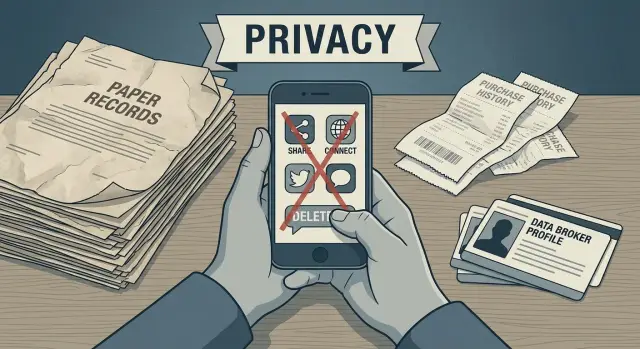
Why profiles stay online after you delete your accounts
Deleting your social accounts does not erase the copies other companies already made.
Data brokers do not need your Facebook, Instagram, or X profile to stay online. If they copied or bought your details before you deleted it, they can keep that record for years. In many cases, nothing changes until the broker updates its database or someone files a removal request.
That is why an old profile can still show up long after the original account is gone. A broker may have saved your name, past usernames, city, age range, relatives, or phone numbers in an earlier data batch. Even if you remove the source later, the copy often stays put.
These pages are usually a mix of old and new details. One listing might show your current city, a street address from five years ago, and a phone number you no longer use. The record can look messy and still identify you.
A simple example makes the point. Say you deleted your social accounts last year after moving to a new apartment. A people-search site may still show your old address, your old employer, and a relative's name. The page did not survive because your accounts stayed active. It survived because your data had already been copied, stored, and passed around.
Deleting an account removes one source you control. It does not pull back the copies already sold to other companies. It also does not remove older records that came from paperwork, marketing lists, or public filings.
That is the frustrating part. You can stop posting today and still find yourself listed next month because older copies of your data are still moving through the market.
Where broker sites get information besides social media
Social media is only one source, and often not the biggest one. Data broker profiles keep growing because companies collect information from places that have nothing to do with your public posts.
Public records are a big piece of it. If you bought a home, moved, registered a business, changed your name, or appeared in a court filing, some of that information may sit in county, state, or federal databases. Brokers collect those records, match them to your age, relatives, and old addresses, and turn them into a profile.
Then there is ordinary shopping. A store loyalty card, warranty registration, magazine subscription, or discount popup can tie your name to an address, phone number, and buying habits. Even when a retailer does not directly sell a raw customer file, marketing partners can still receive and reuse parts of it.
Apps and sweepstakes add more detail. A weather app, quiz, coupon form, or prize drawing may ask for your email, birth year, ZIP code, and phone number. That sounds minor, but a few details are often enough to match you to larger records already sitting in commercial databases.
Lead forms make the problem worse. When you ask for insurance quotes, compare movers, check loan rates, or request home repair estimates, that form may send your information to several companies at once. Those companies can pass it along again.
A single address change can travel farther than most people expect. It might show up in a property record, then in a retail database, then in a lead form, and finally on a people-search page. That is why deleting social media is not enough. Broker sites often rely on offline records and commercial data that keeps refreshing the same profile.
How one record spreads across many companies
One record rarely stays in one place.
Once your name, address, phone number, or age lands in a commercial database, it can move quickly. A broker might buy details from a retailer, survey company, public records vendor, or change-of-address data provider. Then it sorts that information into lists and sells access to other brokers, ad companies, lead generators, and people-search sites.
The next company usually adds more. A phone number gets tied to an old address. An address gets matched to a relative. A birth date gets paired with a property record or voter file. Piece by piece, a fuller profile appears.
The usual chain is simple: one company buys your name and mailing address, another adds a phone number from somewhere else, and a people-search site pulls in age, relatives, and past addresses. After that, more sites copy the profile and publish their own versions.
This is why listings come back even after one page disappears. Removing one result does not erase the copies already made. It also does not stop a later refresh, when a broker buys a newer file and rebuilds the same profile again.
Think about someone who deletes every social account but still owns a home, forwards mail, signs up for store rewards, and appears in public records. None of that depends on social media. Yet those records can still be bought, matched, and republished across dozens of sites.
That copy-and-match cycle is the real problem. You are not dealing with one bad listing. You are dealing with a chain of sellers and resellers that keep feeding each other.
A simple example of how it keeps happening
Picture a normal move. Emma leaves one apartment, rents another, and files a change of address so her mail follows her. She also updates her shipping address in a store account.
None of that feels public. But both addresses now point to the same person in several databases.
How the record keeps traveling
The store already has Emma's name, email, and purchase history. When she updates the account, the old address often does not disappear. It stays in the record as a previous address. If that customer data gets shared or sold, a buyer can connect the old and new address and treat them as one profile.
A few weeks later, Emma fills out a coupon form at a local event and adds her phone number. That number can end up in marketing lists and then in other commercial databases.
Now the profile is stronger. It ties together Emma's full name, current address, old address, and phone number. A broker can match those details with public records, warranty cards, voter files where available, or other list brokers. Once one company builds that match, the data can be sold again.
Soon a people-search page appears. It may show Emma's age range, current city, old street, relatives, and phone number. She could have deleted Facebook years ago and never posted on Instagram. It would not matter.
That is the annoying part. Ordinary events keep the profile alive. Moving, forwarding mail, joining a rewards program, or using a discount form can echo across many companies.
What to do first if you want fewer broker listings
Start with an inventory of your own data. Most people search their full name once, see a few results, and stop. That misses a lot because broker pages are often built from old phone numbers, past addresses, and email accounts you have not used in years.
Open a note or spreadsheet and list every detail you have used in public or semi-public places. Include your full name, nicknames, old last names, current and old email addresses, mobile numbers, landlines, and past home addresses. One old detail can lead to several listings.
Then search for yourself using each detail on its own. A few searches usually uncover the most:
- your full name plus city or state
- an old email address
- a phone number you used years ago
- a past street address
- your name next to a relative's name
This feels repetitive, but it works. Many people-search sites index pages by phone number or address, not just by name. A listing may not appear when you search your current name alone, but it can show up right away when you search an old number or an address from a previous move.
A cleanup plan that works
The best plan is plain and a little boring. That is usually a good sign.
Start with the listing that exposes the most. If one page shows your current address, age range, past cities, and relatives, deal with that before chasing smaller copies on other sites. Large profiles often feed other listings.
A simple order works well:
- Search for your name, city, old phone numbers, and past addresses.
- Send opt-out or removal requests to the pages with the most detail.
- Keep a note of the date, site name, and anything the company asked you to submit.
- Save screenshots before and after so you can confirm the page changed.
After that, close accounts you no longer use. Old store accounts, delivery apps, travel sites, rewards programs, and forgotten app logins can keep pushing new details into the market. Even an account you have not touched in years may still hold an address, phone number, or purchase history that gets shared.
Next, use privacy rights where they apply. Many companies let you ask them not to sell or share your data, especially under laws such as CCPA and GDPR. This step helps slow future relistings instead of only cleaning up what is already public.
Then wait a little and check again. Some removals take time, and some sites repost data after a few weeks. Run the same searches you used at the start. If a profile comes back, send another request and update your notes.
Mistakes that keep profiles alive
The most common mistake is assuming the job ends when the social accounts are gone. It does not. Broker profiles are often built from other sources that keep moving long after an account disappears.
A home purchase, warranty card, voter file, court filing, loyalty program, or change-of-address form can keep feeding the same identity record. If your social accounts are gone but an old property record still ties your name to an address, brokers can still connect you to age range, relatives, and past locations.
Another common mistake is searching with only one email address. Most people have more than they remember: a school email, a first Gmail account, an old work address, or a throwaway used for shopping. Older details are often the glue that helps brokers match records across companies.
People also skip old phone numbers and past addresses. That is a big miss. Many broker pages are easier to find through those details than through your current name alone.
The last mistake is treating removal as a one-time job. Many people-search sites refresh their data on a schedule. A successful opt-out today does not stop a broker from rebuilding the same profile next month from a different source.
A small example shows how this happens. You delete your social accounts, but your name still sits in an old apartment lease, a retail marketing list, and a people-search entry tied to a phone number you no longer use. One company buys the retail list, another copies the people-search page, and your address history appears again under a slightly different profile.
How to check a listing before and after removal
Before you send a removal request, make sure the listing is actually yours. Broker pages often mix people with similar names, and one wrong match wastes time.
A quick check is usually enough. Look for your full name and city, then compare the page with your address history. If it also connects you to a relative, housemate, or old phone number you recognize, that is often enough to confirm the match. You do not need every detail to line up perfectly. One old address and one familiar relative name can be plenty.
If the name matches but the city, age range, and contact details all look wrong, skip that page and keep searching.
Before you submit the request, save the page title, take a screenshot, and copy the page address if you can. That makes it much easier to check what changed later.
After the broker says the record was removed, do not stop at the direct page. Check the path that led you there. The profile might be gone at its old page address but still appear in the site's own search for a while.
Run a quick post-removal check. Open the old page if you saved it. Search the broker site for your name and city again. Look for fresh listings that still show old addresses, relatives, or phone numbers. Then search your name and city in a search engine to see whether the old result is still cached.
If the page is gone from the site but still shows in search results, give it a few days and check again. Search engines often keep an old snippet for a short time after the source page disappears.
When manual cleanup stops being worth it
The tiring part usually starts after the first few removals. You send requests, wait, check again, and then find your details on other sites a few weeks later. At that point, a simple system matters more than motivation.
Set one monthly reminder to recheck the main broker sites. Search your name, past addresses, phone numbers, and a couple of common spelling variations. Keep the review short. The goal is to catch relistings before they pile up.
It also helps to keep a basic log with the broker name, the date you sent the request, any reply or confirmation number, and the current status. It does not need to be fancy. A notes app or simple spreadsheet is enough.
Then be honest about the time cost. Ten minutes on one site is easy. Ten minutes across dozens of sites, plus follow-ups, captchas, identity checks, and repeat requests, can eat an evening fast.
If you do not want to manage that cycle yourself, Remove.dev is one option that fits this kind of work. It removes personal data from more than 500 data brokers, tracks requests in a dashboard, and keeps monitoring for relistings so the same record does not quietly return.
You do not have to choose an all-or-nothing approach. Some people handle a few large people-search sites on their own and use a service for the rest. That is a sensible middle ground.
The hard part is not understanding the steps. The hard part is that the work repeats. A monthly check and a simple log can take you a long way. After that, the best move is whatever keeps the cleanup going instead of letting it slide for another six months.