Suppression vs deletion: what privacy requests really do
Suppression vs deletion can change what happens after a privacy request. Learn what each term means, what to expect, and when to follow up.
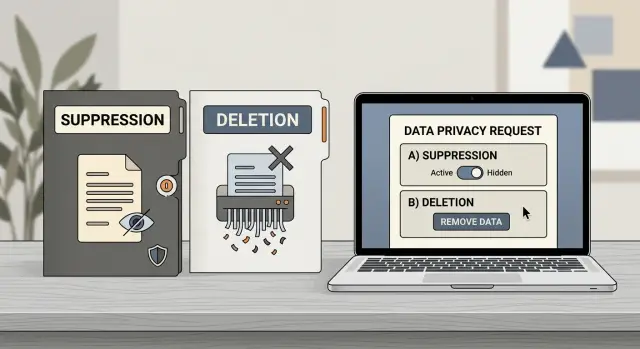
Why these words matter
People often read "suppressed" and "deleted" as if they mean the same thing. They don't. In privacy requests, those words can describe very different actions, and the difference affects what you should do next.
A reply email can sound final even when the result is limited. If a site says your record was "suppressed," it may have hidden the profile from public search or blocked it from view. That sounds good, but it doesn't always mean the record is fully gone. The company may still keep enough information to hide the listing, match future requests, or stop the same profile from showing up again.
"Deleted" sounds more complete, but that word needs a careful read too. Some companies delete the public page and keep internal logs, request records, or backups for a period of time. Others remove only part of a profile. If you assume every use of "deleted" means total erasure, you may stop checking too soon.
That is the real difference in suppression vs deletion. The wording tells you what changed, what may still exist, and whether follow-up still matters.
A simple example helps. A data broker replies that your record was suppressed. Two weeks later, the page is gone, so you move on. Three months after that, your details reappear after a database refresh. If you had read "suppressed" as a limited action, you would have saved the confirmation and checked again later.
Tracking matters for that reason. If you're managing several requests, a service like Remove.dev can keep a record of each one and watch for relistings, which helps when a broker uses suppression instead of full deletion.
What deletion usually means
Deletion sounds simple, but in practice it often means one specific thing, not everything.
Sometimes deletion means the public listing is gone. Other people can no longer search your name, address, or phone number on the site. That's useful, but it doesn't always mean the company erased every copy it still holds behind the scenes.
A broader deletion can include internal records too. A company may remove the public profile, clear matching records from its search system, and stop using that data for future sales or marketing. That's closer to what most people expect when they ask for personal data deletion.
Even then, many companies keep a small amount of information after a deletion request. They may retain a note that a request was made, the email used to verify identity, or a record showing they should not add you back by mistake. Legal, fraud, billing, or audit rules can lead to the same result. So deletion is often broader than suppression, but it still may not mean total erasure.
A useful deletion notice should say what actually changed. Clear replies usually explain whether:
- the public profile was removed
- the record was deleted from public search
- some internal data was kept for legal or operational reasons
- backup copies will age out later
If the company only says "your request has been processed," you still don't know much. The public page may be gone. The internal record may remain. Both may still exist in some form.
That is why specific language matters more than the label itself. "Deleted" is only helpful if the company explains what it deleted.
What suppression usually means
Suppression usually means your data is hidden from public view, not fully erased from the company's systems.
If a people-search site says your profile was "suppressed," the page may stop appearing on the site, but some data can stay in the background. In many cases, the company keeps just enough information to recognize you later and avoid republishing the same record.
A common version of this is a do-not-publish list. Your name, address, email, phone number, or another identifier may stay on that list so the site can block future reposting. That can help when the company keeps importing fresh records from public records, partner feeds, or marketing databases.
So suppression is not necessarily a bad outcome. In some cases, it is what keeps a profile from coming back. But it is not the same as deletion. Deletion usually points to removing stored data. Suppression usually points to blocking display or resale while a limited internal record stays behind.
In practice, suppression often means a few things at once:
- your profile is no longer public
- site search results may disappear
- the company still keeps a minimal internal record
- that record is used to stop relisting
If a response says "suppressed," read it as "hidden and blocked," not "erased everywhere."
This matters a lot with data brokers. Many of them keep pulling in new data from outside sources. A suppression flag can protect you better over time than a one-time takedown, but only if the company actually applies it consistently.
Why a site may use one term instead of the other
The choice between suppression and deletion usually comes from how a company's systems work, not from a preference for one word over the other.
The biggest difference is memory. If a site deletes every trace of your record, it may have no way to remember that you opted out. If your data arrives again from a partner feed or a fresh public source, the site might rebuild the listing. That is one reason some companies keep a small internal marker that says, in effect, "do not publish this person again."
Public pages and internal databases are often treated differently too. A site may remove your name from search results or delete a profile page while keeping data in support logs, billing records, fraud checks, or compliance files. That is not always a trick. Sometimes it is simply how the business separates public content from the records it still needs to hold.
Privacy laws shape the wording as well. A company may have to delete personal data unless an exception applies. It may be allowed to retain limited information for legal duties, security, or to honor your opt-out going forward. That is why two sites can answer the same request with different words and still be following the rules that apply to them.
A quick way to read the language:
- "Deleted" often means the record was removed from one or more systems.
- "Suppressed" often means the data is blocked from display or sale while a small control record remains.
- "Removed from search" may mean the page is hidden, not erased.
- "Opted out" can mean future use is restricted even if some internal data stays.
If a company says "suppressed," check whether the public listing is gone and whether the site says anything about future relisting. If it says "deleted," check whether the company kept a suppression record so the data doesn't come back later.
How to read the response you get
Privacy replies often sound clearer than they are. The exact wording tells you what changed, what stayed, and whether you need to check again.
Start with the action words. "Delete" or "erase" usually means the company says it removed data from a record or database. "Suppress" often means it stopped showing the data in public search or marked the record so it won't be displayed. If you see words like "retain," "archive," or "backup," some data may still exist after the request.
Then check the scope. A company may say your listing was "removed" and mean only the page you found in search. That's better than nothing, but it's not the same as wiping the record from every system. If the reply says "your profile will no longer be publicly visible," read that as a narrower promise.
Time matters too. Some sites act right away. Others approve a request and take days or weeks to finish the work. If there is no completion date, plan to check again instead of assuming the job is done.
Finally, keep the receipt. Save the email, case number, screenshot, or support thread. If the record returns, that proof saves time.
If the wording feels slippery, trust that reaction. A short reply can hide a big difference.
How to follow up step by step
A privacy request is only half the job. The follow-up tells you whether the site removed your record, hid it for a while, or did something in between.
Use the same routine each time:
- Before you send the request, save proof of the listing. A full-page screenshot is best.
- Submit the request and keep every detail that comes back, including the case number or confirmation email.
- Wait through the timeframe the company gave you. If it says 7 to 14 days, let that window pass before checking.
- Search the site again using the same name, city, phone number, or other details you used the first time.
- If the record is still there, reply to the same thread with a fresh screenshot and a short note that the listing remains after the stated deadline.
Keep the follow-up calm and specific. A short message with the request ID and proof usually works better than a long complaint.
If the page goes down and later comes back, treat that as a new event. Save proof again and reopen the request with the earlier reference numbers.
A simple example
Say Anna finds a profile about her on a people-search site. It shows her full name, age range, an old address, and a few relatives. She sends a privacy request, and a few days later the site replies that the profile was "removed" or "suppressed."
On the public side, both outcomes can look the same. The page disappears, and a normal site search no longer finds it. For most people, that feels like the problem is solved.
But there may be a second layer. The site might keep a small internal record with enough detail to recognize Anna later. That record is not there for public display. It is there so the site can block the same profile from being republished the next time it refreshes its data.
That is where the difference becomes real. If Anna hears "deletion," she may assume every trace is gone. If the site says "suppression," it may mean the public listing is gone while a minimal record stays in place to prevent the page from coming back.
A month later, Anna checks again. She searches her name, old city, and phone number. If nothing appears, the request worked the way it should. If the profile returns, she has her answer: the first removal was temporary, incomplete, or not applied to the new record.
That recheck matters. The first request gets the page down. The check a few weeks later tells you whether it stayed down.
Common mistakes after a privacy request
The most common mistake is assuming a privacy request did more than it actually did. If a site says your record was "suppressed," it may only mean the page is hidden from public search or blocked from fresh display. It does not always mean the data is gone from the company's systems, partner feeds, or older copies.
Another mistake is treating the first reply as the finish line. People get a confirmation email, feel relieved, and never look again. Then weeks later the same profile is back, or a slightly changed version appears. A quick recheck saves a lot of repeat work.
Timing trips people up too. If a response says removal takes 7 to 14 days, checking after two hours tells you nothing. If it says 30 days, mark the date and wait until then before pushing again.
There is a paper-trail mistake too. Many people send a brand-new request when the first one is still open. That often creates duplicate tickets and makes the history harder to follow. Replying to the existing thread is usually better because the company can see the earlier request, the dates, and the case number.
Keep basic proof before the page changes:
- a screenshot of the listing
- the date you found it
- the response email or request number
A simple rule works well: don't assume, don't throw away the receipts, and don't stop checking after the first confirmation.
Quick checks before you move on
An email that says "completed" is a good sign, not the final word.
Start with the public result. Open the old listing if you saved it, then search your name again. If the page is gone, that is progress. If it still shows your age range, relatives, city, or part of an address, the site may have edited the profile instead of removing it.
Before you move on, do four quick checks:
- compare the page before and after
- read the reply for any line about retained data
- save screenshots, dates, and case numbers
- set a reminder to look again later
That last step matters more than most people expect. "Deleted" may only mean deleted from public search. The company might still keep internal records, and that changes what you do if the profile returns.
One more search later is often worth it. Try your name with an old city, phone number, or street name. Copies of the same profile can show up under small variations, sister sites, or a fresh listing built from the same source.
If you're handling a lot of removals, a simple log helps. Keep the site name, request date, response date, and next review date in one place. Even a note on your phone is better than trusting memory.
What to do if your data comes back
If your details show up again after a privacy request, don't assume the first request failed. Many sites refresh their databases, buy new records, or rebuild profiles from outside sources. That means your data can return even after a real removal.
Start with a simple habit: set a reminder to check again. For sites that already had your name, address, phone number, or age, a 30 to 60 day follow-up is usually enough. If a broker used suppression language instead of clear deletion language, check more often.
Keep a short list of sites that gave vague replies such as "suppressed," "blocked from display," or "hidden from search results." Those phrases often mean the record is not fully gone. It may stay in the database and return later if the listing is rebuilt or the site's matching process fails.
A small tracking routine helps:
- write down the site name and the date of each request
- save the reply, even if it looks generic
- note whether the site said "deleted" or used softer wording
- recheck after the promised removal window
- follow up if the record returns or never disappeared
If the same records keep reappearing, manual follow-up gets old fast. That is where ongoing monitoring helps. Remove.dev, for example, automatically finds and removes personal information from over 500 data brokers, tracks each request in real time, and sends new removal requests if your data shows up again.
The goal isn't to chase every site forever. It's to spot patterns, keep records, and know when a one-time opt-out isn't enough.
FAQ
What does "suppressed" usually mean in a privacy reply?
Usually it means the public profile is hidden or blocked from showing on the site. The company may still keep a small internal record so it can recognize you later and avoid putting the same listing back online.
Does "deleted" mean my data is gone everywhere?
Not always. Many sites use "deleted" for the public page but still keep logs, backups for a while, or a record of your request. Read the reply closely to see what was removed and what was kept.
Which is better, suppression or deletion?
If you want the public page gone, either can solve that part. If you want to know whether the company still holds anything, deletion is usually broader, while suppression often means hidden but not fully erased.
Why would a site keep any of my info after I opt out?
Often they need a small record to remember your opt-out. Without that, a new data feed could rebuild your profile and put it back on the site.
How can I tell what the company actually did?
Look for the action words and the scope. "Removed from public view" is narrower than "deleted from our systems," and words like "retain," "archive," or "backup" usually mean some data still exists.
When should I check the site again after a request?
Follow the timeline the company gave you first. If it says 7 to 14 days, wait through that window, then search again using the same name, city, phone number, or address details you used before.
What proof should I save during the process?
Save a screenshot of the listing before you send the request, then keep the confirmation email, case number, and a screenshot after the deadline. That record makes follow-up much easier if the page stays up or returns later.
What should I do if my profile comes back later?
Reply to the same support thread, attach fresh proof, and mention the earlier request number. If the site keeps relisting you, treat each return as a new removal event and keep the full paper trail.
Does "removed from search" mean the same thing as deletion?
No. That wording often means the page no longer shows in the site's search results, but the record may still exist in the background. It is better than nothing, yet it is not the same as full erasure.
Can a service help with repeated opt-outs and relistings?
Yes, especially if you are handling more than a few brokers. A service like Remove.dev can track requests, watch for relistings, and send new removal requests when your data shows up again, which saves a lot of repeat work.