Security questions data brokers can answer too easily online
Security questions data brokers can answer are no longer safe. Learn why old addresses, relatives, and birth years fail, plus better recovery settings.
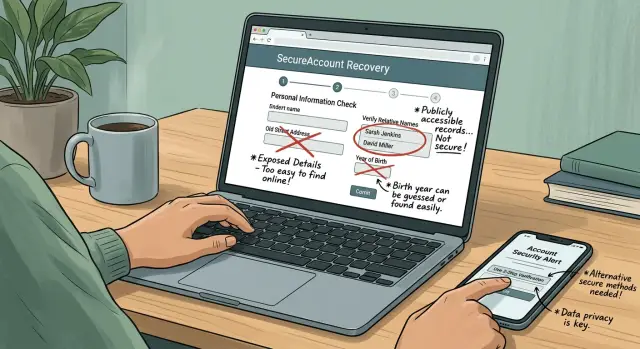
Why these questions fail now
Security questions were built for a different internet. The idea was simple: ask something only you would know, like the street you grew up on, your mother's maiden name, or your birth year.
That logic has aged badly. Personal details now sit in data broker profiles, people-search sites, public records, and marketing databases. Once that information is copied, sold, and reposted across hundreds of sites, a "secret" answer turns into something a stranger can buy or look up.
That is a real problem because account recovery is often the weakest part of an account. You can use a long password and turn on two-factor authentication, then still get asked a fallback question when you lose access to your phone or email. If the answer is an old street name, a relative's last name, or your birth year, that check can be far easier to pass than the password ever was.
The risk is easy to picture. A broker profile shows a past address on Maple Avenue. Another record links family members. A public listing narrows down your age. Put those together, and a recovery prompt that once felt private starts to look flimsy.
That changes the way you should think about account security. The question is not just "Is my password strong?" It is also "What happens if I get locked out?" If the backup path depends on old biographical facts, your account may be easier to take over than it looks.
What data brokers usually know about you
Most people imagine data brokers as simple lists of names and phone numbers. In practice, the profile is often much broader.
A typical record can include your current and past addresses, phone numbers, email addresses, age range or birth year, names of relatives, and names of people linked to your household. Some profiles also pull in property records, voter records where allowed, business listings, and older marketing data.
That overlaps almost perfectly with the kind of facts many sites still use for recovery. Questions like "What street did you live on?" or "What is your birth year?" used to feel personal. Now they are often just search results.
The bigger issue is how scattered records get merged. One site may have an old cell number. Another may show a house you rented years ago. A third may list possible relatives. A stranger does not need a perfect profile. They just need enough pieces to make good guesses.
People-search sites and public records also copy from each other. Even outdated or slightly wrong information can still point to the right person when the same name, city, age range, and family links show up in more than one place.
A broker profile often includes some mix of:
- current and former home addresses
- mobile and landline numbers
- birth year or estimated age range
- relatives and household members
- email addresses tied to signups or marketing lists
That is why security questions data brokers can answer are such a practical risk. The answer does not have to stay secret. It only has to be easy to infer from a stitched-together profile.
Why common recovery questions break down
Recovery questions were supposed to rely on facts you would remember and strangers would not know. Once a data broker profile exists, that idea falls apart.
Take the old address question. Moving does not help much because previous addresses often stay attached to your name for years. A broker listing may show your current home, two earlier apartments, and the street where you lived in college. If a site asks which street you lived on, that is barely a speed bump.
Relatives' names are weak for the same reason. Many broker profiles include "possible relatives" or "associated people." Those lists are not always accurate, but they do not need to be. If someone already has your email, phone number, or city, a relative's first name can be easy to spot.
Birth year is even weaker than it sounds. On its own, it seems harmless. In practice, it narrows the search quickly and helps confirm that an attacker found the right person.
The worst part is that these answers barely change. People keep the same birth year forever. Old addresses stay true long after you move. Family names do not rotate the way passwords do. Once one of these facts shows up in a broker profile, it can stay useful for years.
That is why these prompts fail. They rely on facts that are easy to buy, scrape, or look up. They use details that stay true for decades. And they treat widely exposed information as proof of identity.
A recovery method should stop someone who knows your background. These questions often do the opposite.
A simple takeover example
Mia has an old shopping account tied to her main email. She did the obvious part right: the password is long, random, and saved in a password manager.
An attacker starts with her email address from an old mailing list breach. A quick search turns up her current city, two past addresses, her birth year, and names of close relatives.
At the store's password reset screen, the attacker chooses "answer security questions." The site asks for a previous street name, the birth year on file, and the name of a relative.
Every answer is available on broker pages or easy to guess from them. The attacker gets in, sets a new password, and locks Mia out.
Her original password never mattered. Once the site treated an old address, a relative's name, and a birth year as proof of identity, the reset flow became the weak spot. A strong password can protect the front door. A weak recovery step still leaves a side window open.
This does not just affect banks. Retail sites with saved cards, delivery apps, phone accounts, and older email inboxes are all worth targeting. One easy takeover can lead to purchases, stolen loyalty points, or password resets on other services.
How to replace weak recovery questions
If an account still uses personal trivia for recovery, fix that first. Start with the accounts that can unlock everything else.
Start with the accounts that matter most
Begin with your main email account, banking and payment apps, shopping accounts that store your card or address, social accounts tied to your identity, and your password manager.
Open the security settings for each one and look for anything labeled recovery questions, identity questions, or account recovery. If the site lets you switch to another recovery method, do it.
Better options are usually an authenticator app, backup codes, a passkey, or a trusted-device prompt. None of these is perfect, but they are much harder to guess from a public profile.
Some sites still force you to keep security questions. If that happens, do not answer with real facts. Treat those answers like extra passwords. Use random answers you would never post anywhere, and store them in your password manager.
Make the backup path solid
After you change the recovery method, save your backup codes right away. Keep them somewhere you can still reach if your phone is lost or broken. A printed copy in a safe place works well.
Then check the contact details the account will use if you get locked out. Make sure the recovery email is one you still use, the phone number is current, and any old numbers or forgotten email addresses are removed. It is also smart to confirm that you are still signed in on at least one trusted device before you log out everywhere.
A simple rule helps here: if a stranger could find the answer in a people-search result, public record, old listing, or family post, it should not protect your account.
Safer recovery settings to turn on
A lot of people focus on the password and ignore the reset path. That is a mistake. If someone can answer a few personal questions, they may not need your password at all.
A safer setup usually includes an authenticator app for sign-in approval or recovery, backup codes stored offline, a recovery email that is separate from your everyday inbox, and alerts for sign-in or password reset attempts.
The authenticator app matters because the code comes from your device, not from facts about your life. SMS can still help, but it is weaker. If you have to rely on a phone number, make sure it is one you still control. An old number attached to an old account is a quiet risk.
Backup codes are easy to skip until you need them. Then they matter a lot. Think of them as a spare house key for your account.
Your recovery email deserves extra care too. If possible, keep it separate from the inbox you use for shopping, newsletters, and random signups. Protect it with its own strong password and two-factor authentication. If every account points to the same inbox and that inbox gets taken over, the damage spreads fast.
Alerts are the last layer, but they help. If a reset request lands in the middle of the night and you see it right away, you have a chance to stop the takeover before the account is gone.
Mistakes that leave you exposed
The weak spot in many accounts is not the password. It is the recovery setup you picked years ago and never checked again.
One common mistake is leaving old answers unchanged for years. A site may still treat a street from two moves ago or a phone number from a family plan as proof of identity. Old facts are often the easiest facts to find.
Another mistake is answering with truthful information. That sounds sensible, but real answers can be searched, guessed, or pieced together from public records and broker listings. A childhood street, a parent's last name, or your birth year may already be sitting in a profile someone else can access.
Using fake answers can help, but only if each answer is unique. Reusing the same made-up answer across several accounts creates a single point of failure. If that answer leaks once, it can work everywhere else.
People also forget to update recovery details after a move or phone change. If an account still sends recovery codes to an old number and that number gets recycled, someone else may receive the code. That kind of mistake is small and easy to miss. It can still end badly.
The pattern is simple: accounts stay exposed when recovery details are old, truthful, reused, or forgotten.
A quick account check
You can do a useful review in about 15 minutes. Start with your main email, bank, password manager, shopping accounts, and social accounts.
Look for any service that still uses security questions. If you see prompts about an old address, relatives, a first school, or your birth year, replace them if you can. If you cannot, switch to stronger recovery options and use random stored answers instead of real ones.
Then check your recovery email account too. A backup email only helps if it is secure on its own. Turn on two-factor authentication, update an old password, and review any forwarding rules or recovery methods.
Find your backup codes now, not during a lockout. If you cannot find them, generate a new set and store them somewhere private. Remove old phone numbers and email addresses from account settings while you are there. Finally, test your alerts. A login from another browser or device should trigger a message quickly.
One habit makes this easier: keep a short note of which accounts still have weak recovery settings, then fix the worst ones first. Your main email should be near the top of that list because it can often reset everything else.
What to do next if your data is already out there
If your personal details are already floating around online, do not panic. Start with a reality check. Search your full name, past cities, and old street addresses on people-search sites. You may find relatives, age ranges, phone numbers, and older property records attached to your name.
Those are the same scraps many sites still use in weak account recovery. If any important account still relies on them, change that first.
A simple plan works better than a giant cleanup you never finish. Make a short list of accounts to update this week, starting with your main email, bank, mobile carrier, password manager, and any account that can reset other logins. Replace security questions where possible. If a site still forces them, use random answers stored in your password manager. Turn on stronger recovery options like an authenticator app, backup codes, and a recovery email you actually check.
If your details show up across many broker sites, manual removal can take a lot of time. Remove.dev is built for that job: it finds and removes personal information from over 500 data brokers, tracks requests in a dashboard, and keeps monitoring for re-listings so old records are less likely to keep resurfacing.
That said, data removal is only part of the fix. Better account recovery settings matter just as much. A good first goal is small and clear: update your most sensitive accounts this week and confirm whether your old addresses and family details are still public. That alone cuts a lot of avoidable risk.
FAQ
Are security questions still safe?
Usually, no. Many of the answers these prompts rely on, like old streets, relatives, or your birth year, can now show up on people-search sites, public records, and broker profiles.
If a stranger can look up the answer or make a good guess from a stitched-together profile, it is not doing much to protect your account.
Which security questions are easiest for data brokers to answer?
Old address questions are often the weakest because past homes can stay attached to your name for years. Relative names and birth year prompts are weak too, since those details are often easy to find or confirm online.
Even when a broker record is a little wrong, it can still give someone enough clues to pass a recovery check.
Why is a strong password not enough?
Because the reset path can bypass the password. You might have a long, random password and still lose the account if the site lets someone recover it with personal facts they found elsewhere.
That is why the backup method deserves the same attention as the password itself.
What should I use instead of security questions?
A better default is an authenticator app, backup codes stored offline, or a passkey if the site offers one. Those methods depend on something you control, not on facts about your life.
Also make sure your recovery email and phone number are current, since old contact details can turn into an easy opening.
What if a site still forces me to use security questions?
Do not answer with real facts. Treat those fields like extra passwords and use random answers that do not match your life at all.
Store them in your password manager so you do not have to remember them, and do not reuse the same fake answer across accounts.
Which accounts should I fix first?
Start with your primary email, password manager, bank, mobile carrier, and any shopping or payment account with saved cards or personal details. If one of those gets taken over, the damage can spread fast.
After that, move to social accounts and older services you still use for sign-ins or resets.
Is SMS recovery good enough?
It is better than nothing, but it is not the first choice. An authenticator app or passkey is usually safer because the code or approval stays tied to your device.
If you must use SMS, check that the number is current and remove any old numbers from your account settings.
How often should I review my recovery settings?
A quick review every few months is a good habit, and you should also check after a move, a phone number change, or a new email address. Recovery settings often sit untouched for years, which is why they get stale.
A 15-minute check is enough to catch most problems on your most sensitive accounts.
What if my old phone number or email is still on an account?
Change it right away. An old number can be recycled, and a forgotten email inbox can become a weak spot if you no longer control it well.
While you are there, remove any outdated recovery methods, generate fresh backup codes if needed, and test your sign-in alerts.
Can removing my data from broker sites lower this risk?
Yes, it helps reduce what strangers can look up about you. If your old addresses, relatives, phone numbers, or age details are less visible, weak recovery prompts become harder to answer.
Still, removal is only part of the fix. You also need stronger recovery settings. Remove.dev can find and remove personal data from over 500 brokers, track requests in a dashboard, and keep checking for re-listings so old records are less likely to come back.