Webinar replay privacy: how your signup details stay online
Webinar replay privacy matters when attendee pages, chat logs, and speaker cards keep names, jobs, or emails visible after an event ends.
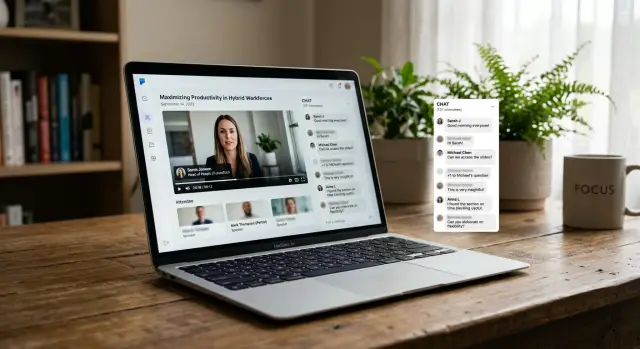
Why event details stay online
A webinar does not end when the live call ends. The signup form, replay page, attendee list, chat log, and event landing page can all keep parts of your information.
The first problem is copy-paste by software. You enter your name, email, job title, and company once, but that data can move through several tools. It might show up in the webinar app, the replay page, the email system, and the course platform that stores the recording. If one page comes down, another copy can still be live.
Replays also keep more than video. Many platforms save chat messages, Q&A threads, polls, and attendee comments next to the recording. If your full name appeared beside a question during the live session, that same label can stay visible months later. A message that looks harmless on its own can say a lot once it sits next to your name and employer.
Speaker cards create another long tail. Someone who spoke for two minutes may still get a profile card with a headshot, company name, role, and bio. Those details are often pulled from an old registration form or a reused event template. If that person changed jobs, the old card can still stay public.
Old event pages also linger because cleanup is rarely urgent for hosts. A team runs the event, posts the replay, and moves on. The page may still collect signups or search traffic, so nobody checks what personal details remain. Course platforms make this worse when they turn one live session into an on-demand lesson library.
Duplication is the real problem. One event can leave traces on the original registration page, the replay page, speaker cards, follow-up emails, and course libraries that reuse the session later. Removing one page often removes only one copy.
Where your information usually shows up
A replay rarely lives in one place. After a webinar ends, parts of it often get copied into course pages, community posts, email archives, and help pages. One signup can leave your name, job title, or email trail in places you never saw during registration.
Start with the event page itself. Some hosts keep attendee lists, "who joined" counters, or discussion threads tied to the session. If the webinar ran inside a course platform, your profile photo and full name may still appear next to comments or progress markers long after the event.
Chat is another common leak. Many tools save live chat with the replay so later viewers can watch the session as it happened. People share more than they think when they type fast. Full names, company names, city names, personal questions, and sometimes email addresses can all end up in the record. A saved chat or export can stay searchable long after the event.
Q&A panels create the same problem. If you asked a question under your real name, the replay page may keep both the question and your name visible. Some platforms also keep timestamps, which makes it easier to connect your comment to your voice or video if you spoke during the session.
Speaker and guest cards can expose more than people expect. A short bio, headshot, employer, and social handle may feel fine for a live event. Later, that same card can get copied onto a replay hub, a lesson page, or a promo email. One small speaking spot can turn into several public mentions.
Follow-up pages are easy to miss. Hosts often reuse the original session page for the replay, then copy parts of it into a recap post or members area. That means the same details can survive in several places at once: the replay page, a saved chat tab, a course lesson, a community thread, and a recap page.
This is why removals take longer than people expect. Deleting your name from one page does not remove the duplicate sitting elsewhere.
What one old replay can reveal
One old replay can reveal a lot. The issue is rarely a single detail. It is the way small pieces of information sit together on one page, in one video, or inside one chat file.
A replay page may show your full name, the work email you used to register, and the company attached to that email domain. If the platform pulled details from your profile, it may also show your job title and city.
That already gives a stranger a decent sketch of who you are. They can guess where you work, what tools you use, and whether you are senior enough to target with sales emails or fake support messages.
Chat makes this worse. A simple question like "We tried this at our Austin office" can reveal your location, employer, and what your team is working on. If the replay keeps that message public, it becomes easy context for phishing or impersonation.
A speaker card or attendee page can add even more: your real name next to your company, your role or department, the date you joined, the names of other attendees, and your questions or opinions in chat.
That last part matters more than it seems. If someone sees that you attended a tax webinar in March, asked about payroll issues, and joined with two coworkers, they now know the timing, the business context, and likely contacts around you.
Each detail may seem harmless on its own. Together, they are useful. They can support phishing, impersonation, cold outreach, or plain stalking. A fake email looks more believable when it mentions the webinar you attended, the speaker you listened to, and the question you asked.
The awkward part is how long these pages can stay up. By then, you may have forgotten the signup, but the replay still tells a story about where you worked, what you cared about, and who was in the room with you.
A simple example
Sara signs up for a free course webinar with her work email. She uses her real name because the form looks normal, and she asks one question in the chat: "Do you offer team pricing for small hiring teams?"
She watches the session, gets what she needs, and forgets about it.
Four months later, the host turns that webinar into an on-demand lesson. The replay page is still public. It has the video, a speaker card, and a side chat panel that was never cleaned up.
Sara's full name still appears next to her question. Her work email is not shown in the chat, but the page includes enough to connect the dots. The speaker card names her company because she joined as a guest speaker for a few minutes during a Q&A segment. Now her name, employer, and a question about pricing and hiring live on one page.
A search engine can pick up that replay. If someone searches Sara's name, they may also find her public profile, her company bio, or an old conference page. None of those pages alone say much. Together, they tell a clear story about where she works, what she may be buying, and who she might be trying to hire.
That can lead to small problems that add up. Sales teams can use the replay to guess budget. Recruiters can tie her name to hiring plans. Data brokers may scrape the page and copy parts of it into other listings.
The frustrating part is how ordinary this is. Sara did not overshare. She joined a free webinar, used her work email, and asked a reasonable question.
If she wants it removed, she may need more than one fix: the replay page, the chat export, and any copied course lesson.
How to check if your info is still visible
Start with a plain search. Type the event name with your full name, then try it again with your email address in quotes. Public replay pages can show up in search results long after the live session ends.
Do not trust what you see while signed in. Open the replay page in a private browser window or sign out first. That gives you a better view of what a stranger, search engine, or future employer might see.
A quick check is usually enough:
- Search the event name with your name and email.
- Open the replay or course page in a private window.
- Check attendee tabs, chat panels, comments, downloads, and speaker sections.
- Save screenshots of anything that shows your personal details.
- Write down the page title, date, and platform name.
Look around a little longer than you think you need to. Some pages hide attendee names behind tabs, pop-out panels, or "community" areas that do not show on the first screen. Chat exports are easy to miss too. A replay may show your first name in the video, while a downloadable transcript shows your full name, company, or email.
Speaker cards deserve a close look. If you spoke, asked a question, or joined a panel, your card may still list your job title, headshot, social handle, or contact details.
When you find something, keep a clean record. A screenshot helps, but the context matters too. Note the exact page title, the date you found it, and the name of the webinar or course site. That makes your removal request easier to prove and harder to brush off.
What to ask the host or platform to remove
Vague requests usually stall. A short, specific request works better.
Name the exact page, replay, or file you want removed. That might be the public replay page, the attendee list, a downloadable chat export, a speaker card, or a course lesson that still shows your signup details. If the platform sent you a confirmation email, include the event name and date so support can find it quickly.
Be clear about what identifies you. In many cases, that is more than your name. It can include your email address, company name, job title, profile photo, chat messages, Q&A posts, or a short bio attached to the replay.
A plain request is often enough: "Please remove my name, email address, company, and chat messages from the replay page, attendee page, and any exported files tied to this event."
Copied pages are easy to miss. Some events live in more than one place, such as the host's site, the webinar platform, a course library, and a mirrored event page used for promotion. If you saw your details on more than one version, say so directly and ask them to remove every copy they control.
It also helps to ask whether the replay was shared with partners, guest speakers, or a virtual event provider. One edit on the main page may not fix the whole problem.
Before the exchange ends, ask for written confirmation. It does not need to be long. A short reply that says the replay was edited, the export was deleted, and mirrored pages were updated is enough. Keep that message.
If the host says the content is handled by the platform, send the same details to platform support. The best requests are boringly specific: exact page, exact fields, exact confirmation.
Mistakes that slow down removal
The most common mistake is being too vague. If you write, "Please remove my data from your webinar," support may have no idea which replay, attendee page, or speaker card you mean. A short note with the exact page title, date, and what is visible can save days of back and forth.
Skipping screenshots is another mistake. Pages change fast. Chat panels or attendee lists may disappear before a support agent checks them. If you do not save proof first, you may end up arguing about a page that looked different an hour earlier.
People also waste time by contacting only the speaker. That feels logical, but the speaker often does not control the replay page, the course platform, or the exported chat file. In many cases, the host company or platform vendor is the one that can edit the page, remove a file, or block public access.
Another bad assumption is that deleting your account clears old event data. Often it does not. Your login may be gone while your name still appears on an attendee page, your comment still sits in a chat export, or your headshot still shows on a speaker card copied into a replay hub.
Waiting too long can make cleanup harder. Once a replay is indexed, downloaded, or reposted, one public page can turn into several copies on partner pages, event archives, and cached versions.
If the host stalls, ask who controls the platform and who handles privacy requests. That one question often moves things faster than sending the same message three times.
Quick checks before your next signup
A webinar signup form can follow you longer than you expect. Your name might end up on an attendee page, in a replay, inside a chat export, or on a speaker card that stays public for months. A few small checks before you register can prevent a lot of cleanup later.
Assume anything you type might be saved and shown again. That sounds a little harsh, but it is usually the safer bet.
A short pre-signup routine helps:
- Use an email address meant for events, newsletters, or trials instead of your main inbox.
- Skip optional fields, especially company, phone number, job title, and social profiles.
- Check whether other attendees can see your full name, profile photo, or contact details.
- Look for a note about what the replay includes, such as chat, Q&A, poll answers, or attendee names.
- If you plan to post in chat, keep it short and avoid details you would not want quoted later.
One common mistake is treating chat like a private room. It often is not. Some platforms save the full thread and show it in the replay, or export it for hosts to reuse later.
If you are speaking, do one extra check. Ask what will appear on your speaker card and whether that card stays live after the event. A headshot, full name, company, and direct email can keep showing up long after the webinar ends.
Before you join, scan the registration page for plain language about recordings and visibility. If the page is vague, ask one direct question: "Will my name, chat messages, or attendee profile appear in the replay or on a public event page?"
That takes about a minute. It gives you a lot more control over what stays attached to your name after the event is over.
What to do next
Start small. Make a short list of old webinars, course platforms, and paid communities you joined over the last few years. Five to ten names is enough. You do not need to fix everything at once.
Then work in order of risk. A page that shows your full name, job title, company, or work email should go first. Public attendee pages, speaker cards, replay comments, and downloadable chat exports usually matter more than a half-forgotten signup email.
Keep a simple log with the event or platform name, where your details appear, the exact details shown, who you contacted, and what was removed. It sounds dull. It works.
Ask for one clear action at a time, such as removing your name from an attendee page, deleting a speaker profile, or taking your chat messages out of a replay download. Clear requests are easier to handle, and they leave less room for a partial fix.
Focus first on anything that ties your online identity to your work life. That usually means your full name, employer, work email, city, phone number, or profile photo. If one old course page shows only your first name, it can wait. If a replay page shows your full name and company, send that request today.
Take screenshots before and after. If the host replies, save the message. If nothing changes after a reasonable wait, follow up once with the same page details and your original request date.
Sometimes the problem does not stop at the original webinar page. Old attendee lists and speaker cards can later show up in data broker listings too. If that happens, manual cleanup gets slow. Remove.dev can help find and remove exposed personal details from over 500 data brokers worldwide, then keep checking for re-listings so the same data does not quietly come back. The webinar page itself still needs a direct request to the host or platform.
The best next step is a boring one: pick the first page, send the first request, and write it down. That is how this gets fixed.