Where your email address gets sold and how to stop it
Learn where your email address gets sold, who buys it, and the first places to start removals so spam, broker listings, and reuse drop faster.
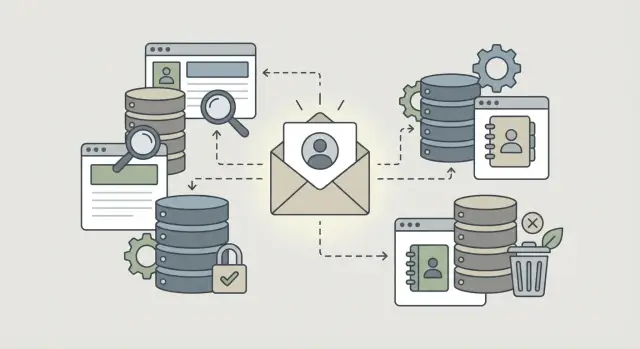
Why your email shows up in places you never used
If you've ever wondered how your email address ends up in random databases, the answer is usually boring and annoying: it doesn't take much. One store signup, coupon form, giveaway entry, or app account can push your address into several partner lists at once. The company you remember is often only the first stop.
A personal email address is one of the most stable pieces of information you have online. People move, switch jobs, and change phone numbers. Many keep the same email for years. That makes email especially useful to data brokers. They use it to connect shopping history, ad records, public profiles, and old contact lists.
The pattern is simple. You enter your email on one site. That site shares it with a partner, agency, or list seller. The next company matches it with other records tied to the same address. A fuller profile gets copied into more databases. Months later, your inbox fills with messages from companies you've never heard of.
The copying matters more than the first sale. Once an address lands in a few systems, it gets cleaned up, sorted, and resold in different forms. One company tags you as a shopper. Another adds your city, age range, or likely income. A people search site might connect the same email to your name or an old address. Even if one source deletes your record, older copies can stay active for years.
That's why unsubscribing from one sender rarely fixes much. It stops one stream of email, not the wider trade behind it. Many lists are built from other lists, so the trail gets cold fast.
A small example helps. Say you use your personal Gmail to get 10 percent off at a clothing store. The store's marketing vendor gets the address. That vendor matches it with another file that already has your ZIP code and age range. A list broker buys the merged record. Later, a people search site or ad database picks up the same email from another seller.
That chain is why removal work usually starts with brokers and profile databases, not only the first business you signed up with.
The places it usually goes
Most people picture one mailing list. In reality, an email address often moves into three buckets at once: lead generation firms, people search sites, and marketing databases.
Lead generation firms usually get there first. You fill out a form for a quote, a discount, a newsletter, a contest, or a "free" download. That form may feed more than one business. It can also feed a company that tracks what you clicked, what you asked for, and what you might buy next.
People search sites work differently. They try to attach your email to a public-facing profile. That profile can include your name, age range, past addresses, relatives, social accounts, and other public or purchased records. Even if your email was collected somewhere else, it can end up tied to your identity here.
Marketing databases sit in the middle of much of this trade. They bundle emails with details like location, shopping habits, job title, home ownership, or likely income range. To an advertiser, an email by itself isn't very useful. An email with tags and segments is much more useful, which is why these databases keep growing.
A single address can end up in all three places at once. A lead generation company collects it from a form, a people search site matches it to public records, and a marketing database buys or swaps it with other profile data. That's the part most people miss. When someone asks where an email address gets sold, the honest answer is often "in several places at the same time."
How lead generation firms get your address
Lead generation firms are often near the start of the chain. They collect contact details, sort them into categories, and pass them to companies that want fresh leads.
The source usually isn't a breach. It's a form you filled out on purpose. A quote request, giveaway entry, coupon page, or free download can all feed the same market.
A lot depends on the fine print. If a page says you agree to hear from "partners," that can mean far more than one business. It may include advertisers, comparison sites, list sellers, or companies you've never heard of.
Common collection points are familiar: insurance or loan quote forms, sweepstakes entries, discount pages, free guides, and home services comparison forms. One form can send your details to many buyers at once, sometimes within seconds. You think you contacted one company, but your email may be routed to several businesses that match your age, location, income range, or recent interests.
That's why the follow-up emails often feel random. The sender may never explain where it got your address. You might see a vague line like "you requested information" even if you only remember entering a giveaway two months earlier.
Picture a roofing quote after a storm. You fill out one comparison form. That site may keep your email, send it to a lead generation firm, and sell it to multiple roofing companies plus a home warranty advertiser. Soon your inbox has offers from brands you never visited.
This part is easy to miss because the original form looked harmless. The sharing happened in the background, buried in consent text most people don't read.
How people search sites build email profiles
People search sites rarely get your email from one clean source. They buy records from data brokers, public data suppliers, and other list sellers, then glue those records together into one profile.
That profile often mixes a lot of details at once. Your current name may sit next to an old address, a past phone number, relatives, age range, and one or more email addresses. Even if each source is incomplete, the site can still publish a page that looks convincing.
The pattern is straightforward. One broker sells a contact record with an email. Another source adds a home address or age range. A people search site matches those details to a name. The finished profile then gets copied or resold again.
This is why people search sites matter so much. They don't just store one piece of data. They turn an email into a person-shaped record that is easier to search, share, and reuse.
The matching is often messy. If two people have similar names, lived on the same street years apart, or share a family connection, a site can attach the wrong email to the wrong person. Once that bad match appears on one site, it can spread quickly. Other sites may buy the same feed, scrape the page, or import the profile into their own database.
That's why one wrong listing can keep coming back. You remove it from one place, then a copied version shows up somewhere else a month later.
Removal is usually slow because it has to be done site by site. There is no single switch that clears every people search page at once. Each company has its own form, rules, and review time. Some remove the page quickly. Others ask for extra details, then relist the data later when a fresh batch of broker records comes in.
For most people, the hard part isn't finding one profile. It's finding the whole chain behind it.
How marketing databases turn an email into a profile
A marketing database doesn't stop at your email address. It tries to connect that address to other information: past purchases, ad clicks, app activity, loyalty programs, newsletter signups, and sometimes public records. Once those pieces line up, your email becomes the anchor for a much larger profile.
That profile can include an age range, household income band, likely interests, job area, and whether you're more likely to buy certain products. Some companies sort people into buckets like "new parent," "frequent traveler," or "homeowner." Others score how likely you are to open an ad, respond to an offer, or switch brands.
A common trick is hashing. Instead of storing your plain email in every system, a company may turn it into a coded version. That sounds safer than it really is. If multiple companies hash the same email the same way, they can still match records and target the same person across databases and ad systems.
A typical chain looks like this:
- You give your email to a store, app, contest form, or coupon site.
- That business shares or sells customer data to a marketing vendor.
- The vendor matches your email with shopping, device, or ad data.
- Your record gets placed into audience groups for advertisers.
- Another company buys or licenses that audience data and adds it to its own files.
After that first match, the profile often travels again. It can be shared with ad platforms, list sellers, enrichment providers, and firms that help brands build lookalike audiences. Your original email stays at the center, even when the surrounding data changes.
This is one of the less obvious answers to where an email address gets sold. Sometimes it isn't a plain list of addresses changing hands. It's your email being used as the thread that ties many records together.
How one email spreads
Say you want a home repair quote. You type your name, ZIP code, and personal email into a form. It looks like one company asking for your details. Often, it's really a lead collection page.
The company behind that form may not plan to contact you just once. Its business may be selling your request to several buyers. Within minutes, your email can go to roofers, insurance agents, call centers, or other lead resellers. Some buyers keep the lead for themselves. Others pass it along again.
Then a broker adds another layer. It takes your email and tries to match it with older records already sitting in its database. That might include a past address, a mobile number, a nickname, or a household connection. If the match is close enough, your email stops being just a way to reach you. It becomes the thread that ties many records together.
A few weeks later, you may notice the same email in places you never signed up for. A people search site lists it next to an old street address. A marketing database tags it with guesses like homeowner or recent mover. Your inbox gets more sales emails, and your phone may start ringing more too.
That's why removals usually start with the brokers and search sites that copied and matched the data. Unsubscribing from one message only deals with one sender. It doesn't stop the same email from being sold again somewhere else.
Where removals usually start
If you want to slow the spread, start with proof. Open a private browser window and search your email address in quotes, like "[email protected]." That won't catch every listing, but it gives you a cleaner first look without old search history shaping the results.
As you search, keep a simple record. Write down every site that shows your full email address, part of the address, or a profile tied to your name, city, employer, or relatives. A spreadsheet works fine. So do phone notes if you keep them organized.
The first removals should usually target people search pages. They often expose the most in one place: your email, age, address history, phone numbers, and family links. When one page shows all of that, it gives other brokers an easy source to copy.
After that, move to the brokers feeding other sites. Some email brokers and marketing databases don't show much on the page itself, but they pass your details to lead generation firms, ad databases, and lookup tools. Removing your data there can slow future relistings.
A practical order looks like this:
- Search your email in quotes in a private window.
- List the sites that show your email or a profile tied to it.
- Remove the people search pages with the most exposed data first.
- Send opt-out requests to the brokers behind the scenes next.
Keep evidence for every request. Save the date, a screenshot of the listing, and any confirmation email or case number. If the page comes back in a month, you'll know whether it was a failed removal or a fresh relisting.
This paperwork is dull, but it saves time later. If you're using a service such as Remove.dev, having requests and relistings tracked in one dashboard makes the follow-up easier.
Mistakes that make removal harder
The most common mistake is using your main inbox for every opt-out request. It feels simple, but each message can confirm that the address is active. If a site didn't have a clean record before, your request can help it build one.
That doesn't mean you should avoid opting out. It means you should be careful about how you do it. Use the broker's removal form when possible, and avoid extra back-and-forth from the inbox you use for work, banking, and personal accounts.
Another mistake is sending too much information. People often add a phone number, home address, date of birth, or old aliases to "help" the company find the record faster. That can backfire. A broker may use those details to match you to more profiles, not fewer.
A safer routine is simple: share only the detail needed to find the listing, save confirmation emails or screenshots, recheck the listing after a short wait, and treat each broker as a separate removal.
Skipping follow-up also causes trouble. Listings come back. A broker can re-import your data from a new source, or a partner site can publish a fresh copy weeks later. If you never check again, you may think the removal worked when it only worked for a moment.
Say you remove your email from one people search site, then stop there. A month later, the same address shows up on a lead list because it was pulled from a different source. Nothing was wrong with the first opt-out. You simply had more than one copy in the market.
That's why ongoing checks matter. Remove.dev is built around that problem. It sends removal requests to data brokers and keeps monitoring for relistings, which is useful when the same data keeps resurfacing.
How to check after you opt out
An opt-out request is only the first step. Plenty of sites say a record is removed, but the old page can still load for a while, or the same email can return under a slightly different version.
After every request, check the broker site itself and search for your record again. Don't rely on the confirmation message alone. If the page still appears, save a screenshot and note the date. Then search your name or email in a search engine and look at the snippet. Sometimes the broker page is gone, but the old text stays in results for days or weeks.
You should also look for clear proof from the broker, such as an email, case number, or status page. If there's no proof, assume you may need to follow up. Set a reminder to check again in two to four weeks, because some brokers relist records after buying a fresh batch of data.
It also helps to search for close variants of your address. If your main email is [email protected], check versions like [email protected], [email protected], old aliases, and plus-tag versions such as [email protected]. To a broker, that can look like a separate profile even when it's still you.
If you're doing removals by hand, keep a log with the site name, request date, and result. If you're using Remove.dev, you can track requests in one place instead of checking sites one by one.
The job isn't done when the form is submitted. It's done when the page is gone, the broker confirms it, and the record stays gone.
What to do next
Once you know where your email gets sold, don't try to hit every site at once. Start with the ones that show your email in plain view next to your name, city, phone number, or home address. Those listings are easiest for other brokers to copy.
Then move to the bigger sources. Large people search sites and major marketing databases often feed dozens of smaller lists. If you clear a tiny list before the source gets removed, the same email can pop back up a week later.
A good order is simple: remove public listings first, tackle large people search sites and major brokers next, then work through smaller lead generation and marketing databases. After that, set a reminder to check again every 30 to 60 days.
That last step matters more than most people expect. Data comes back all the time. A broker buys a fresh file, merges records, or pulls from another source, and your old listing is back.
If you're handling this yourself, keep notes. Save screenshots, record submission dates, and mark which sites confirmed removal. Even a basic spreadsheet helps when the same broker asks for another request later. If you don't want to manage that process on your own, Remove.dev can automate removals across more than 500 data brokers worldwide and keep watching for relistings after your data is taken down.
The best next move is straightforward: clear the public listings first, go after the biggest sources second, and keep checking.
FAQ
Why am I getting emails from companies I never signed up for?
Your email often spreads after a normal signup, coupon, quote form, or giveaway entry. One company can share it with partners, vendors, or list sellers, and those copies can be matched with other records and sold again.
Does unsubscribing fix the problem?
No. Unsubscribing usually stops one sender, not the wider data trade behind the messages. If your email is already sitting in broker files or people search profiles, other companies can still keep using it.
Where should I start removing my email?
Start by searching your email in quotes in a private browser window. Then remove the public people search pages that show your email next to your name, address, phone number, or relatives, because those pages are easy for other brokers to copy.
How do lead generation sites get my email?
Most of the time, it comes from a form you filled out on purpose. Quote requests, discount pages, sweepstakes, and free downloads often include consent text that allows sharing with partners or multiple buyers.
Why is my email showing up on people search sites?
They buy and merge records from brokers, public sources, and other sellers. Once your email gets tied to your name or an old address, the site can publish a profile that looks complete even when the source data is messy or partly wrong.
What do marketing databases do with my email?
They use your email as a stable identifier and attach other details to it, like shopping activity, location, likely interests, or income range. Sometimes the email is stored in hashed form, but companies can still match the same person across systems.
Should I use my main email address for opt-out requests?
Usually not. Using your main inbox can confirm that the address is active, and sending extra details can help a broker match you to more records. Use the site's removal form when possible and share only what is needed to find the listing.
How do I know if an opt-out actually worked?
Check the broker site itself after the request, not just the confirmation message. Save a screenshot, note the date, and search again in two to four weeks because some sites remove a page at first and then relist it after a new data import.
Why does my email come back after I remove it?
Because there are often multiple copies of the same record. One site may remove it, but another broker can sell a fresh version later, or a partner site can publish the same email from a different source.
Can Remove.dev handle this for me?
Yes. Remove.dev can find and remove your data from over 500 data brokers, track requests in a live dashboard, and keep checking for relistings so new opt-out requests go out automatically. Most removals finish in 7 to 14 days, and plans come with a 30-day money-back guarantee.